
Giving Claude a Terminal: Inside the Claude Agent SDK
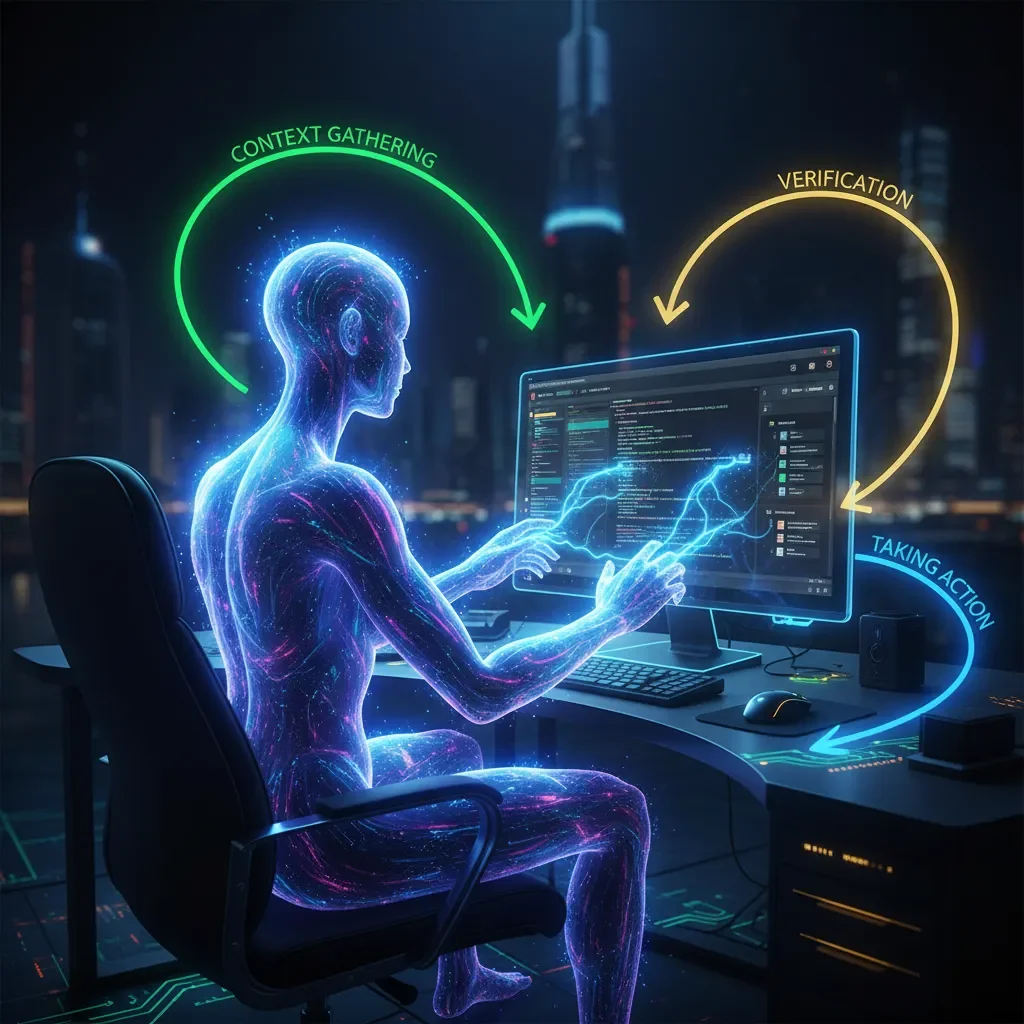
How Anthropic's Agent SDK transforms AI from conversational assistant to autonomous digital worker
💡 TL;DR: The Claude Agent SDK gives AI agents terminal access, file system operations, and network connectivity: the same tools developers use daily. Built around a three-phase "agentic loop" (Gather Context → Take Action → Verify Work → Repeat), it enables autonomous digital work across finance, research, support, and enterprise automation. Key features include agentic search, subagents for parallelization, MCP integrations for enterprise tools, and a verification hierarchy for reliability. Released September 29, 2025.
Introduction: Why the Claude Agent SDK Changes Everything
What if you could give an AI the same tools you use every day: terminal access, file system operations, and full network connectivity? That's exactly what Anthropic did. And it's transforming what's possible with AI agents.
The AI industry is witnessing a fundamental shift. Companies are moving away from specialized tools toward something far more powerful: general-purpose autonomous agents capable of handling complex digital work independently.
At the center of this transformation stands the Claude Agent SDK, released by Anthropic on September 29, 2025. If you've followed this space, you might remember it by its former name: the Claude Code SDK. That name change tells the whole story.
Anthropic originally developed the SDK internally to build highly effective coding agents. These tools could write, debug, and manage entire code projects. The mission was clear: boost developer productivity through specialized AI assistance. Then something unexpected happened.
Anthropic's teams quickly realized the underlying engine was so robust that they started using it for everything but coding: deep research, data synthesis, managing internal knowledge bases, even creating videos and images. The SDK powered almost all of their major internal agent loops. The capability had outgrown its label.
They weren't building a Code SDK anymore. They were building an Agent SDK. This platform handles general digital work. The rename wasn't just marketing. It was recognition of what they'd actually built: a system that could tackle any computational task a human worker could handle at a terminal.
The Core Philosophy: "Giving Claude a Computer"
The central idea behind the Claude Agent SDK is deceptively simple: give Claude a computer.
This isn't just a clever phrase. It's the fundamental insight that separates modern AI agents from traditional chatbots. A conventional chatbot lives in a text-only world. Ask it a question, get text back. No persistence. No memory beyond the conversation. No ability to do anything except generate words.
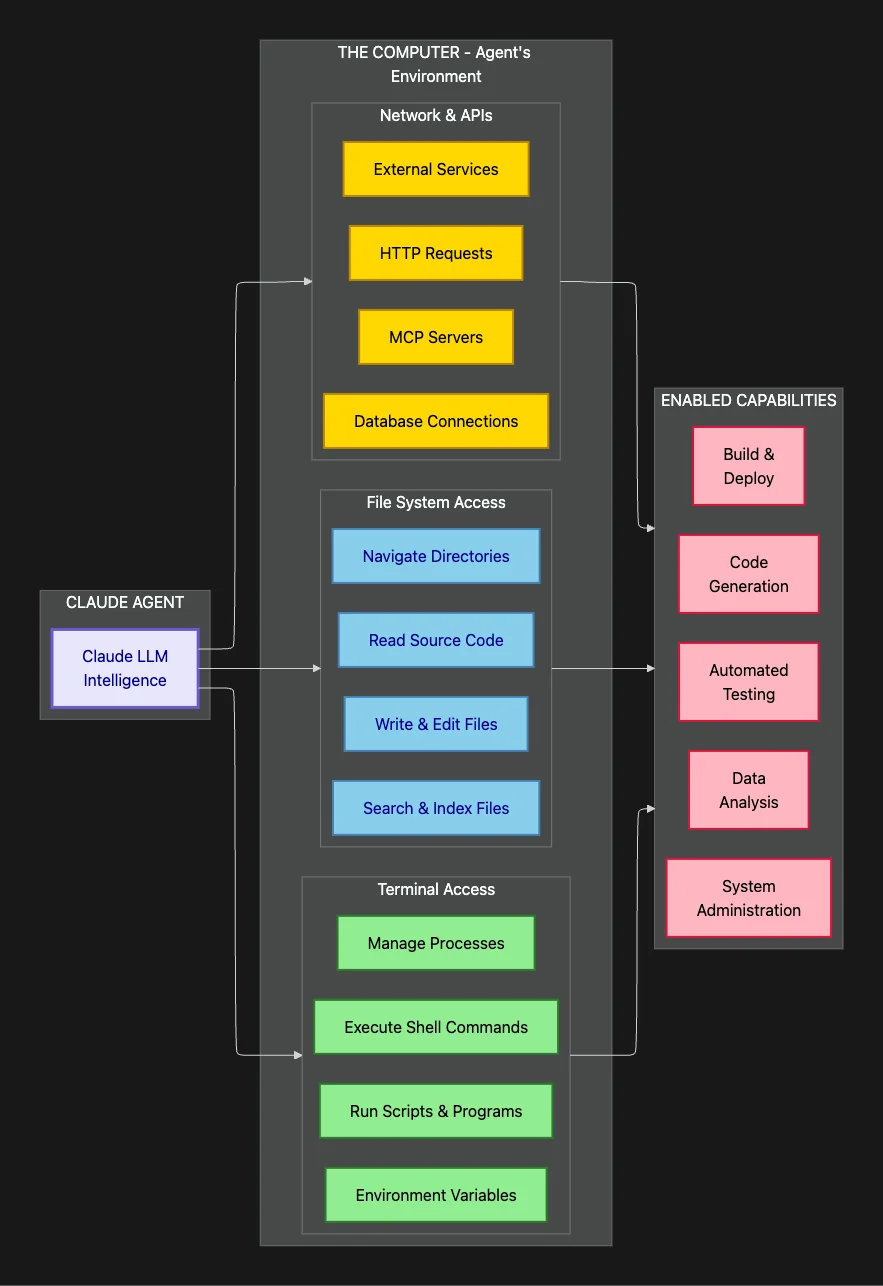
The Claude Agent SDK shatters that limitation. It gives the agent the same toolkit that any programmer or digital worker relies on every single day: terminal access, file system operations, and network connectivity.
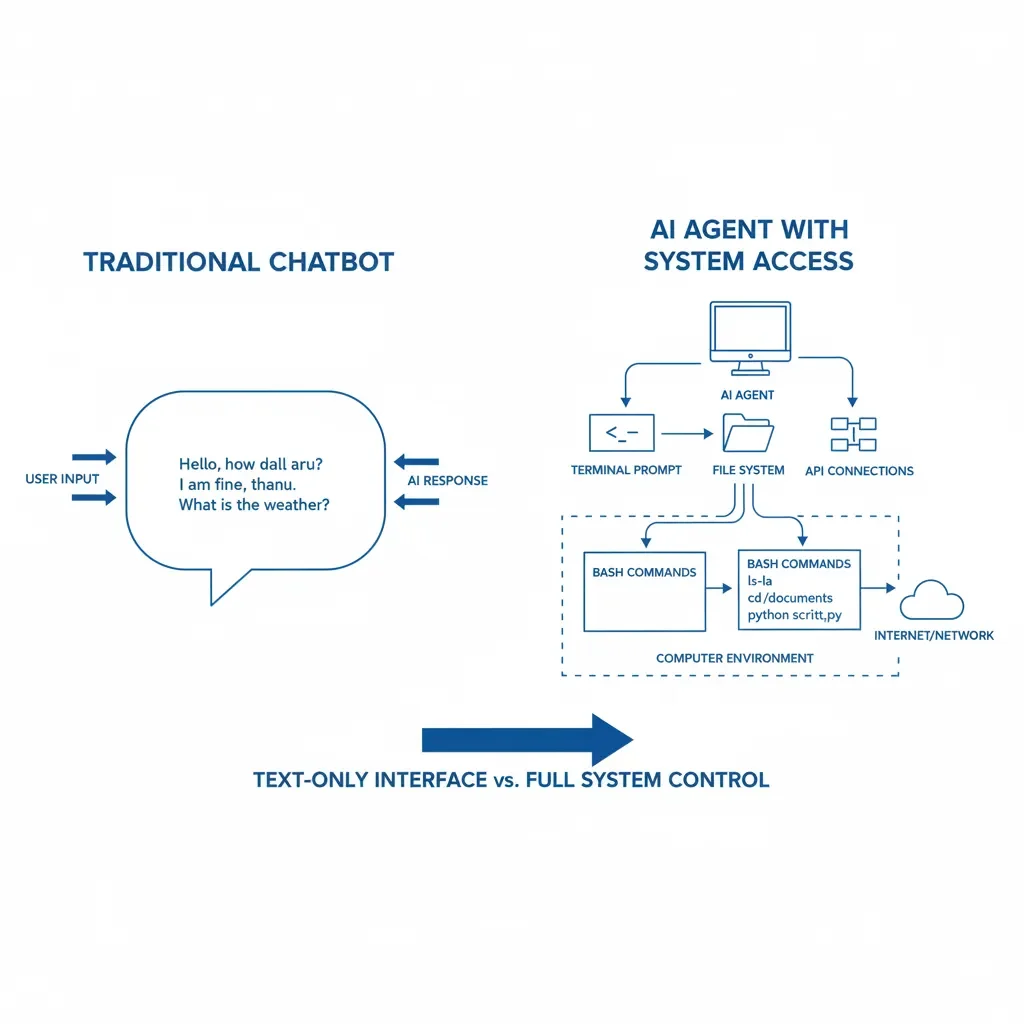
The diagram above shows a traditional chatbot with text-only interface versus AI agent with full system access including terminal, file system, and network connectivity. It unlocks worlds. Claude also has Claude Excel that can work with your Excel Spreadsheets and Claude Computer Use that can work direct with a sandboxed computer. We live in the future. But I digress, back to Claude Code, oops, I mean back to Claude Agent SDK.
When we say "giving it a computer," we're not talking about some sandboxed playground or browser simulation. We're talking about literal access to your development environment, specifically through the user's terminal; bash commands, file system, the works! The agent can execute bash commands, navigate directories, manipulate files, and call external services. Just like you do.
Think about what that means. Instead of an AI that can only describe how to fix a bug, you get an AI that fixes the bug! The AI tool can search your codebase, identify the problem, write the fix, run your test suite, and verify the correction worked. The difference between theory and practice. The power of the reasoning loop; instant feedback!
The Power of Interaction and Persistence
What does terminal access practically enable that a normal LLM can't do? Two transformative capabilities: interaction and persistence.
With terminal access, the agent can:
- Run and debug code in real-time: Execute programs, capture output, fix errors, and iterate
- Find and manipulate files at scale: Search through thousands of files, extract specific data, and edit precisely. Agentic search with GLOB and Grep.
- Execute general-purpose bash commands: Leverage the full Unix toolkit for data processing and system operations
Bash is the universal language of computer operations. If you can use bash, you can process massive CSV files, search through nested directories, query databases, interact with APIs, manage cloud infrastructure, and orchestrate complex workflows.
This is what transforms Claude from a brilliant text synthesizer into a genuine digital worker. Instead of telling you what to do, it can actually do the work.
The Security Trade-off: Utility vs. Risk
The obvious question from anyone in IT: If you're giving an AI agent terminal access to run arbitrary bash commands, isn't that a massive security headache?
Yes. The design acknowledges this explicitly. The complexity of granting that level of access safely is high. You're essentially giving an AI assistant the same permissions you'd give a junior developer on their first day. That requires thoughtful security architecture.
But here's the critical question: What's the alternative?
To do sophisticated, multi-step work, a human needs terminal access and a file system. If you restrict an AI to just text generation, you fundamentally limit the complexity of problems it can solve. You get advice, not action. Recommendations, not results.
The bet Anthropic is making: For complex digital work, the utility of real environmental access outweighs the engineering effort required to secure it properly. The gains are worth the complexity.
This is why the SDK is designed for professional development environments with proper access controls, not production systems. It's a power tool for experts who understand the risks and can implement appropriate safeguards.
For enterprise use cases where agents handle research, automate workflows, and manage complex data pipelines, the utility is transformative. The question isn't whether to give agents access. It's how to do it safely.
What security concerns would you prioritize when deploying autonomous agents in your environment?
AI Agent Use Cases: What Claude Agent SDK Can Actually Do
The Claude Agent SDK doesn't just produce text responses. It provides the fundamental building blocks, the computational primitives, to automate almost any complex knowledge work workflow. Let's examine specific domains where this capability shines.
Finance Agents: From Analysis to Execution
These aren't simple stock lookup bots that regurgitate market data. Finance agents built with the SDK can act as quantitative analysts:
- Analyze entire portfolios: Load holdings, evaluate asset allocation, identify risk exposures
- Gather market intelligence: Pull real-time data from financial APIs, track competitor movements, aggregate news sentiment
- Run sophisticated simulations: Execute Monte Carlo analyses for risk assessment, backtest trading strategies, model portfolio scenarios
- Persist results reliably: Store analysis in structured formats (CSV, Excel, databases) for audit trails and compliance
- Write and execute custom code: Generate Python or R scripts for complex calculations that exceed what structured data formats can express
Why is terminal access crucial here? Because finance requires computation and persistence, not just conversation. Without a computer, an agent can only talk about portfolio optimization. With one, it can perform the optimization, document the methodology, and deliver actionable results.
It becomes a junior quant analyst that never sleeps and works at machine speed.
Deep Research Agents: Knowledge Synthesis at Scale
For research tasks involving massive amounts of data, the file system becomes a collaborative workspace. A research agent might need to:
- Process thousands of documents: Synthesize information across internal reports, academic papers, and industry analyses
- Cross-reference and verify claims: Find supporting evidence, identify contradictions, track citations across sources
- Generate structured insights: Create detailed reports with proper formatting, citations, and visual elements
- Manage large file collections efficiently: Organize research materials, create indices, and maintain searchable archives
The entire workflow depends on the ability to load, process, and manipulate persistent data. The SDK gives the AI a proper research environment, not just a question-answering interface.
This means the agent isn't starting from scratch with every query. It's building on its own previous work. It can spend Monday gathering sources, Tuesday analyzing patterns, and Wednesday producing the final report. Just like a human researcher would.
Personal Assistant Agents: Context Across Applications
These agents connect to internal data sources to handle complex coordination tasks:
- Manage calendars intelligently: Schedule meetings while respecting preferences, time zones, and availability patterns
- Handle travel logistics: Book flights that align with meeting schedules, find hotels near venues, arrange ground transportation
- Assemble briefing documents: Pull relevant emails, meeting notes, and background materials for upcoming engagements
- Maintain context over time: Track ongoing projects, remember preferences, and connect related information across weeks or months
The key advantage: state that persists beyond a single conversation. The agent can access files it created last week, reference decisions made last month, and maintain continuity across long-running projects.
Customer Support Agents: High-Touch Problem Resolution
For complex support tickets that require investigation and synthesis, these agents can:
- Gather comprehensive user context: Pull account history, previous tickets, usage patterns, and configuration settings from multiple systems
- Integrate with enterprise tools: Connect to CRMs, ticketing systems, and internal knowledge bases via MCP servers
- Diagnose technical issues systematically: Run diagnostic scripts, analyze log files, query databases to identify root causes
- Escalate intelligently: When human intervention is needed, provide complete context summaries with all relevant investigation details
These aren't chatbots reading from a script. They're support analysts that can actually investigate problems using the same tools your human support team uses.
Which of these use cases resonates most with your current automation challenges? Drop a comment in the comment section? And if you got this far, go ahead and follow my account and give some applause and likes. It gives the article wider distribution.
Claude Code Roots
Since the Agent SDK came out of the same ecosystem that started with Claude Code, it supports the same subagents as Claude Code, and the same agentic skill infrastructure.
And, remember now it is not just Claude Code and the SDK that supports skills, but so does the Claude Desktop. For that matter Agentic Skills is now an open standard supported by Codex, Github Copilot and OpenCode have all announced support for Agentic Skills. There is even a marketplace for agentic skills that support Gemini, Aidr, Qwen Code, Kimi K2 Code, Cursor (14+ and counting) and more with Agentic Skill Support via a universal installer. I wrote the skilz universal skill installer that works with Gemini, Claude Code, Codex, OpenCode, Github Copilot CLI, Cursor, Aidr, Qwen Code, Kimi Code and about 14 other coding agents as well as the co-founder of the world's largest agentic skill marketplace.
The Agentic Loop: How Claude Agent SDK Processes Tasks
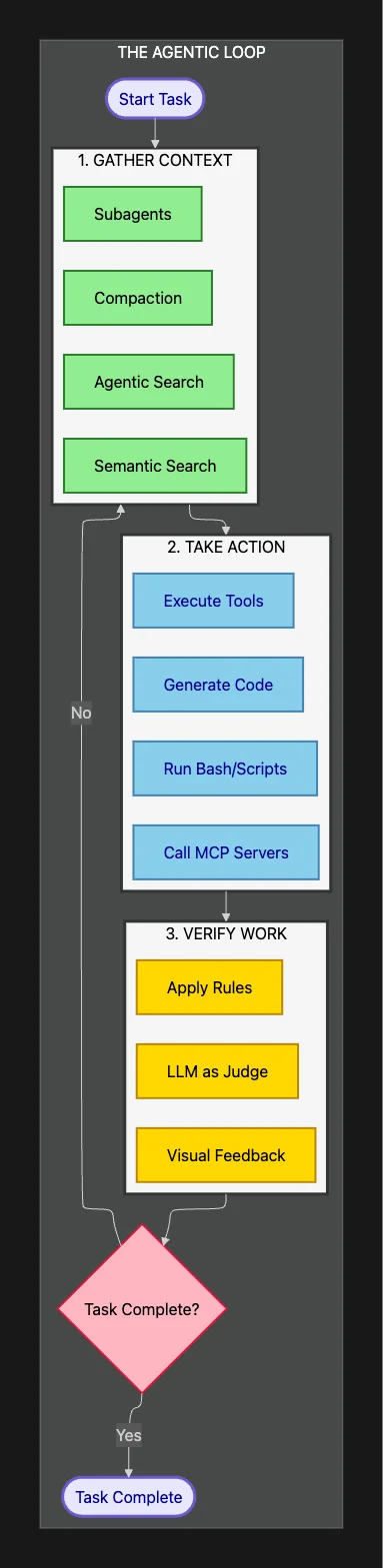
Once the agent has its computational environment, how does it systematically tackle complex problems? The Claude Agent SDK is built around a clear, iterative three-phase loop:
- Gather Context: Collect all relevant information needed to make decisions
- Take Action: Execute operations using available tools and resources
- Verify Work: Check that actions produced correct results
Then repeat until the task is complete.
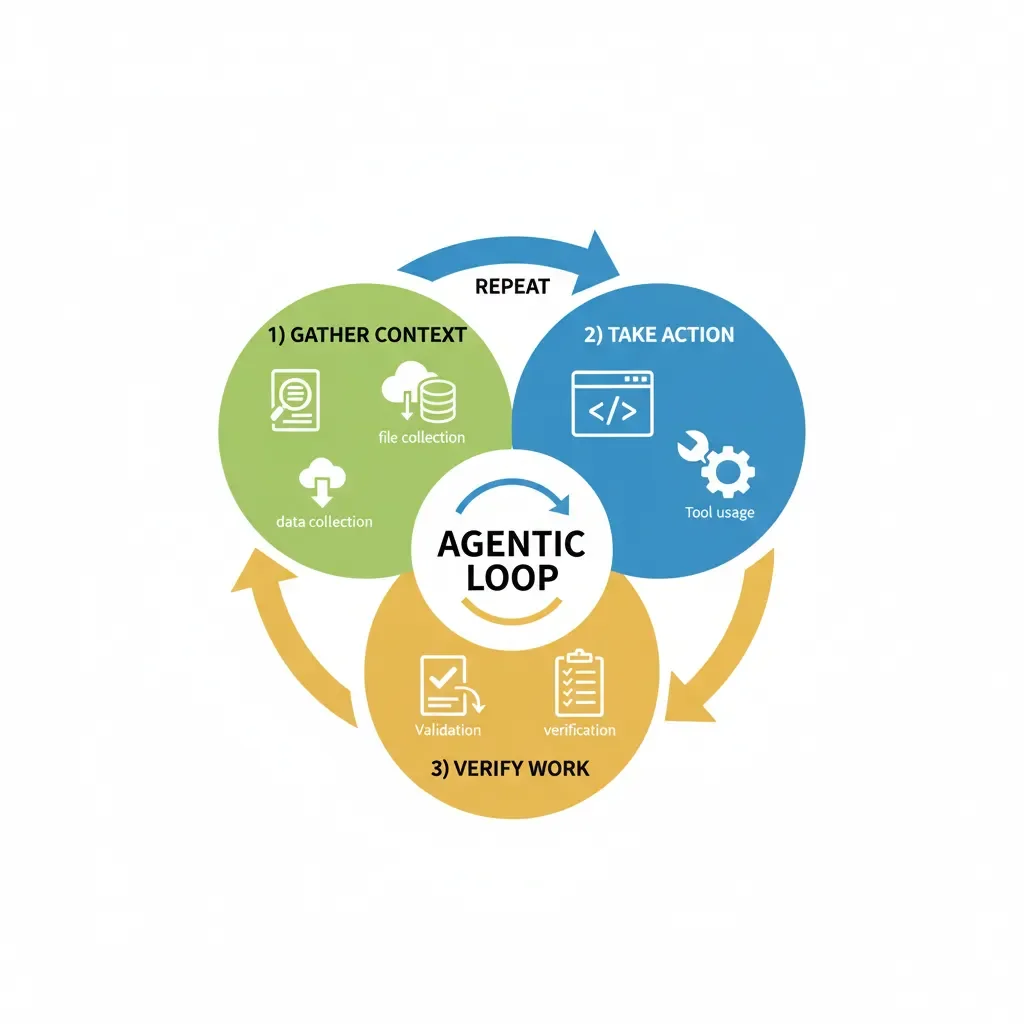
The above diagram for Claude Agent SDK shows the circular flowchart showing the agentic loop cycle with three phases: gather context, take action, and verify work then rinse and repeat.
This cycle transforms a probabilistic language model into a more deterministic, reliable system. Let's examine each phase in detail.
Claude Agent SDK: Each iteration of the loop repeats this sequence
This diagram illustrates the continuous cycle that enables autonomous operation. Each iteration refines understanding, takes concrete steps toward the goal, and validates progress before continuing, then it repeats until the task is complete. This is fundamentally different from single-shot text generation. It's genuine problem-solving.
Phase 1: Context Gathering in the Claude Agent SDK
This is where agent intelligence truly begins. The agent can't just rely on your initial prompt. It must actively gather and update its own understanding of the problem space.
Think of it like a detective arriving at a crime scene. The initial report gives you the basics, but to solve the case, you need to search the environment, interview witnesses, analyze evidence, and build a complete picture. That's exactly what happens in Phase 1.
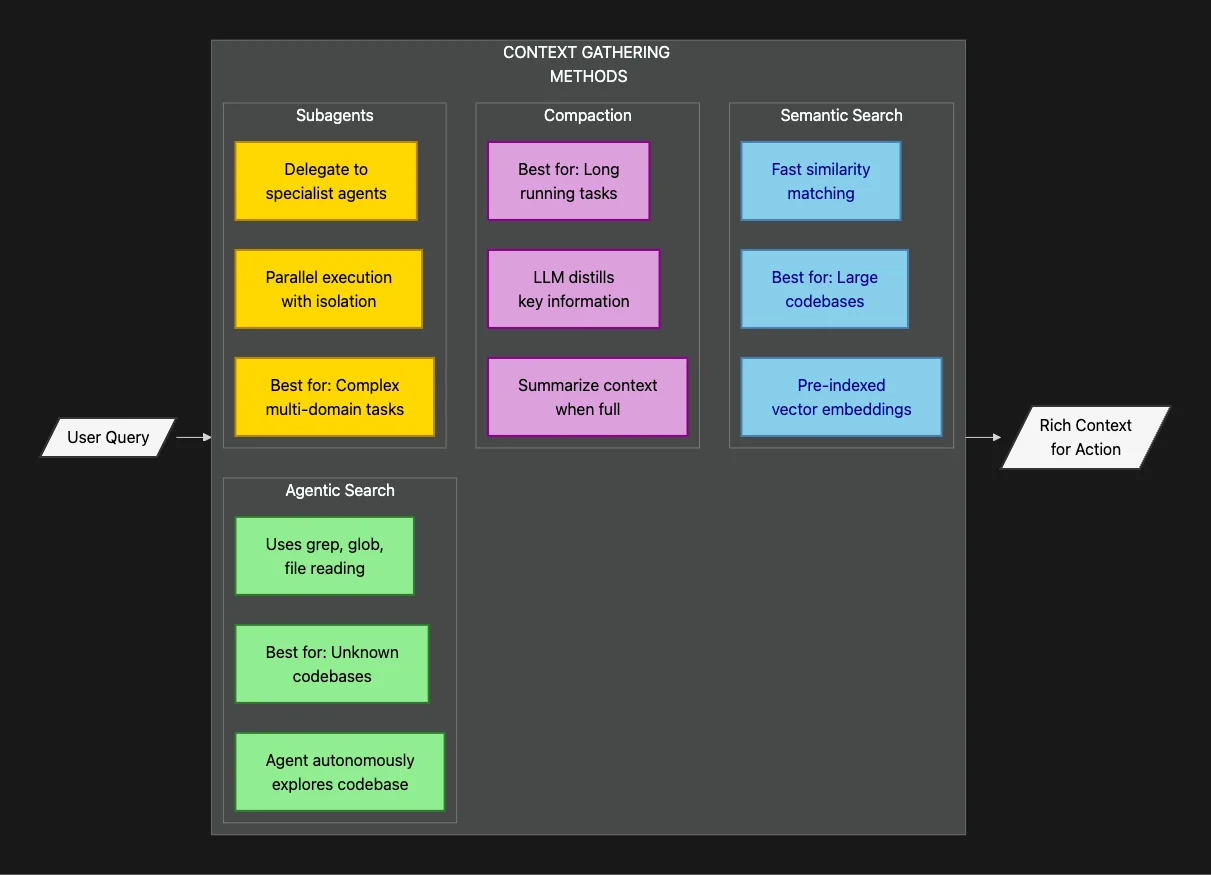
This diagram shows four complementary approaches to context gathering. Each method has specific strengths for different scenarios. Let's explore how they work in practice.
Agentic Search: The File System as Navigable Memory
The key mechanism is what Anthropic calls agentic search. Here's the crucial insight: the folder and file structure of an agent's workspace becomes a form of context engineering. The organization of the workspace actually guides the agent's thinking and search patterns.
When an agent receives a complex query, it first examines its own file system. Imagine asking it to analyze error patterns in production logs. The agent might find a 10GB log file. It doesn't try to load the entire file into its context window. That would instantly exceed token limits and crash.
Instead, it thinks like a skilled sysadmin. It uses bash tools like grep to search for specific error codes, tail to examine recent entries, awk to extract structured data, and head to sample the file format. It surgically extracts only the relevant snippets before loading them into active context.
The file system becomes the agent's external memory. It's a searchable, persistent knowledge store that the agent can query selectively.
Here's a real example: If you ask an agent to "fix the authentication bug in our codebase," it might:
- Use
grep -r "authentication" .to find all files mentioning authentication - Read the main auth module to understand the current implementation
- Use
git logto see recent changes that might have introduced the bug - Search test files to understand expected behavior
- Only then generate a fix with full context
This systematic exploration is impossible without file system access.
Agentic Search vs. Semantic Search: The Trade-offs
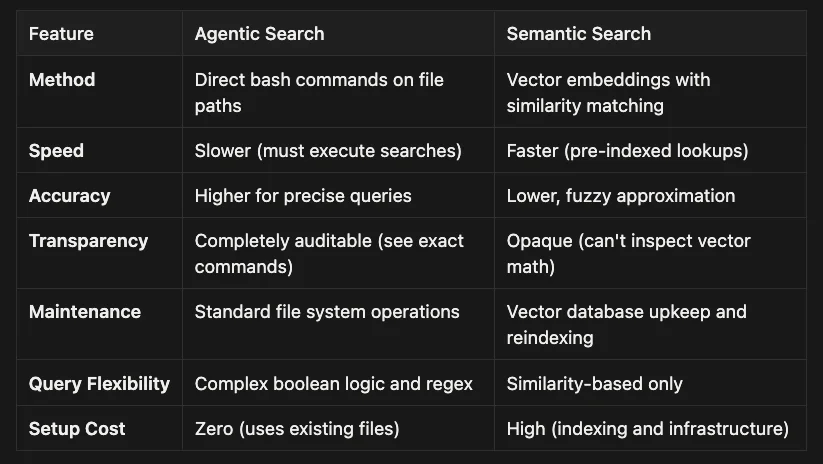
This approach differs fundamentally from the semantic search (vector database) approach that dominates most AI discussions. Understanding the trade-offs is critical for architectural decisions.
Both approaches have their place in production systems. The key insight from Anthropic's architecture is that agentic search provides superior transparency and precision for most enterprise use cases, especially when you need to understand exactly how the agent reached its conclusions.
Consider these guidelines when choosing between approaches:
- Use agentic search when: You need precise, auditable results; working with structured codebases; require complex boolean queries; or want zero infrastructure overhead
- Use semantic search when: You have massive document collections (millions of files); need fuzzy matching across natural language; or speed is absolutely critical for user-facing features
- Use both when: Semantic search can provide initial candidates, then agentic search validates and refines the results with precise queries
The hybrid approach often delivers the best of both worlds: semantic search for broad discovery, agentic search for precise verification.
For enterprise reliability, transparency and auditability are paramount. When an agent makes a critical decision, you need to trace its reasoning. With agentic search, you can see exactly which files it read and which grep commands it ran. With semantic search, you get "the vector database returned these results" with no clear explanation of why.
Anthropic's recommendation: Start with agentic search. Only introduce semantic search when you absolutely need speed for fuzzy retrieval across massive corpora. Don't prematurely optimize for a problem you don't have yet.
Subagents: Parallelization and Context Isolation
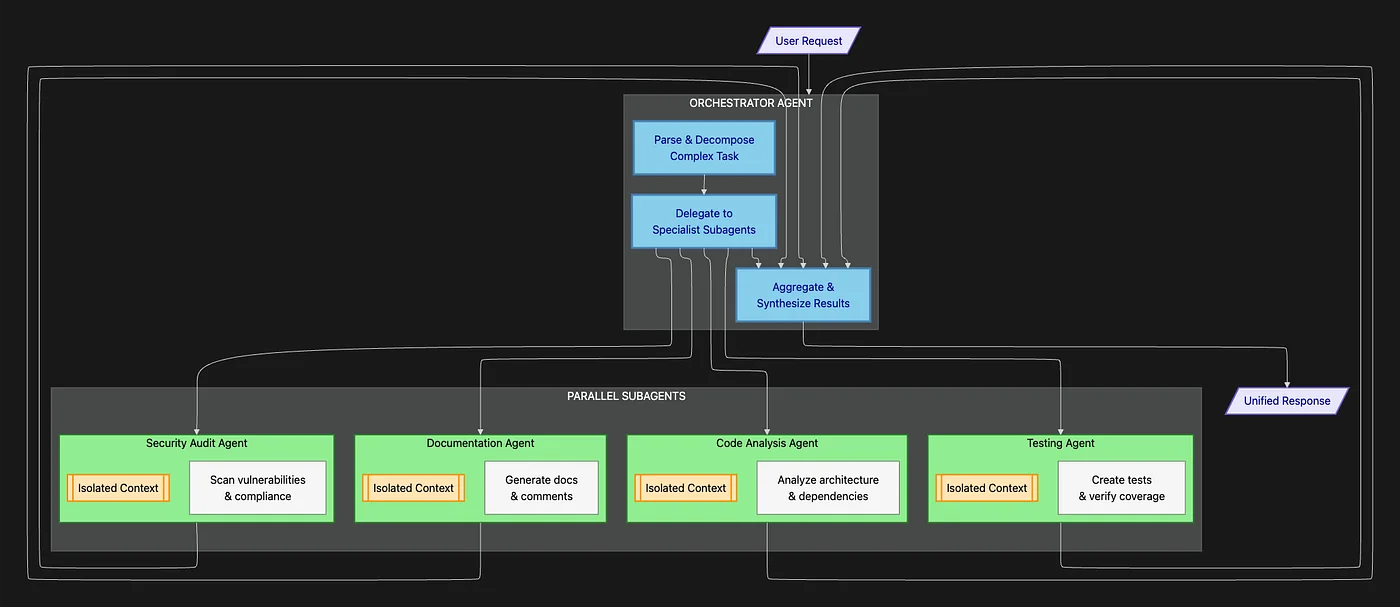
For truly enormous tasks that require diverse expertise, the SDK employs subagents. These specialized workers provide two critical capabilities:
This diagram illustrates the subagent orchestration pattern. Notice how each specialist operates independently with its own context, then reports back concise results to the orchestrator.
Capability 1: Massive Parallelization
Need to research 10 different technologies for a technical decision? Spin up 10 research subagents in parallel. Each one conducts its investigation simultaneously, then returns findings to the orchestrator. What would take a human researcher two weeks happens in minutes.
Capability 2: Context Window Isolation
This is the more subtle but equally important advantage. Each subagent operates in its own isolated context window. When investigating a topic, it might read dozens of files, execute numerous searches, and accumulate significant context.
But when it's done, it doesn't send its entire messy work history back to the orchestrator. It only returns the final synthesized answer. The orchestrator never sees the intermediate steps.
This architectural pattern keeps the orchestrator's context clean and high-level. It thinks strategically about task decomposition and result synthesis. It's never bogged down in implementation details.
Think of it like managing a team. A good manager delegates specific tasks, then receives executive summaries, not hour-by-hour activity logs. The SDK implements this pattern computationally.
Compaction: Managing Long-Running Memory
For long-running tasks where even the orchestrator's context might fill up, the SDK includes compaction. This is automatic memory management for AI agents.
As the context limit approaches, the agent automatically summarizes the oldest messages in its conversation history. It compresses its own memory, retaining essential information while discarding verbose details.
This is similar to how human memory works. You remember the key decisions from a meeting last month, but not every word spoken. The agent does the same thing computationally.
Result: Agents can work on tasks that span hours or days without running out of context space. They maintain continuity while managing memory efficiently.
Phase 2: Taking Action with Claude Agent SDK Tools
The execution phase is where gathered context transforms into concrete results. This is all about tools: the mechanisms through which agents interact with the computational environment.
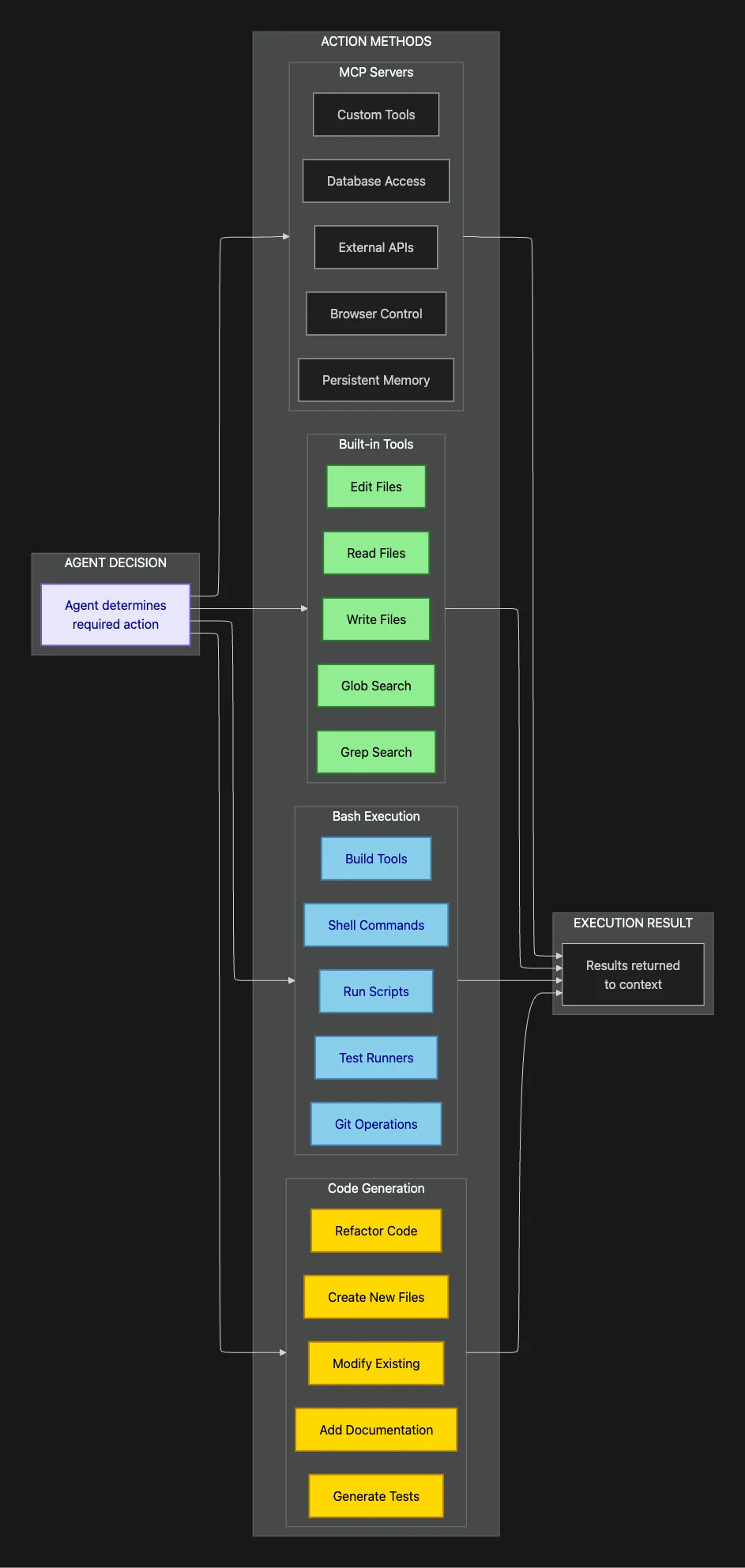
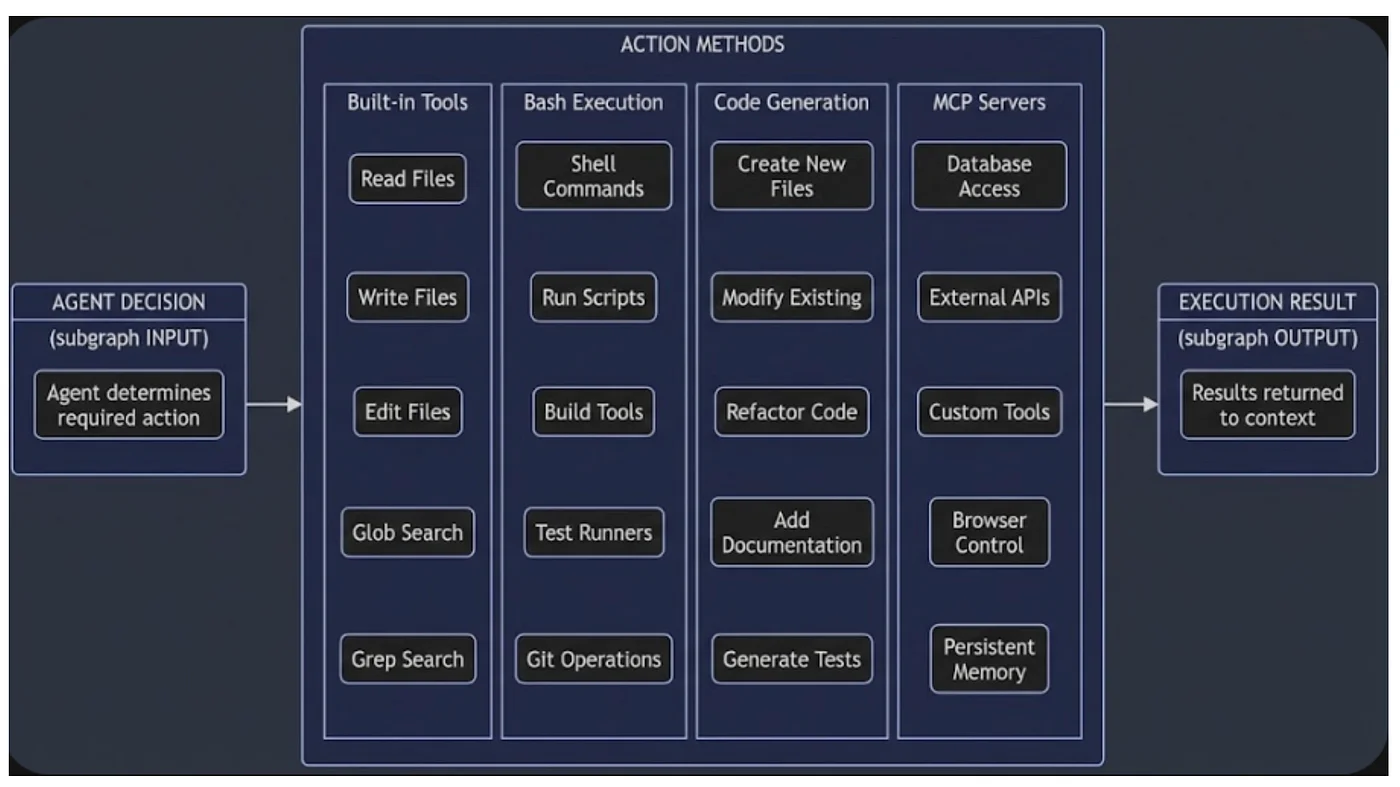
Tools are the core building blocks for agent capabilities, designed as the primary, most frequently used action primitives. Understanding the tool ecosystem is essential for building effective agents.
The above two diagrams shows the four categories of actions available to agents. Each serves specific use cases and offers different capabilities. Let's explore when and how to use each one.
Tools: High-Efficiency Predefined Operations
You're not making Claude reinvent operations every time. You're giving it hyper-efficient, predefined macros that consume minimal context tokens.
Think of defining fetchUserCalendarData as a custom tool. When the agent needs calendar information, it doesn't have to:
- Figure out which API to call
- Remember the authentication method
- Parse the response format
- Handle errors appropriately
It just invokes the tool. All the complexity is encapsulated. These become the default actions that keep the context window efficient and the agent focused on high-level logic.
Design principle: Define tools for any operation you'll use repeatedly. Each tool invocation costs far fewer tokens than explaining and executing the operation manually.
Bash: The Universal Adapter
Bash serves as the general-purpose catch-all for operations that don't fit predefined tools. It's the escape hatch that makes agents genuinely flexible.
Real-world example: A finance agent needs to:
- Download an encrypted client document from cloud storage
- Decrypt it using GPG keys
- Convert from PDF to text
- Run a custom data extraction script
- Load results into a database
The agent can orchestrate all those steps using bash commands. It can even write and execute a temporary Python script on the fly that ties everything together.
This is computational flexibility that structured APIs can't match. Bash gives agents the ability to handle edge cases and unexpected requirements without human intervention.
Code Generation: Precision Beyond Data Structures
Why is writing full Python or JavaScript code often better than returning structured JSON output?
Code offers precision and composability that data structures can't match.
Consider this scenario: An agent needs to create an Excel spreadsheet with:
- Multiple worksheets with specific formatting
- Formulas that reference cells across sheets
- Conditional formatting based on value ranges
- Charts derived from table data
JSON fails here. You can't express "apply bold formatting to cells where value > 1000" or "create a pivot table summarizing quarterly data" in a simple data structure.
But a Python script using libraries like openpyxl or pandas can guarantee consistent, complex formatting every single time. The code is the instruction set. The agent writes it, executes it with bash, and produces a fully formatted artifact.
The output becomes functional, not just informational. This is the difference between an agent that describes work and one that delivers production-ready results.
Model Context Protocol (MCP): Enterprise Integration Made Simple
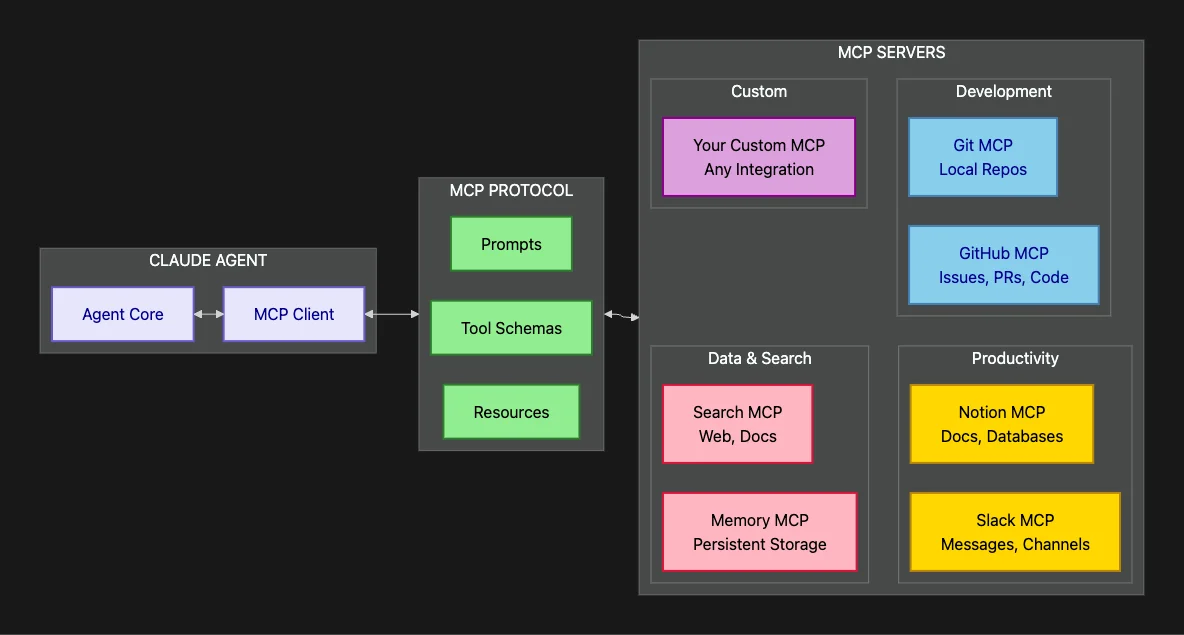
MCP is the key to enterprise utility. These are standardized, pre-built integrations for services like Slack, GitHub, Notion, Jira, and databases.
This diagram illustrates the Claude Agent SDK and the MCP ecosystem. The protocol provides a standardized interface, while individual servers handle specific integrations. The result: plug-and-play enterprise connectivity.
No more custom integration code and OAuth nightmares. The agent can use out-of-the-box tools like:
search_slack_messagesto find relevant team discussionsget_github_pull_requeststo track code review statusquery_notion_databaseto pull project documentationlist_asana_tasksto understand current workload
This provides instant situational awareness about team context. Instead of agents working in isolation, they tap into the same knowledge sources your human team uses.
The difference: An agent that can only access code is limited. An agent that can also check Slack conversations, review GitHub issues, and pull Notion documentation understands the full context of why code exists and what problem it solves.
Phase 3: Verifying Work with Claude Agent SDK
This is what separates autonomous agents from sophisticated chatbots: the ability to self-correct.
Agent reliability is directly tied to verification capability. Without self-checking, agents always need human supervision. They become assistants, not autonomous workers. The verification phase enables true delegation.
The SDK provides three verification methods, ranked by robustness and appropriate use cases.
This diagram shows the three verification levels in order of increasing sophistication. The key insight: Start with rules whenever possible. Only escalate to more expensive methods when necessary.
Method 1: Defining Rules (Most Robust and Preferred)
Set up clear guardrails with binary success or failure criteria. This is the gold standard for verification because it's fast, deterministic, and completely transparent.
For code generation: Generate TypeScript instead of JavaScript. Why? TypeScript adds structural rules the agent can verify against. The type checker provides instant feedback about interface mismatches, missing properties, and type errors. The agent catches mistakes before running code.
For an email automation agent, define explicit rules:
- Is the email address format valid? Error (block send)
- Is the legal disclaimer present? Error (block send)
- Has user been emailed in the last 3 days? Warning (flag for review)
- Does subject line exceed 78 characters? Warning (suggest revision)
These rules give the agent fast failure points. When something's wrong, it knows immediately and can fix it before proceeding. No ambiguity, no guessing.
Real-world example: A deployment agent that must verify configurations before pushing to production might check:
- All environment variables are set: Binary check
- Database connection strings are valid: Syntax validation
- No hardcoded secrets in config files: Regex pattern matching
- All required services are running: System status check
Each check either passes or fails. The agent doesn't proceed until all checks pass. This is how you achieve reliability.
Method 2: Visual Feedback (For Perceptual Validation)
For visual tasks like UI generation or document formatting, the agent becomes its own QA tester.
Using an MCP server with Playwright or similar browser automation, it can:
- Render the generated UI in a headless browser
- Take screenshots at different viewport sizes (mobile, tablet, desktop)
- Visually inspect the results using its vision capabilities
The agent then checks:
- Is the "Submit" button the correct color (matching brand guidelines)?
- Is the navigation menu properly aligned?
- Do text elements have sufficient contrast for accessibility?
- Are images loading correctly without layout shift?
- Does the footer stay at the bottom on short pages?
When it spots visual failures, it iterates on the code by adjusting CSS, fixing layout issues, and correcting color values. This creates a perception-action loop that was impossible before vision-capable models.
Critical insight: This isn't just about aesthetics. Visual feedback catches real functional bugs like overlapping elements that hide buttons, text that renders outside containers, or broken responsive layouts.
Method 3: LLM as Judge (Last Resort for Subjective Criteria)
For subjective, fuzzy requirements like "ensure the email tone is friendly but professional" or "make sure code comments are helpful," you can spin up a separate subagent whose only job is evaluation.
This judge agent receives:
- The original requirements
- The output produced by the worker agent
- Specific evaluation criteria
It then provides structured feedback: pass/fail, specific issues found, suggested improvements.
Critical warning: This is the last resort. Using another LLM for validation:
- Adds significant latency (another API call)
- Costs more (additional tokens)
- Introduces non-determinism (LLMs can be inconsistent)
- Creates potential for disagreement (two models might have different opinions)
Use rules and visual feedback whenever possible. Only employ LLM judges when the criteria are genuinely subjective and impossible to codify.
When it makes sense: Evaluating creative writing quality, assessing persuasiveness of marketing copy, judging appropriateness of customer communications. Things humans would debate.
When it doesn't: Checking if code compiles, validating data formats, verifying API responses. Things with objective right/wrong answers.
Building Production-Ready AI Agents: Engineering for Reliability
The three-phase system of Gather, Act, and Verify transforms an agent from a sophisticated tool into a genuinely autonomous system. But reaching production-grade reliability requires disciplined engineering.
When an agent fails, developers must systematically diagnose the root cause:
Context Failure: Does the agent lack critical information?
- Is the file structure unclear? Improve workspace organization
- Are relevant files not being found? Add better search keywords or indexing
- Is context getting truncated? Use compaction or subagents to manage memory
Action Failure: Does the agent have the right tools?
- Is a required operation impossible with current tools? Define new custom tools
- Are bash commands too complex? Create helper scripts
- Are API integrations missing? Add necessary MCP servers
Verification Failure: Does the agent lack good feedback?
- Are errors not being caught? Add formal validation rules
- Are success criteria ambiguous? Define clearer acceptance tests
- Is the agent repeating mistakes? Improve error messages and retry logic
For high-stakes environments, Anthropic emphasizes building representative test sets. These are programmatic evaluations that mirror actual customer usage patterns. You can't just deploy and hope. You need:
- Test scenarios that cover common tasks and edge cases
- Acceptance criteria that define what success looks like
- Performance benchmarks that track improvement over time
- Failure analysis that identifies patterns in agent mistakes
This is software engineering discipline applied to AI agents. The technology enables autonomy, but reliability comes from rigorous testing and iteration.
What testing strategies have you found most effective for AI systems?
Complete Claude Agent SDK Architecture Overview
This diagram brings all the pieces together, showing how the different layers interact to create a complete agent system:
This architectural overview shows the complete stack from user interaction down to system resources. Notice how each layer builds on the layers below it, creating a coherent system for autonomous work.
Key Takeaways
- Core Philosophy: "Give Claude a computer": terminal and file system access enables genuine digital work
- Agentic Loop: Gather Context, Take Action, Verify Work, Repeat (the cycle that enables autonomy)
- Agentic Search: Use bash commands (grep, tail, awk) for precise, auditable file searching
- Semantic Search: Pre-indexed vectors for speed; use only when agentic search is too slow
- Subagents: Parallel execution with isolated context windows for complex multi-domain tasks
- Compaction: Automatic context summarization for long-running tasks that span hours or days
- MCP: Standardized integrations (Slack, GitHub, Notion, Asana) for enterprise connectivity
- Tools: Predefined operations that minimize context usage and maximize efficiency
- Bash: Universal adapter for operations that don't fit predefined tools
- Code Generation: Precision and composability beyond what data structures can express
- Verification Hierarchy: Rules (most robust), Visual Feedback, LLM Judge (least robust)
- Security Trade-off: Utility of environmental access vs. complexity of securing it properly
The Provocative Question
If the core goal of autonomous agents is flawless, scalable reliability, how much development effort should shift away from building new capabilities (Phase 2: Actions) and instead focus almost entirely on perfecting verification and testing (Phase 3: Verification)?
Current AI development emphasizes what models can do: new features, broader capabilities, more integrations. But production reliability depends on what they consistently do correctly.
The engineering challenge of moving from what's possible to what's reliable may be where the future of AI agents truly lies. Not in more tools, but in better verification.
That shift in focus could transform agents from impressive demos to dependable production systems. The technology is here. The reliability engineering is the next frontier.
Where do you think the industry should focus: more capabilities or better verification? Leave a comment below. I would love to hear your thoughts.
Getting Started with Claude Agent SDK
The Claude Agent SDK is available today in Python and TypeScript:
# Python
pip install claude-agent-sdk

# TypeScript/JavaScript
npm install @anthropic-ai/claude-agent-sdk
Documentation and Resources:
- Official SDK Documentation
- Claude Agent SDK Python
- Claude Agent SDK TypeScript
- Claude Agent SDK Demos
- MCP Server Registry (available integrations)
Getting Help:
For developers already building on the SDK, Anthropic provides comprehensive migration guides and backward compatibility resources to ease the transition from the Claude Code SDK to the broader Agent SDK.
The Claude Agent SDK represents a fundamental shift in how we think about AI capabilities, moving from conversational assistants to autonomous digital workers. By giving Claude a computer, Anthropic has opened the door to a new class of AI applications that can truly work alongside humans, not just talk to them.
The technology democratizes access to autonomous agents. The challenge now is engineering them to be reliable enough for production. That's the work ahead.
About the Author
Rick Hightower is an accomplished technology executive and data engineer with extensive experience at a Fortune 100 financial technology organization, where he led the development of advanced Machine Learning and AI solutions focused on enhancing customer experience metrics and fraud detection. His expertise spans both theoretical AI research and practical enterprise implementation.
His professional qualifications include TensorFlow certification and completion of Stanford University's Machine Learning Specialization program. Rick's technical proficiency encompasses supervised learning methodologies, neural network architectures, and enterprise-grade AI solution development. He recently earned multiple certifications from Anthropic, including Claude SDK implementation on Vertex AI and Amazon Bedrock, Claude Tools, and Model Context Protocol (MCP).
Connect with Rick Hightower on LinkedIn or Medium for insights on enterprise AI implementation and strategy.
Discover AI Agent Skills
Browse our marketplace of 41,000+ Claude Code skills, agents, and tools. Find the perfect skill for your workflow or submit your own.