
Giving Claude a Computer: The Rise of the Claude Agent SDK
It feels like a significant pivot in AI. We are witnessing a foundational shift away from specialized, chat-based tools towards something much more powerful: general-purpose, autonomous agents capable of handling complex digital work.
At the center of this shift is the newly named Claude Agent SDK (formerly the Claude Code SDK). The name change tells the whole story. What started as a specialized tool for developer productivity, letting Claude write and debug code, quickly escaped the lab. Anthropic realized the underlying engine wasn't just for coding; it was a robust platform for deep research, data synthesis, and the management of internal knowledge bases.
They weren't just building a code SDK. They were building an agent SDK. And the core idea behind it is deceptively simple: Giving Claude a computer.
The "Computer" Concept
A traditional chatbot takes text input and produces text output. The Claude Agent SDK changes this paradigm by giving the agent the same toolkit that any programmer or digital worker relies on every day: literal access to the environment through the terminal.
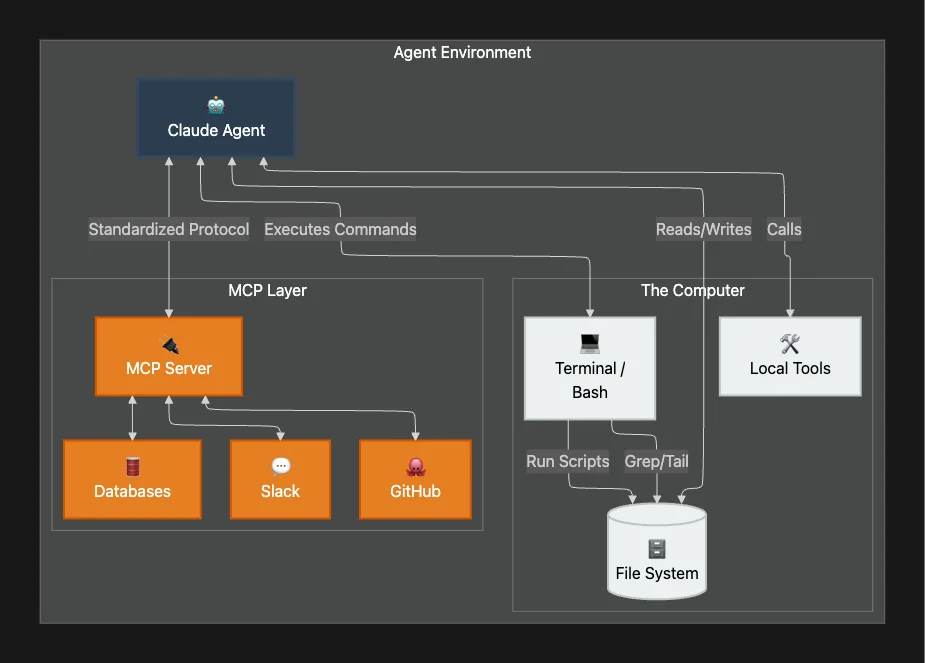
This isn't a sandbox browser; it's deep, interactive persistence. The foundational design principle is elegantly profound yet straightforward: by providing tools like a terminal, agents can perform a vast array of general-purpose digital work.
What "Computer Access" Really Means
- Interaction: The agent can execute general-purpose Bash commands; anything a human could type at a terminal.
- Persistence: It can find, edit, and manage files on the local file system, maintaining state across operations.
- Execution: It can write and run scripts, debug its own work iteratively, and interact with APIs directly.
If an agent can use Bash, it can read massive CSV files, search through folders, process data with Python, and interact with external services. It turns Claude from a synthesizer of text into a genuine digital worker.
💡 Key Insight: This access enables agents to execute complex digital workflows like reading CSV files, searching the web, building visualizations, and interpreting metrics directly: mimicking the natural workflow of a human operator.
Practical Applications
This "computer" access unlocks workflows that were previously impossible for LLMs. The expanded vision transforms what agents can accomplish across industries.
Finance Agents: The Junior Quant
Imagine a "Junior Quant Analyst." It doesn't just talk about stocks. It can:
- Call external APIs for real-time market data.
- Store that data in a local CSV for analysis.
- Write and execute custom Python code to run Monte Carlo simulations or portfolio analysis.
- Generate formatted reports with visualizations.
Technical Deep Dive: Why Code Generation Beats JSON
You might ask: Why not just output a JSON object with the analysis?
Code offers precision and composability that structured data cannot match. If an agent needs to perform a specific calculation (e.g., "Calculate the 30-day volatility of this portfolio"), generating a Python script guarantees the logic is executed exactly as written. Generated code is precise, composable, and infinitely reusable, making it a highly reliable execution mechanism.
# Example: Agent-generated script for volatility analysis
import pandas as pd
import numpy as np

def calculate_volatility(csv_path):
    df = pd.read_csv(csv_path)
    returns = np.log(df['Close'] / df['Close'].shift(1))
    volatility = returns.std() * np.sqrt(252)
    return volatility

print(f"Annualized Volatility: {calculate_volatility('portfolio_data.csv'):.2%}")
Without a computer to run this script, the agent is just guessing numbers. With one, it is performing verifiable analysis.
Personal Assistant Agents
These agents connect to internal data sources to manage calendars, book travel, schedule appointments, and assemble briefing documents, seamlessly tracking context across multiple applications.
Customer Support Agents
Designed to handle high-ambiguity requests, these agents can resolve customer service tickets by:
- Collecting user data from CRM systems
- Connecting to external APIs for diagnosis
- Messaging users for clarification
- Escalating to human support when necessary; with full context
Deep Research Agents
For synthesis across thousands of internal documents, the file system becomes a collaborator. The agent can load, process, and manipulate persistent data to generate detailed, structured reports, effectively managing its own workspace. They can navigate file systems, synthesize information from multiple sources, cross-reference data, and generate comprehensive reports.
The Agentic Feedback Loop
How does an autonomous agent systematically tackle these problems? The SDK relies on a robust three-phase loop: Gather Context, Take Action, and Verify Work.
💡 Architectural Insight: This feedback mechanism is the cornerstone of building enterprise-grade agents. It transforms a probabilistic system like an LLM into a more deterministic and verifiable engineering component.
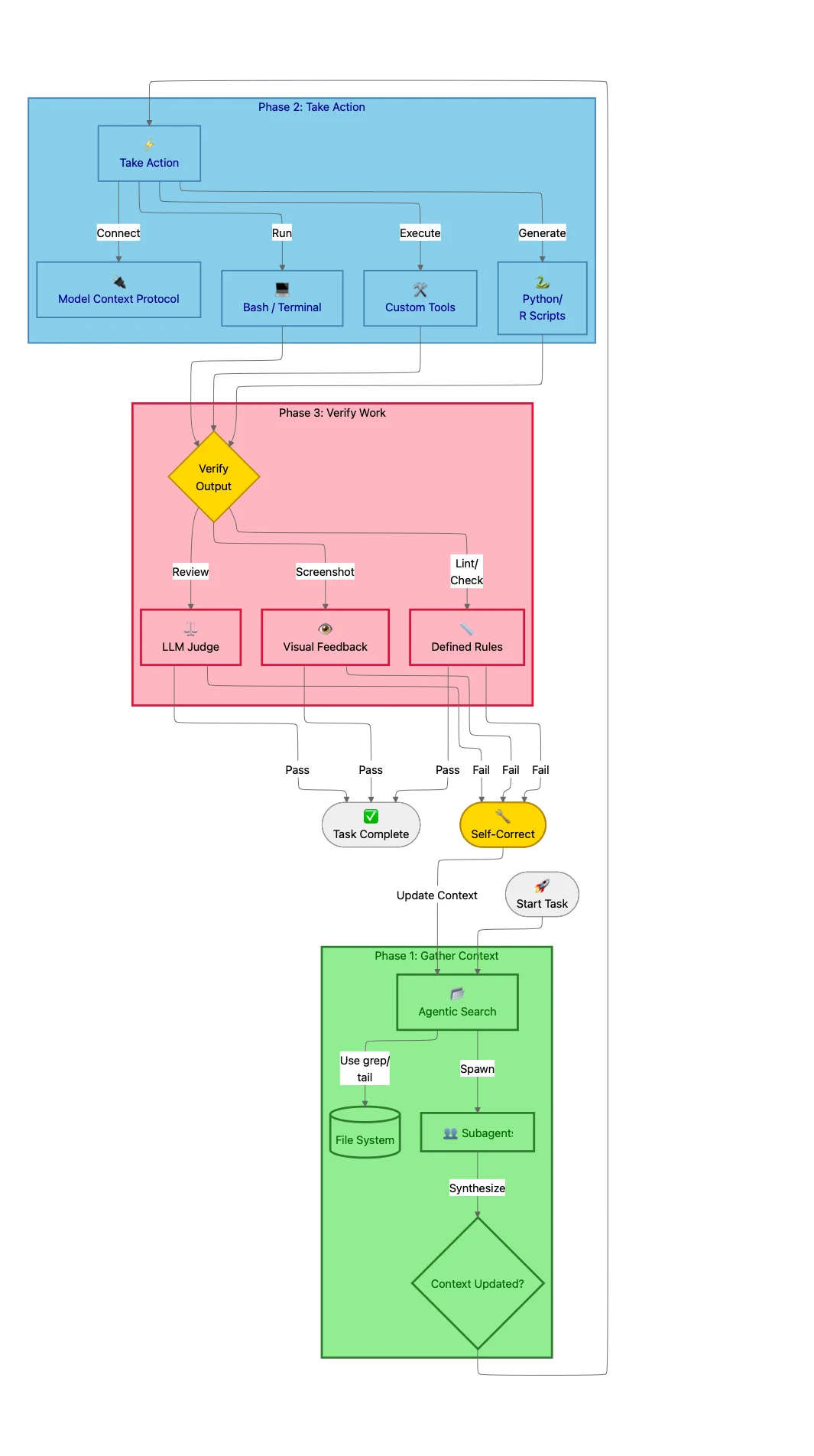
This loop is not a single, linear execution but a repeatable cycle. The agent can: and often does: repeat these steps multiple times, progressively gathering more context, taking more refined actions, and verifying its work until the task is successfully completed.
Phase 1: Gather Context (Agentic Search)
An agent's performance is directly proportional to the quality of its context. The ability to gather relevant, timely, and accurate information is the critical first step that informs every subsequent action.
Agentic Search via the File System
Instead of relying solely on Semantic Search (vector embeddings), which can be opaque and hard to debug, the SDK encourages Agentic Search. Treating the file system as a dynamic source of context is a cornerstone of the SDK's design.
The agent uses the file system as a "memory map," utilizing tools like grep or tail to surgically search massive log files and pull only relevant snippets into its context. This is transparent, auditable, and highly efficient.
# Agent finds relevant error context without reading entire 10GB log
grep "ERROR" /var/log/app.log | grep "transaction_id: xyz-123" | tail -50
For example, an email agent could store conversation histories in a dedicated folder. When a user asks about a past interaction, the agent can use search commands to locate the specific conversation file and load only the relevant portions, ensuring an informed and accurate response.
Agentic vs. Semantic Search Trade-offs
| Feature | Agentic Search | Semantic Search |
|---|---|---|
| Mechanism | Bash commands (grep, tail) | Vector embeddings |
| Transparency | High — fully auditable | Low — opaque results |
| Best For | Precision, exact matches | Conceptual similarity |
| Debugging | Easy — see exact commands | Difficult — "why this result?" |
| Maintenance | Low — standard file system | High — chunking/embedding pipeline |
💡 Best Practice: Start with the debuggability and reliability of agentic search, introducing semantic search only when speed or query variation becomes a critical requirement.
Subagents for Parallelization
For massive tasks, Subagents can be spun up to parallelize research. Each subagent operates within its own isolated context window and returns only synthesized answers to the orchestrator; preventing context window pollution.
In an email agent example, the primary agent could launch multiple "search subagents" in parallel. Each subagent executes a different query against the user's email history and returns only the most salient excerpts.
Compaction for Long-Term Operation
For agents running extended periods, the SDK's compact feature automatically summarizes previous messages as the context limit approaches. This ensures the agent retains a coherent understanding of the long-running task without exceeding its operational limits.
Phase 2: Take Action (Tools & MCP)
Once an agent has gathered sufficient context, it requires a flexible and powerful set of capabilities to take meaningful action. The Claude Agent SDK provides a layered toolkit, allowing agents to choose the right level of abstraction.
Tools as Primary Actions
Tools are the primary building blocks; predefined macros like fetchInbox or searchEmails. Because they are prominently featured in the model's context window, they are the first actions an agent will consider. This makes thoughtful tool design essential for guiding agent behavior.
💡 Design Principle: Tools should represent the primary, most frequent actions you expect the agent to perform.
Bash & Scripts for General-Purpose Work
Direct access to a Bash terminal provides agents with a general-purpose toolkit for flexible, on-the-fly problem-solving. If an email contains important information locked within a PDF attachment, the agent can use Bash commands to download the file, convert its content to text, and search for the required data.
Code Generation for Precision
Code is an ideal output for agents tasked with complex or repetitive operations demanding precision. For example, an email agent could write code to implement user-defined rules for inbound emails: enabling dynamic, runtime behavior that persists beyond the conversation.
Model Context Protocol (MCP)
The real power lies in the Model Context Protocol (MCP). MCPs are standardized integrations for services like Slack, GitHub, and Asana. They eliminate the need for custom integration code, giving the agent instant situational awareness of the team's context.
An email agent could use MCP to call search_slack_messages for team context or get_asana_tasks to check project status; with the MCP server managing authentication and API complexity seamlessly.
Claude Code Roots
Since the Agent SDK came out of the same ecosystem that started with Claude Code, it supports the same subagents as Claude Code, and the same agentic skill infrastructure.
And, remember now it is not just Claude Code and the SDK that supports skills, but so does the Claude Desktop. For that matter Agentic Skills is now an open standard supported by Codex, Github Copilot and OpenCode have all announced support for Agentic Skills. There is even a marketplace for agentic skills that support Gemini, Aidr, Qwen Code, Kimi K2 Code, Cursor (14+ and counting) and more with Agentic Skill Support via a universal installer.
Phase 3: Verify Work (The Reliability Moat)
This is the most critical step. Self-verification is a cornerstone of building enterprise-grade, reliable agents. An agent that can check its own work, identify errors, and self-correct is fundamentally more robust than one that operates without a feedback mechanism.
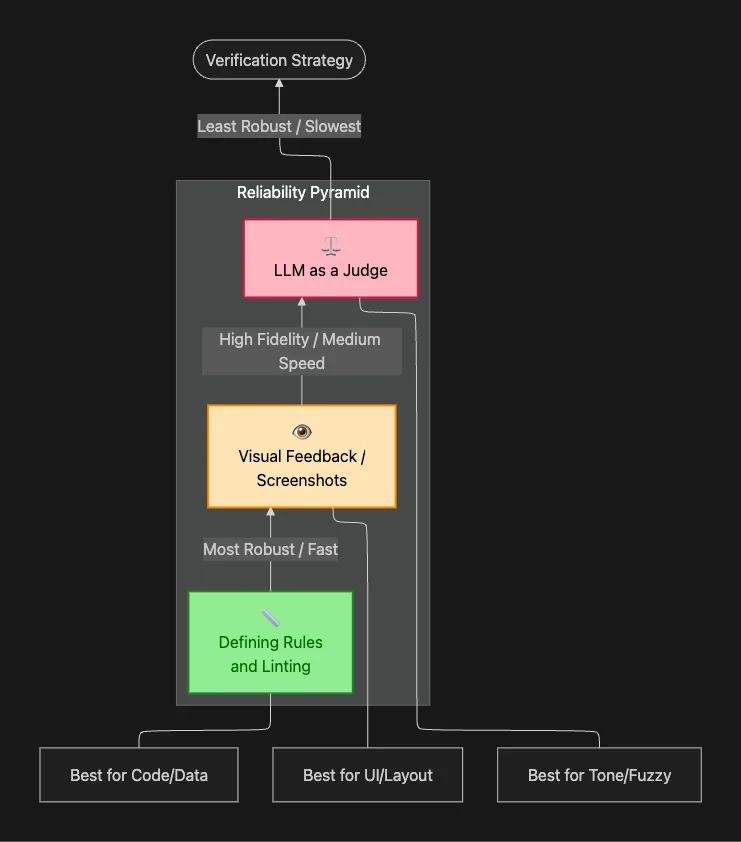
The SDK outlines a hierarchy of verification methods, from most to least robust:
1. Defining Rules (Most Robust)
The most effective form of feedback is based on clearly defined rules. By providing the agent with a concrete specification for a successful output, it can programmatically check its work and receive specific, actionable feedback.
Examples:
- Code linting: Generating TypeScript and linting it provides multiple layers of feedback compared to plain JavaScript; the agent is immediately notified of type errors.
- Data validation: Checking if an email address is valid, if required fields are present, or if a legal disclaimer exists.
// Tool with built-in validation rules
function sendEmail(recipient: string, body: string): Result {
    if (!recipient.includes("@")) {
        return { status: "error", error: "Invalid email address." };
    }
    if (!body.includes("Legal Disclaimer")) {
        return { status: "error", error: "Missing legal disclaimer." };
    }
    // ... send email logic
    return { status: "success" };
}
2. Visual Feedback (High Fidelity)
For UI tasks, the agent can use tools like Playwright to take a screenshot of its generated code and visually inspect it for errors. The agent becomes its own QA tester; it looks at its own work and iterates until visually correct.
Checks include:
- Layout: Are elements positioned correctly with appropriate spacing?
- Styling: Do colors, fonts, and formatting match specifications?
- Content Hierarchy: Is information presented in the correct order?
3. LLM as a Judge (Last Resort)
For subjective rules (e.g., "Is the tone friendly?"), a separate subagent can be used to "judge" the output. While less robust than rule-based verification and slower, it's necessary for fuzzy, subjective nuances.
💡 Use Sparingly: LLM-as-judge is powerful but slow and expensive. Reserve it for truly subjective evaluations.
Best Practices for Agent Improvement
Building a robust agent is an iterative process. Agent development often follows an "M-shaped" curve: initial success is followed by a plateau of failures that can only be overcome through systematic diagnosis and architectural enhancement.
Diagnostic Framework
When your agent fails, put yourself in its shoes and ask why:
| Symptom | Root Cause | Solution |
|---|---|---|
| Agent misunderstands the task | Missing key information | Restructure search APIs or file system to make context more discoverable |
| Agent repeatedly fails at same task | Failure condition not handled | Add formal rules in tool calls to identify failure cases |
| Agent cannot correct its errors | Insufficient toolkit | Provide more effective or creative tools for different approaches |
| Inconsistent performance | No baseline for measurement | Establish test set based on real user interactions |
The Improvement Loop
- Analyze failures — Don't just fix symptoms; understand root causes
- Enhance capabilities — Add rules, tools, or context structures
- Test systematically — Use representative test sets from real interactions
- Protect against regressions — Ensure fixes don't break existing functionality
💡 Engineering Insight: The most effective path to improvement is to analyze an agent's failures, understand the root cause, and enhance its capabilities accordingly.
Conclusion
The move from "what's possible" to "what's reliable" is the defining engineering challenge of this generation of AI. By giving agents a computer and enforcing a strict loop of Gathering, Acting, and Verifying, the Claude Agent SDK provides the primitives to build agents that don't just chat: they work.
This paradigm is a production-ready approach for mitigating the most common failure modes in agentic systems:
- Context loss → Agentic search and subagents
- Inflexible action-taking → Layered toolkit (tools, bash, code, MCP)
- Unverified outputs → Hierarchical verification (rules, visual, LLM-judge)
By adhering to this architectural pattern, developers can build agents that are reliable, effective, and easy to deploy for a wide variety of sophisticated workflows. The framework provides the essential primitives for automating tasks and building the next generation of autonomous systems.
What kind of autonomous agent would you build first with this SDK? Share your ideas in the comments!
About the Author
Rick Hightower is a seasoned professional with experience as an executive and data engineer at a Fortune 100 financial technology organization. His work there involved developing advanced Machine Learning and AI solutions designed to enhance customer experience metrics.
His professional credentials include TensorFlow certification and completion of Stanford's Machine Learning Specialization program. He has built projects with LangChain, LlamaIndex, ChatGPT Native API, Lite-llm, and more on AWS, Azure and GCP.
Connect with Richard on LinkedIn or Medium for additional insights on enterprise AI implementation.
Discover AI Agent Skills
Browse our marketplace of 41,000+ Claude Code skills, agents, and tools. Find the perfect skill for your workflow or submit your own.