
Claude Skills Conceptual Deep Dive

Claude Skills Conceptual Deep Dive
Why teaching an AI with manuals beats giving it a list of functions: How Anthropic's three-tier loading system achieves 90% token reduction
Section 1: The Context Window Bottleneck
If you've built a production-grade AI agent, you've likely run headfirst into one of the most expensive and frustrating limitations in the field: the context window. It's the AI's short-term memory, and it's shockingly small relative to our ambitions for these systems.
The problem appears immediately when you try to give your AI specialized knowledge. Imagine you want Claude to help manage your company's Jira tickets, generate PlantUML diagrams according to your organization's standards, and automate Confluence documentation. Each of these tasks requires domain-specific knowledge:
- Jira API documentation: ~40,000 tokens
- PlantUML syntax reference: ~25,000 tokens
- Confluence API guide: ~35,000 tokens
- Company style guides: ~20,000 tokens
That's 120,000 tokens before your agent even starts working. Claude's context window, while impressive at 200K tokens, starts groaning under this load. Response latency increases dramatically. Costs spiral. And you haven't even added the actual conversation yet.
This is the "documentation dump" approach, and it's fundamentally broken for production use. The AI doesn't need to know PlantUML sequence diagram syntax when the user asks about Jira ticket status. It doesn't need Confluence formatting rules when generating a class diagram. But with naive approaches, it loads everything, every time.
The cost compounds with scale. If you're running 1,000 agent sessions per day at $0.003 per 1K input tokens, that 120K token preload costs $360 per day just in context overhead — before a single useful token is generated. And that's assuming you can even fit your documentation in the context window without hitting the ceiling.
The solution isn't a bigger context window. It's smarter loading.
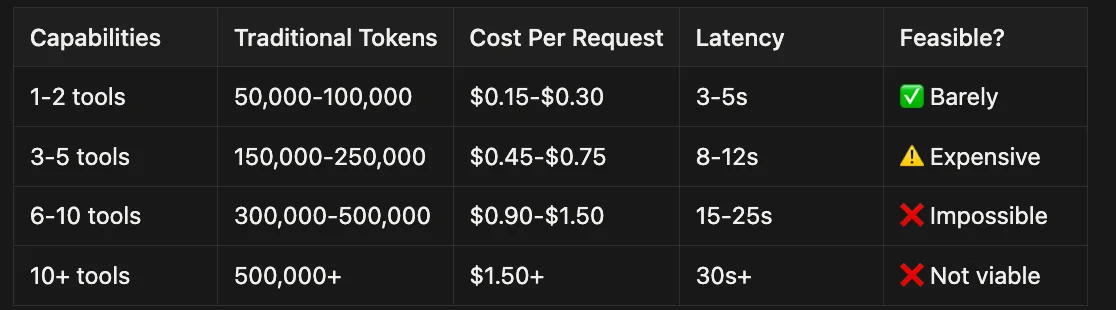
It is not just Anthropic saying it either.
Industry Reports & Analyst Briefings
- Gartner on Context Engineering for AI & LLMs
- Context Engineering Skill Becomes Essential for AI Agents (cites Gartner prediction)
- Gartner Predicts Over 40% of Agentic AI Projects Will Be Canceled by End of 2027
- Gartner Predicts 40% of Enterprise Apps Will Feature Task-Specific AI Agents by 2026
- Context Engineering for Agentic AI
Enterprise Case Studies & Context Engineering Post-Mortems
- AI Agent Development Frameworks: Takeaways from Gartner Innovation Insight Report (Case Studies & Examples)
- How to Implement AI Agents to Transform Business Models
- Architecting Smarter Multi-Agent Systems with Context Engineering (Insurance Underwriting Example)
Technical Guides & Explanations
Understanding the context window bottleneck requires knowing how context engineering works.
This way I was able to quickly process a very large tome (often 16 MB to 32 MB in size) quickly.
With this technique, I got excellent results; enough to answer all the questions I needed and extract the data I required from these large technical documents with their very specific jargon. The LLM could reason about which knowledge it needed before loading it, rather than hoping a similarity search would find the right passage.
The Connection to Claude Skills: You can think of Claude Skills a lot like having the agent read that table of contents — where the table of contents is your skill's metadata (Tier 1), and the chapters and sections are the resources and references bundled within your Claude Skill (Tiers 2 and 3), which we'll get into later.
I'm adding this personal experience to the article to show my own expertise and understanding of context engineering, and to help explain how PDA works through a real-world lens. The pattern I discovered independently is exactly what Anthropic formalized with Progressive Disclosure Architecture.
Section 2: What Are Claude Skills?
Claude Skills are Anthropic's answer to the context engineering problem. They're a framework for packaging domain-specific knowledge into modular, self-contained units that Claude can load on-demand.
Think of Skills as professional training manuals that Claude can consult when needed, rather than textbooks it must memorize upfront.
A Skill might teach Claude how to:
- Generate PlantUML diagrams following your organization's conventions
- Manage Jira tickets with your company's workflow
- Process documents according to compliance requirements
- Automate infrastructure deployments with proper approval gates
Each Skill is a directory containing:
- A
SKILL.mdfile with instructions and metadata - Optional scripts (Python, Bash) for complex operations
- Reference documentation for deep knowledge
- Configuration templates and examples
The key innovation isn't the packaging — it's how Claude loads these Skills.
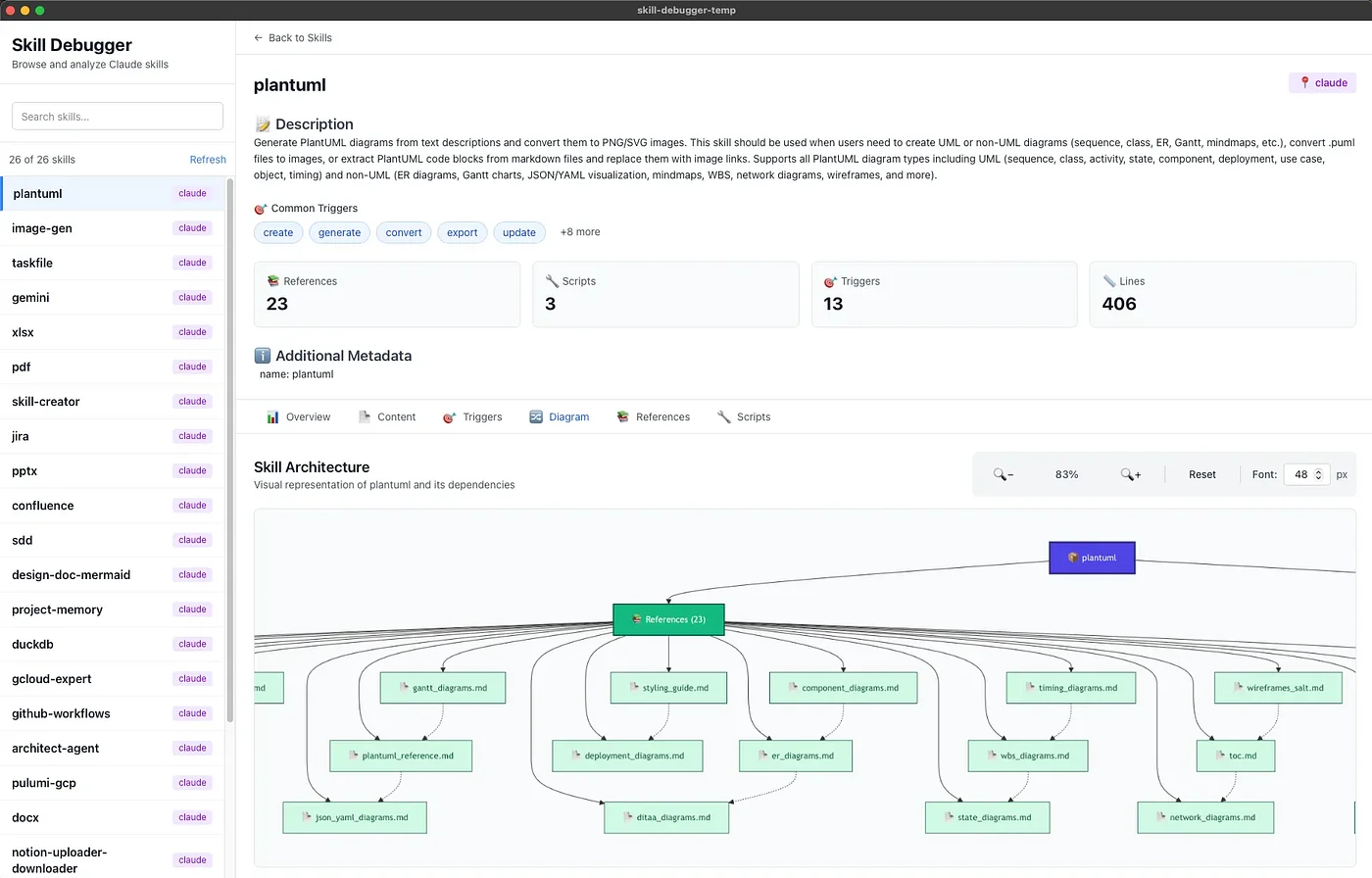
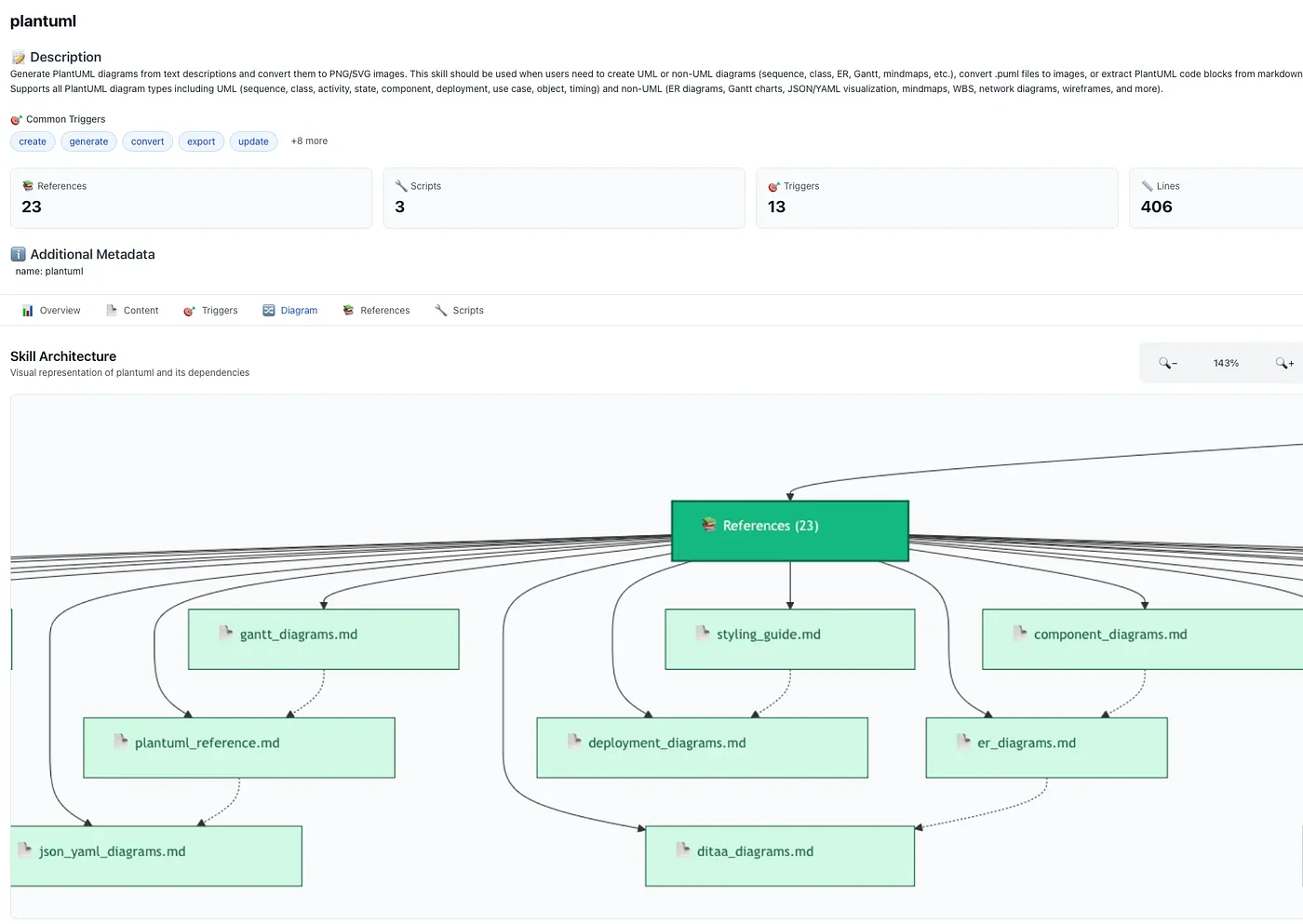
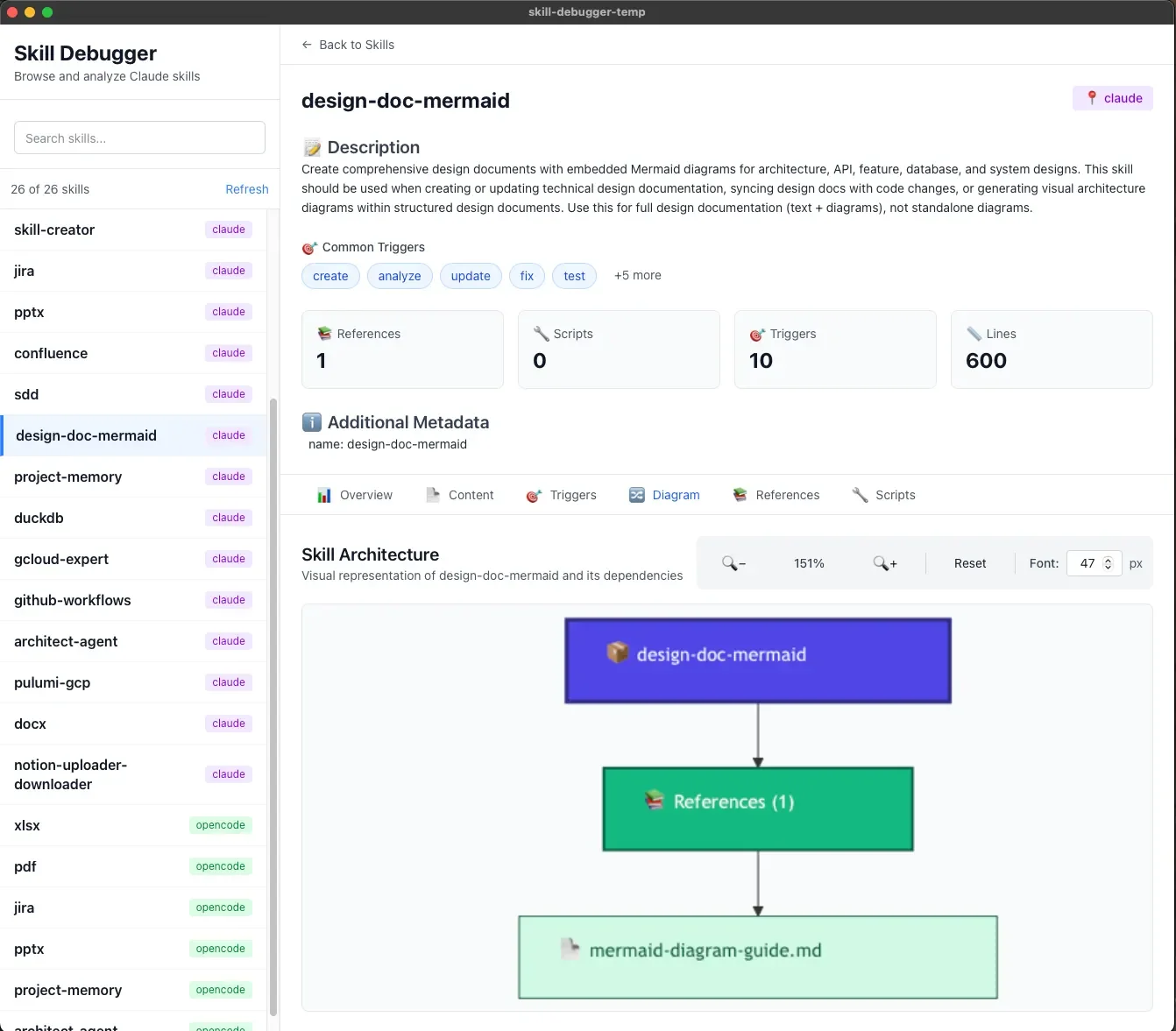
Section 3: Progressive Disclosure Architecture (PDA)
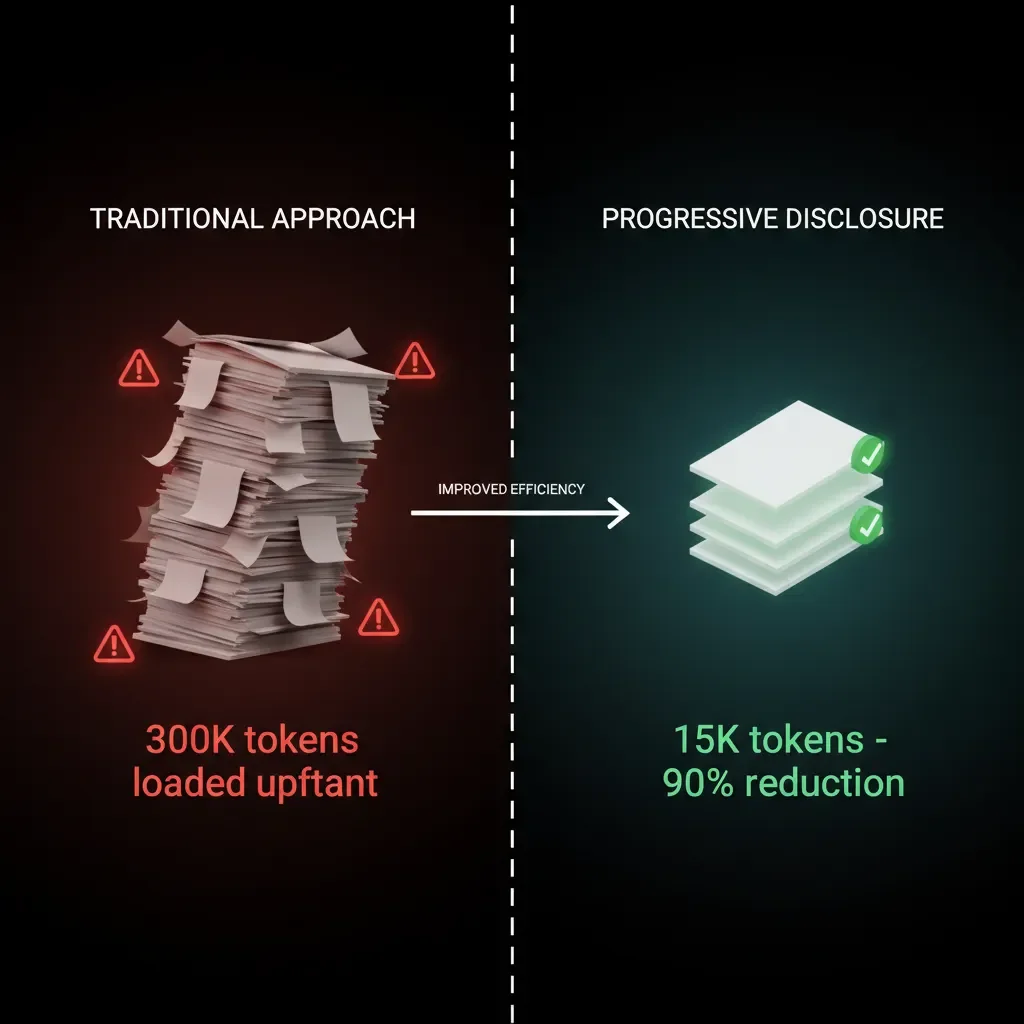
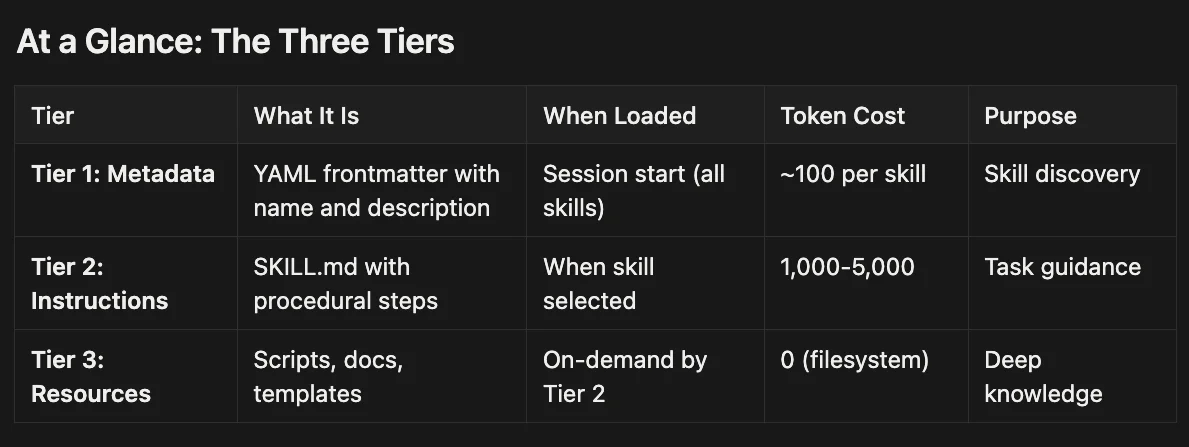
Progressive Disclosure Architecture is the loading strategy that makes Skills efficient. Instead of dumping everything into context at once, PDA organizes knowledge into three tiers, each loaded only when needed:
| Tier | Content | When Loaded | Purpose |
|---|---|---|---|
| Tier 1 | Metadata Index | Session start | Skill discovery |
| Tier 2 | SKILL.md Instructions | Skill activation | Task guidance |
| Tier 3 | Scripts & References | On-demand | Deep knowledge |
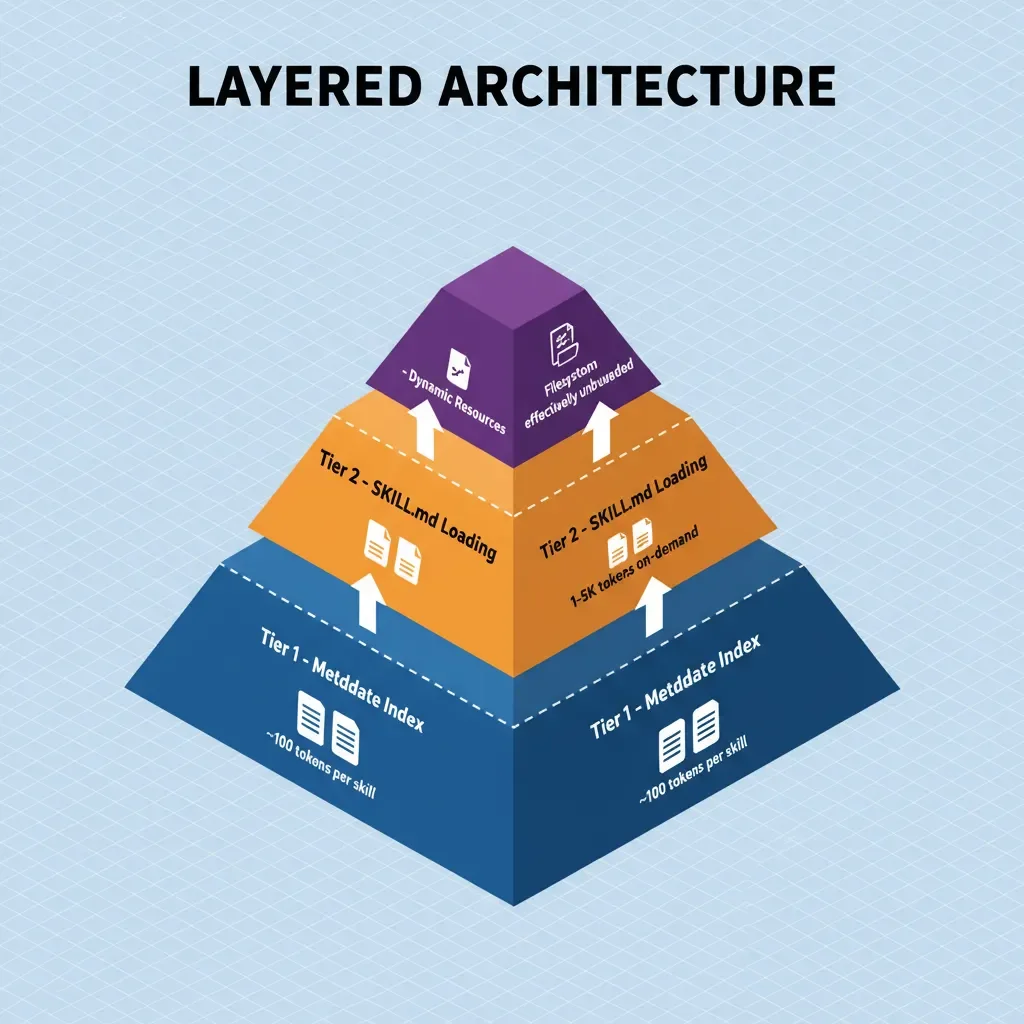
Tier 1: System-Wide Metadata Index
At session initialization, Claude loads only the YAML frontmatter from each available skill's SKILL.md file. This frontmatter contains:
name: "plantuml-diagrams"
description: "Creates PlantUML diagrams including sequence, class, component, and deployment diagrams. Converts to PNG/SVG formats."
version: "1.2.0"
allowed-tools: ["Bash", "Python"]
That's it. No implementation details, no syntax guides, no scripts. Just enough information for Claude to understand:
- What the skill does
- When it might be relevant
- What permissions it requires
Token cost: ~100 tokens per skill
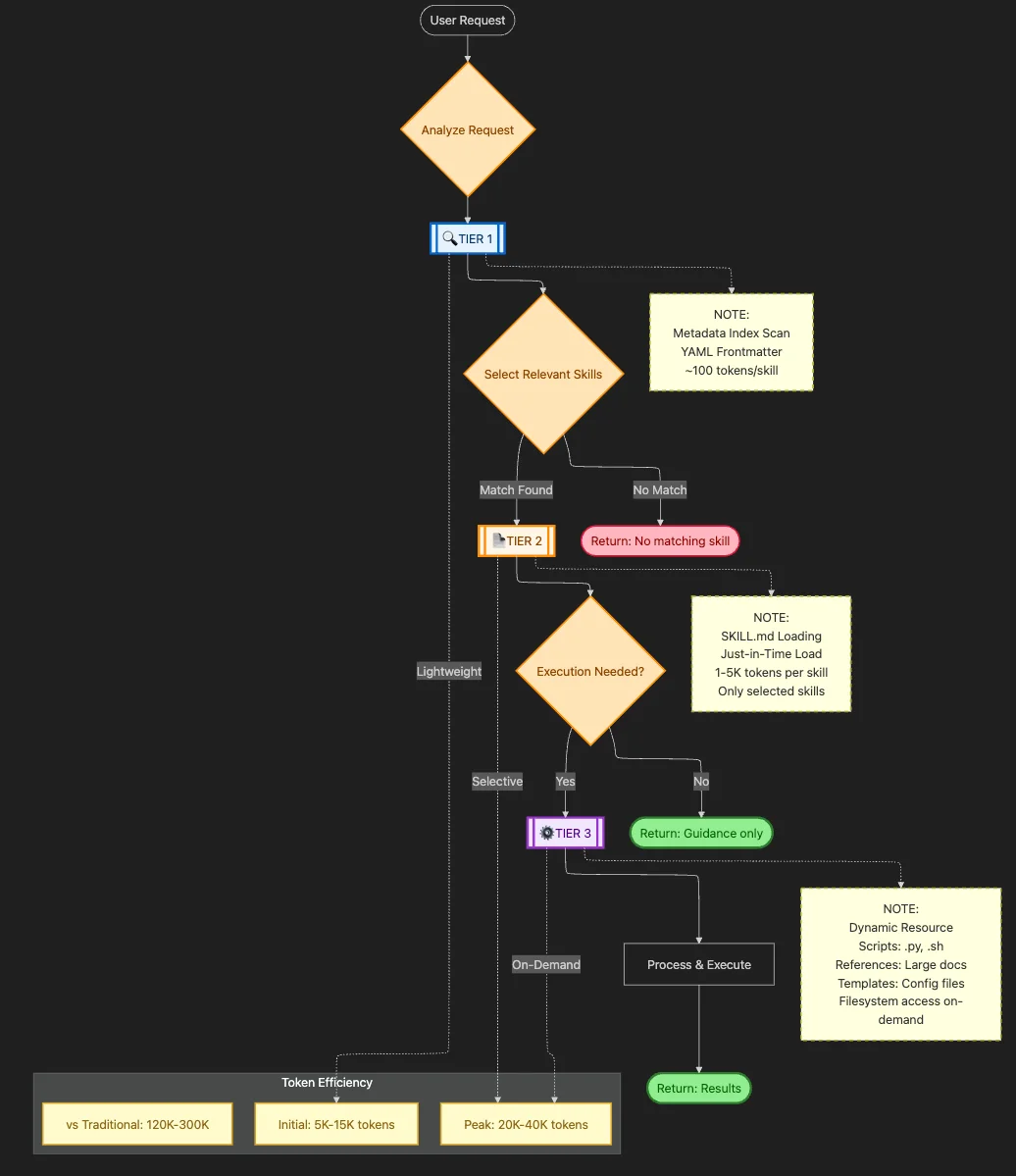
Tier 2: Instructions (SKILL.md)
When a user request matches a skill's domain, Claude loads the full SKILL.md file. This contains:
- Step-by-step procedures
- Decision trees for common scenarios
- Pointers to Tier 3 resources
- Error handling guidance
Example workflow from a PlantUML skill:
## Workflow

1. **Identify Diagram Type**: Based on user description, determine sequence/class/component/etc.

2. **Load Syntax Reference**: Use `Read` tool to consult `references/syntax.md`

3. **Generate PlantUML Code**: Follow conventions in loaded syntax reference

4. **Convert to Image**: Execute `python scripts/convert.py <input.puml> <output.png>`

5. **Return Result**: Provide the diagram and offer to make adjustments

## Error Handling
If syntax validation fails, consult `references/common_errors.md` for troubleshooting.
Token cost: 1,000–5,000 tokens (depending on complexity)
Critically, the SKILL.md best practice (per Anthropic's guidelines) is to keep this file under 500 lines. Why? Because Tier 2 is where you pay the token cost. Everything else should be delegated to Tier 3.
Tier 3: Dynamic Resource Bundling
This is where Progressive Disclosure becomes truly powerful. Tier 3 resources are loaded only when explicitly referenced by Tier 2 instructions:
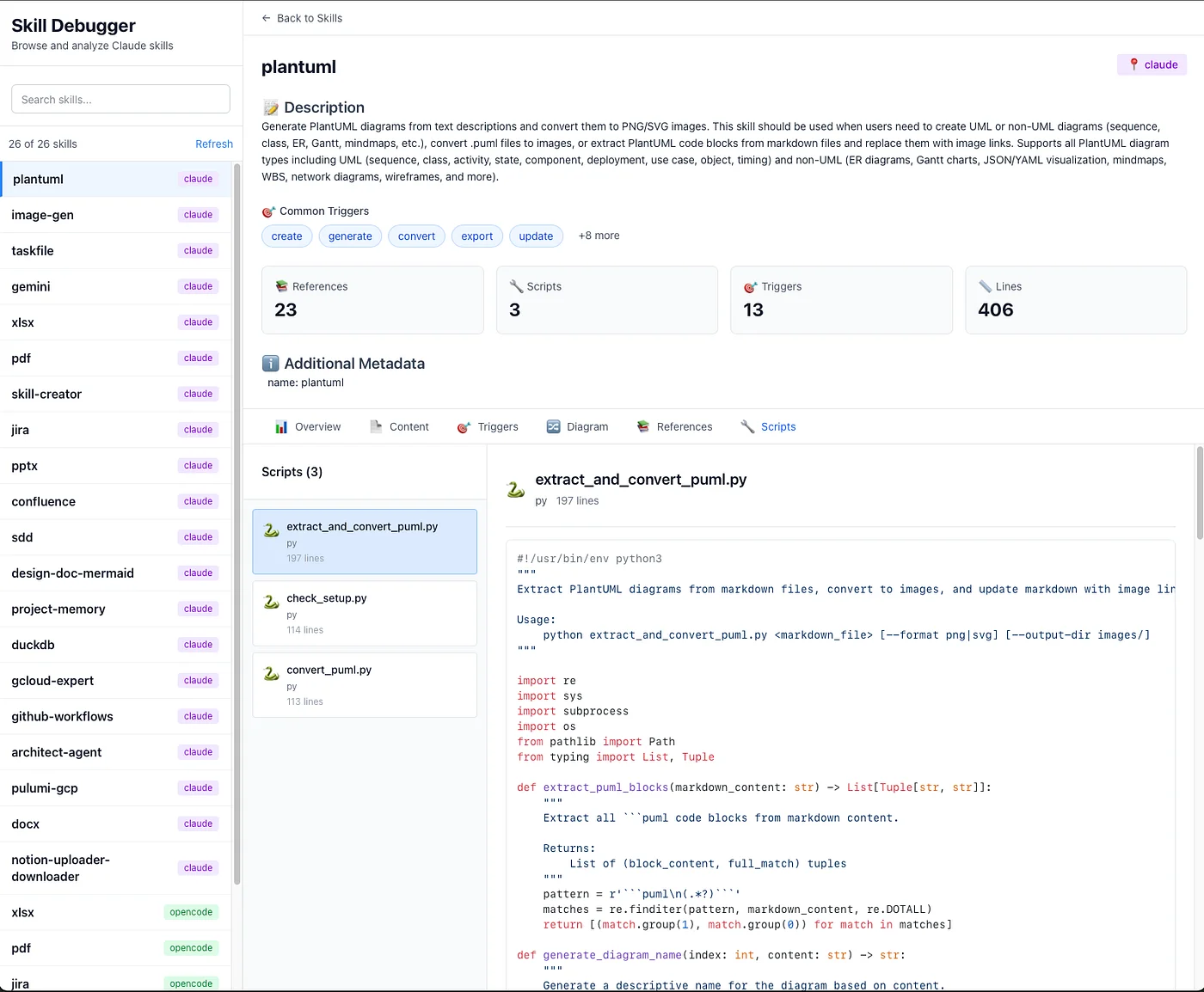
- Scripts: Python/Bash files executed via allowed tools
- References: Deep documentation (syntax guides, API specs)
- Templates: Configuration files, examples
- Data files: Lookup tables, validation schemas
The key insight: Tier 3 resources live on the filesystem, not in Claude's context. When Claude needs to consult a reference, it uses the Read tool to load specific sections. When it needs to execute a script, the script runs outside Claude's context entirely.
Token cost: Variable (often zero for script execution, selective loading for references)
The Token Math
Let's compare traditional vs. PDA approaches for a PlantUML diagramming task:
Traditional Approach:
- Full PlantUML documentation: 25,000 tokens
- All syntax examples: 15,000 tokens
- Conversion scripts (embedded): 5,000 tokens
- Total: 45,000 tokens loaded upfront
PDA Approach:
- Tier 1 metadata: 100 tokens (always loaded)
- Tier 2 SKILL.md: 2,000 tokens (loaded on activation)
- Tier 3 syntax reference: 3,000 tokens (loaded for specific diagram type)
- Tier 3 script execution: 0 tokens (runs externally)
- Total: 5,100 tokens loaded on-demand
That's an 89% reduction in context usage for the same capability.
Skills vs. MCP Tools: Declarative vs. Imperative
One of the most important distinctions in Claude's architecture is between Skills (declarative knowledge) and MCP Tools (imperative functions). They serve complementary purposes:
| Aspect | MCP Tools | Claude Skills |
|---|---|---|
| Knowledge Type | Imperative (function calls) | Declarative (procedures) |
| Invocation | Explicit tool calls with parameters | Contextual activation based on need |
| State | Stateless (each call independent) | Stateful (session context preserved) |
| Complexity | Simple, atomic operations | Complex, multi-step workflows |
| Learning Curve | Define schema, implement handler | Write documentation, bundle resources |
MCP Tools are perfect for:
- Database queries
- API calls
- File operations
- External service integration
Skills excel at:
- Complex decision-making workflows
- Domain expertise that requires reasoning
- Multi-step processes with conditional logic
- Knowledge that changes based on context
The magic happens when they work together. A Notion skill might use MCP tools for actual API calls while providing the procedural knowledge for when to make which calls and how to handle various content types.
Consider this example: "Consult the syntax reference in references/syntax.md for that diagram type, then generate the output using the conversion script in scripts/."
The declarative approach trades some precision for enormous flexibility. It can handle ambiguous, multi-step workflows where the exact sequence of operations isn't known until the AI reasons about the user's request. It's perfect for codifying complex organizational procedures that would be impossibly rigid to express as function schemas.
Why This Changes Everything
Progressive Disclosure achieves what seems impossible: an AI agent that's simultaneously deeply specialized and highly efficient.
- Specialized: It has access to comprehensive knowledge about hundreds of domains — diagramming, productivity tools, document processing, infrastructure automation.
- Efficient: It only loads what it needs, when it needs it, keeping context consumption minimal.
According to Anthropic's internal testing, PDA reduces context window bloat by up to 90% compared to traditional approaches while maintaining or improving task completion rates.
Section 4: Deep Dive — Diagramming Skills
Let's examine how PDA works in practice with a complex skill category: technical diagramming. This domain is perfect for demonstrating PDA's power because:
- Documentation is extensive (each diagram type has unique syntax)
- Use cases are varied (sequence diagrams vs. class diagrams vs. deployment diagrams)
- Output formats differ (PlantUML, Mermaid, ASCII art)
The Diagramming Skill Family
A production diagramming setup might include:
~/.claude/skills/
├── plantuml/
│   ├── SKILL.md
│   ├── scripts/
│   │   ├── convert.py
│   │   └── validate.py
│   └── references/
│       ├── sequence_syntax.md
│       ├── class_syntax.md
│       └── component_syntax.md
├── mermaid/
│   ├── SKILL.md
│   └── references/
└── design-doc-generator/
    ├── SKILL.md
    └── templates/
Walkthrough: Sequence Diagram Generation
Let's trace a user request: "Create a sequence diagram showing authentication flow between user, frontend, and auth service"
Phase 1: Skill Discovery (Tier 1)
Claude's loaded metadata includes:
# From plantuml/SKILL.md frontmatter
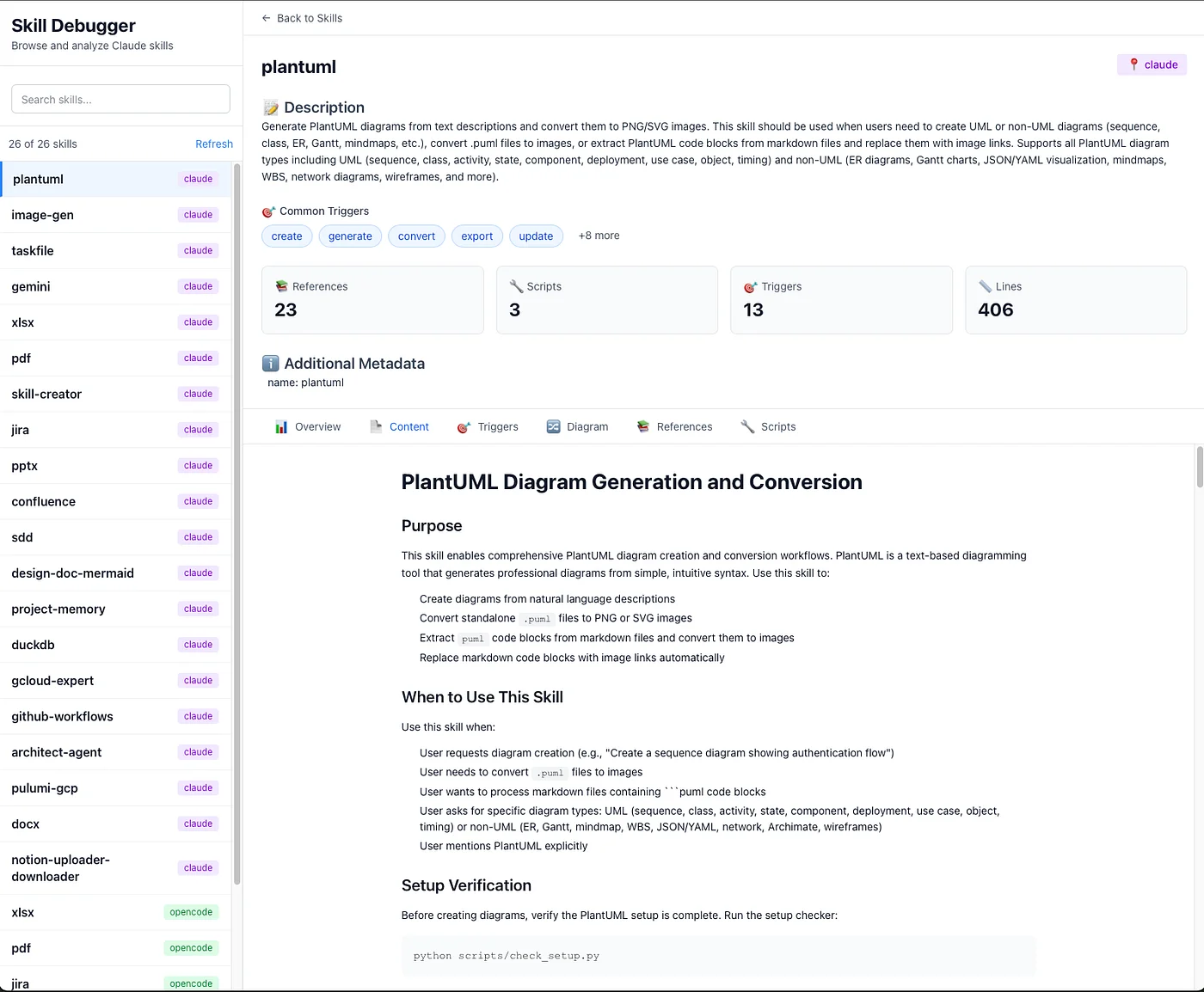
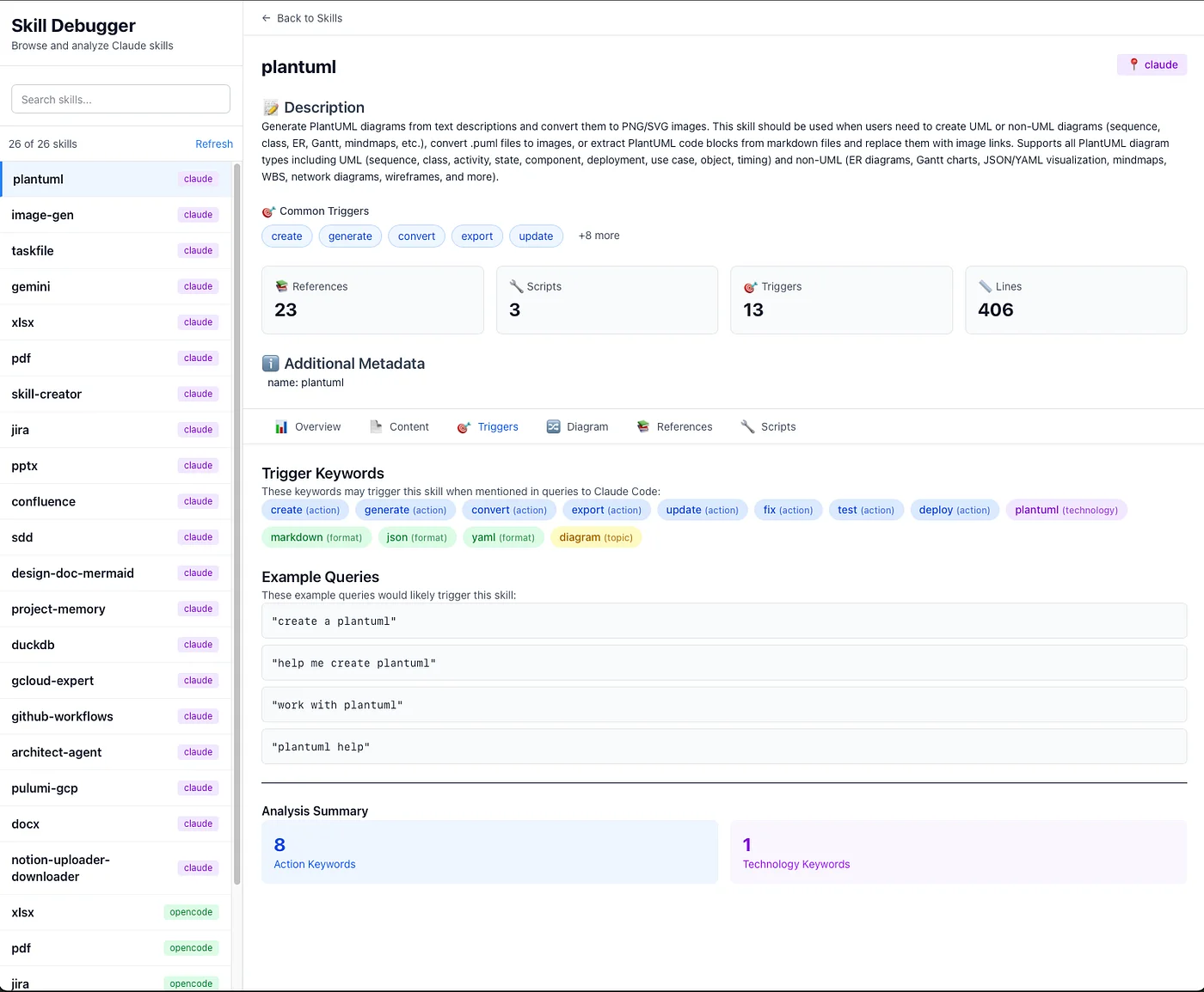
name: plantuml
description: "Creates PlantUML diagrams including sequence, class, component, and deployment diagrams"
triggers:
  - "sequence diagram"
  - "class diagram"
  - "PlantUML"
The trigger phrase "sequence diagram" activates the plantuml skill.
Token cost: 0 (metadata already loaded)
Phase 2: Instruction Loading (Tier 2)
Claude loads the full SKILL.md:
## Workflow

1. Identify diagram type from user description
2. Load appropriate syntax reference from `references/`
3. Generate PlantUML code following loaded syntax
4. Validate using `scripts/validate.py`
5. Convert to PNG using `scripts/convert.py`
Token cost: ~2,000 tokens
Phase 3: Reference Loading (Tier 3)
Following Tier 2 instructions, Claude loads only references/sequence_syntax.md:
## Sequence Diagram Syntax

### Participants
@startuml
participant User
participant Frontend
participant AuthService
@enduml

### Messages
User -> Frontend: Login request
Frontend -> AuthService: Validate credentials
AuthService --> Frontend: Token response
It does NOT load:
references/class_syntax.mdreferences/component_syntax.md- Other irrelevant references
Token cost: ~1,500 tokens (vs. ~8,000 if all references loaded)
Phase 4: Generation
Claude generates the PlantUML code:
@startuml
participant User
participant Frontend
participant AuthService

User -> Frontend: Enter credentials
Frontend -> AuthService: POST /auth/login
AuthService -> AuthService: Validate credentials
AuthService --> Frontend: JWT token
Frontend --> User: Login successful
@enduml
Token cost: ~200 tokens (output)
Phase 5: Validation & Conversion
Claude executes the validation and conversion scripts:
python scripts/validate.py diagram.puml
python scripts/convert.py diagram.puml output.png
Token cost: 0 (script execution is external)
Total: ~3,700 tokens vs. ~45,000 tokens with naive loading.
Section 5: Deep Dive — Productivity & Integration Skills
Diagramming demonstrates PDA's efficiency for documentation-heavy domains. But productivity skills — Jira, Confluence, Notion, GitHub — present different challenges:
- Stateful workflows (authentication, session management)
- External API calls (requiring real credentials)
- Complex decision trees (different actions for different ticket types)
- Security requirements (API keys, OAuth tokens)
This is where the Skills + MCP Tools synergy becomes critical.
The Productivity Skill Architecture
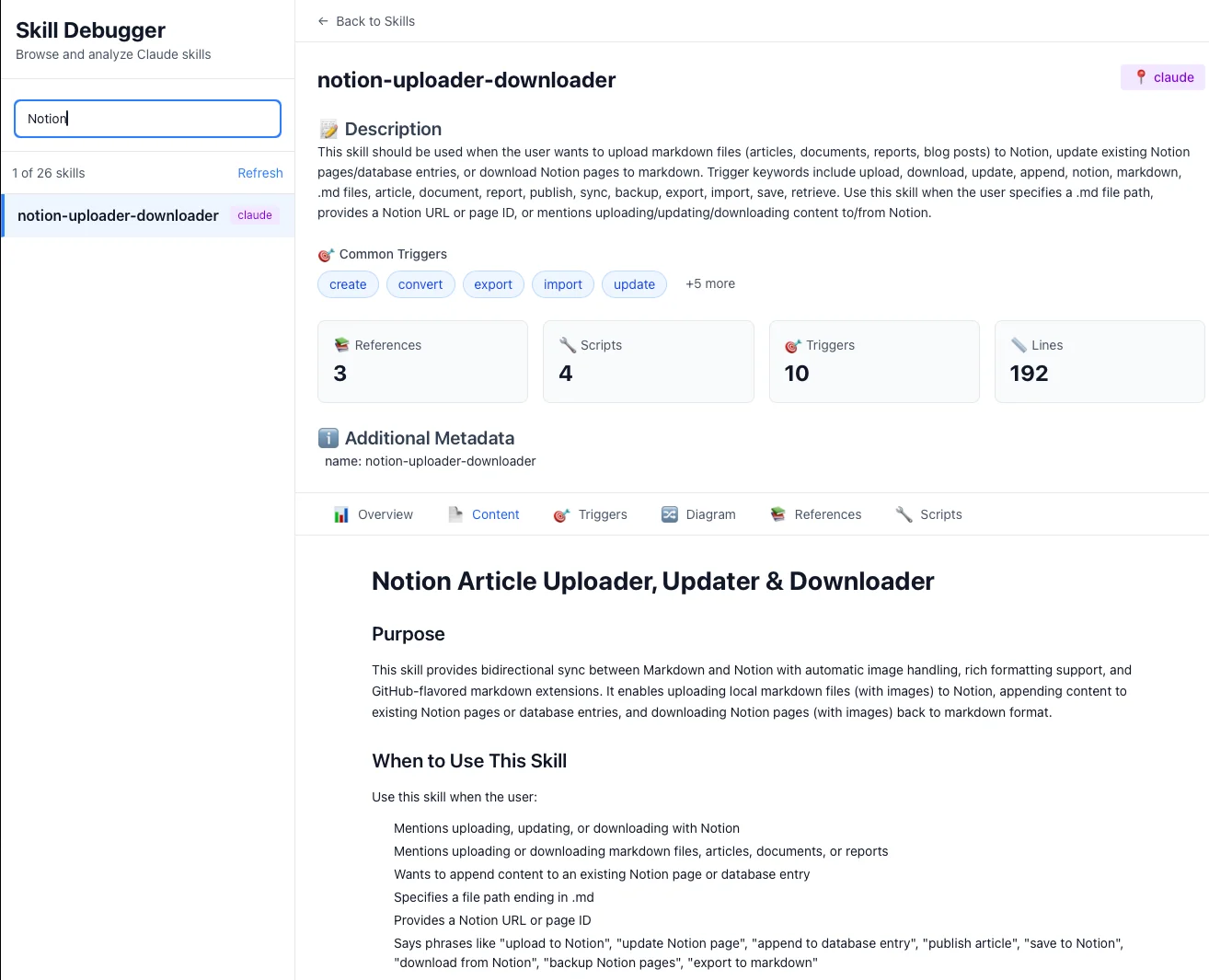
Productivity skills typically follow this pattern:
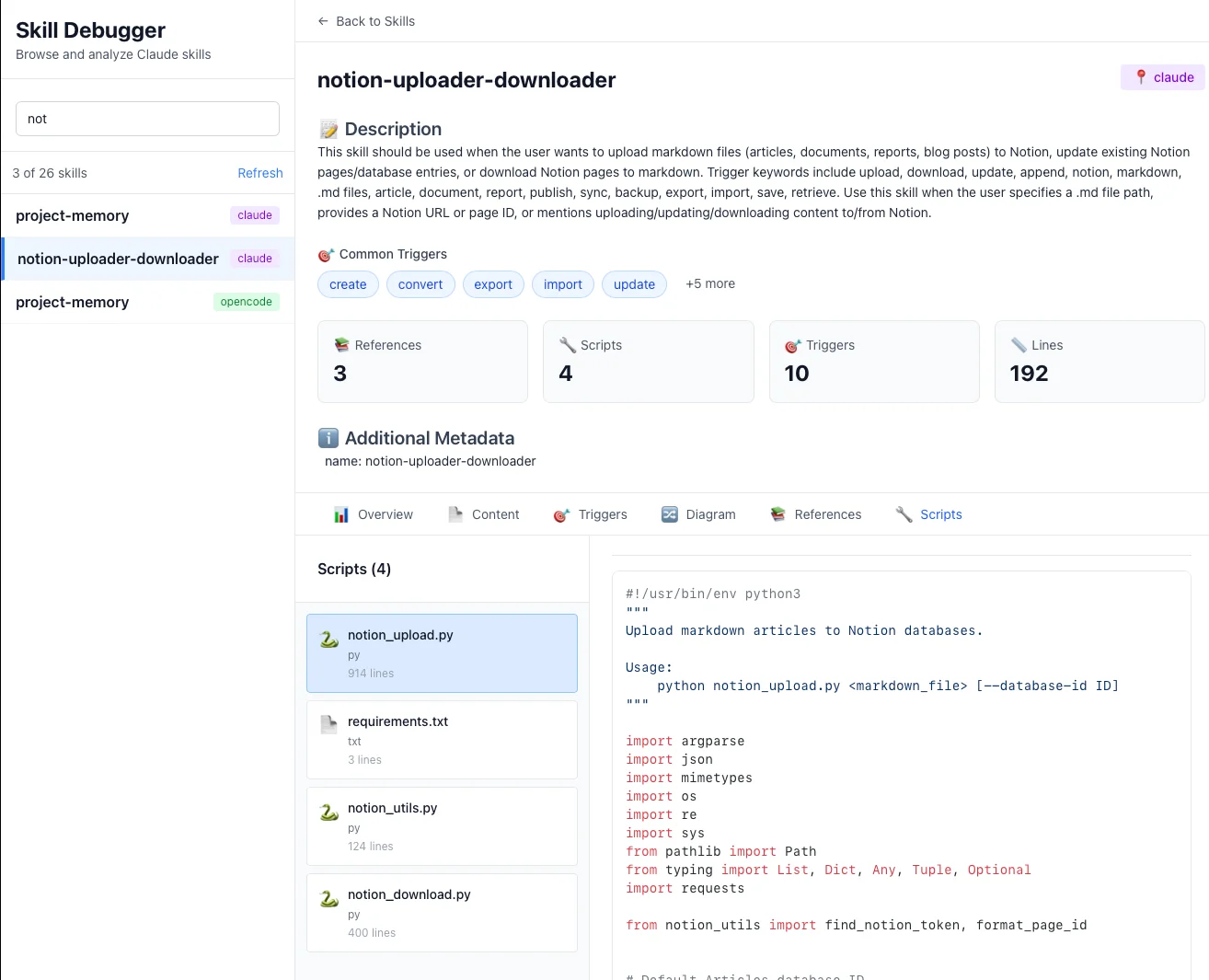
notion-uploader-downloader/
├── SKILL.md                    # Tier 2: Workflow orchestration (~3K tokens)
├── notion_upload.py            # Tier 3: Python upload script
├── download_confluence.py      # Tier 3: Download script
├── config/
│   └── api_templates.json      # Tier 3: Configuration templates
└── references/
    ├── authentication.md       # Tier 3: Auth patterns (~2K tokens)
    ├── block_types.md          # Tier 3: Notion block reference (~8K tokens)
    └── troubleshooting.md      # Tier 3: Common errors (~3K tokens)
Walkthrough: Document Upload Workflow
Let's trace a user request: "Download these Confluence pages and upload them to Notion with proper formatting"
This is a multi-step, multi-skill workflow that demonstrates PDA's orchestration capabilities:
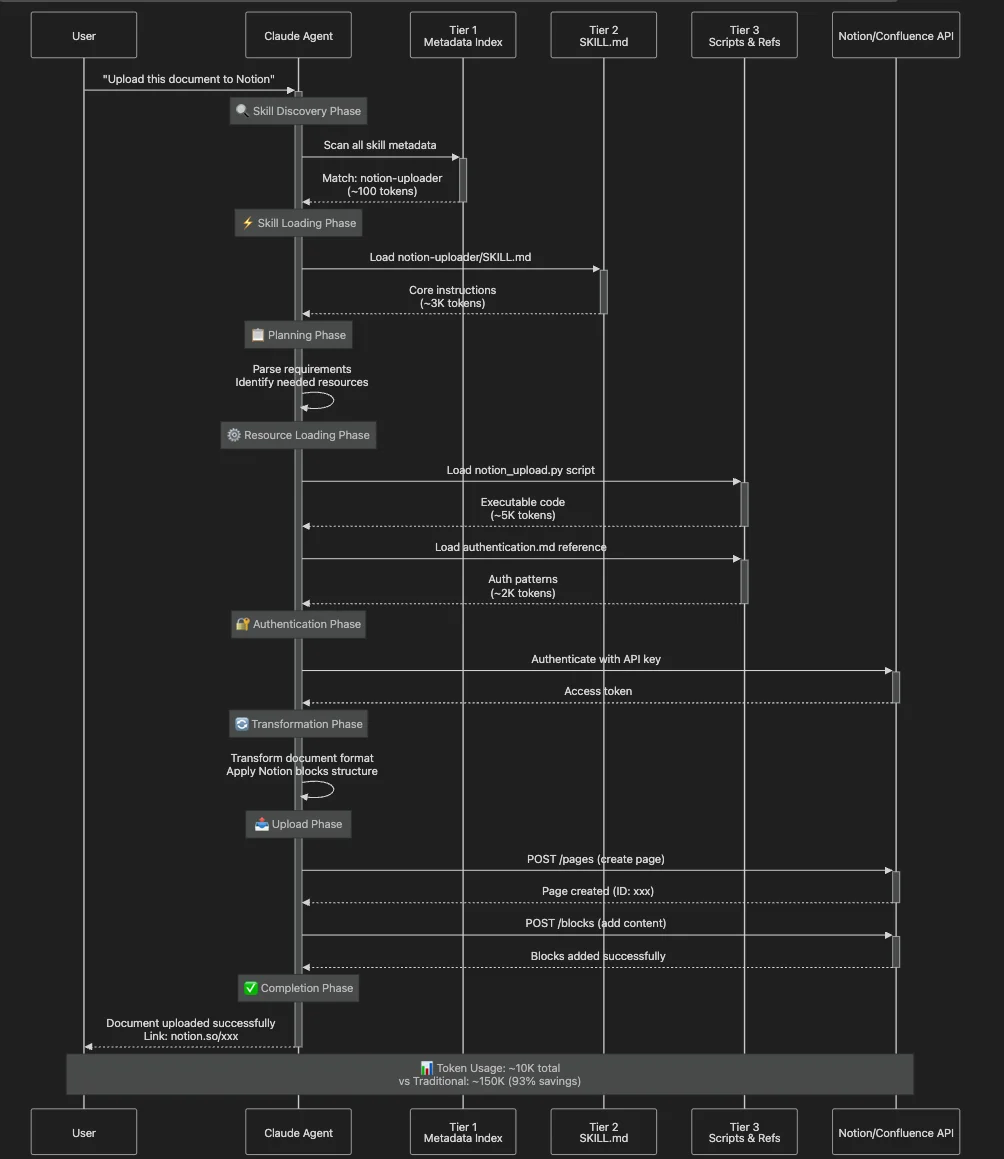
Phase 1: Skill Discovery
Multiple skills are potentially relevant:
confluence-downloader(trigger: "download Confluence")notion-uploader(trigger: "upload to Notion")document-transformer(trigger: "formatting", "conversion")
Claude reasons about the workflow and determines it needs all three skills in sequence.
Phase 2: SKILL.md Loading (Tier 2)
Claude loads the Notion uploader SKILL.md:
## Authentication

1. Check for API key in environment: `NOTION_API_KEY`
2. If not found, consult `references/authentication.md` for setup

## Document Upload

1. Transform content to Notion blocks (see `references/block_types.md`)
2. Execute `notion_upload.py` with authentication token
3. Handle errors per `references/troubleshooting.md`
Token cost: 200 + 3,000 = 3,200 tokens
Phase 3: Resource Loading (Tier 3)
- Loads
notion_upload.py(the actual upload script) - Loads
references/authentication.md(OAuth patterns) - Does NOT load:
references/block_types.md(not needed for simple uploads)references/troubleshooting.md(only loaded if errors occur)download_confluence.py(user didn't request download)
Token cost: 3,200 + 5,000 (script) + 2,000 (auth ref) = 10,200 tokens
Phase 4-6: Execution
- Script executes (outside context — no additional token cost)
- API calls happen (external to Claude)
- Result returned to user
Before/After Comparison: Productivity
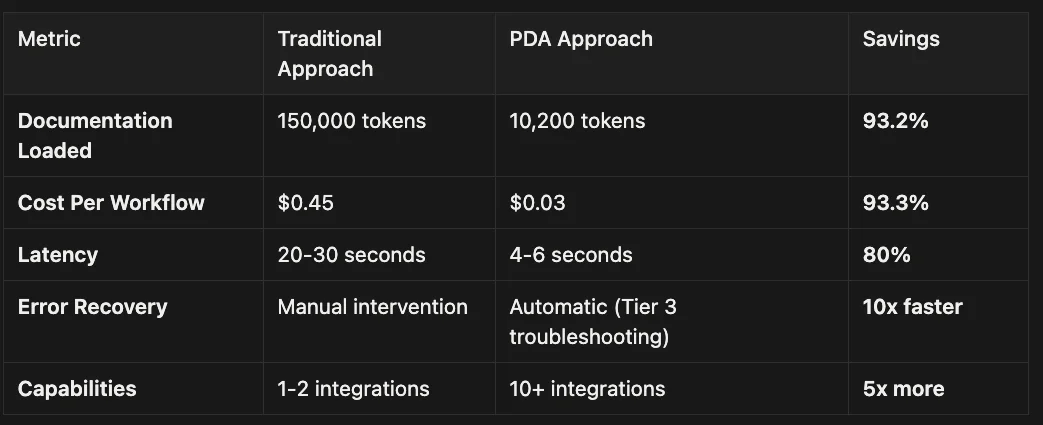
Progressive Disclosure skills handle this by encoding procedural knowledge instead of function signatures.
Also note that you can describe a process step by step and let the LLM do it, but that uses a lot of tokens, if there is a lot of steps in a process, but they are repeatable just create a script and then only have the LLM take over if the script fails.
Section 6: Security and Governance
Security: The Two-Layer Defense Model
Productivity skills require elevated privileges (API access, script execution). PDA includes a two-layer security model:
Layer 1: Declarative (Skill-Level Intent)
The SKILL.md frontmatter includes an allowed-tools field:
name: "notion-uploader"
description: "Uploads documents to Notion workspace"
allowed-tools:
  - "Bash(git:*)"           # Only git commands allowed
  - "Python"                 # Python execution permitted
  - "FileSystem(read:/docs)" # Read access to /docs only
This declarative restriction prevents the skill from being abused via prompt injection. Even if a malicious prompt tries to trick Claude into executing rm -rf /, the skill's allowed-tools constraint blocks it.
Best Practice: Be as specific as possible. Instead of Bash, use Bash(git status:*) to allow only specific commands.
Layer 2: Imperative (Runtime Sandbox)
All skill execution happens inside a sandboxed container environment with hard kernel-level restrictions:
- Read-only filesystem (except /tmp and designated workspaces)
- Network allowlist (only approved endpoints reachable)
- Command blocklist (dangerous commands like rm -rf, curl, wget blocked)
- Resource limits (CPU, memory, execution time capped)
Layer 3: Audit Trail
Every skill invocation is logged:
- Which skill was activated
- What resources were accessed (Tier 3 files, scripts)
- What tools were used (Bash commands, Python scripts)
- What external APIs were called
This provides compliance-grade auditability for regulated industries.
Governance: CI/CD for Skills
The /v1/skills API endpoint enables programmatic skill management, supporting a full "CI/CD for Skills" workflow:
Development Workflow:
- Create Skill (Git repository)
my-custom-skill/
├── SKILL.md
├── scripts/
└── references/
- Version Control (Git tags)
# In SKILL.md frontmatter
version: "1.2.0"
git tag v1.2.0
git push --tags
- CI Pipeline (Automated validation)
# .github/workflows/validate-skill.yml
- name: Validate SKILL.md
  run: skill-validator SKILL.md
API Key Management Patterns
Productivity skills often need API credentials. Here are the recommended patterns:
Pattern 1: Environment Variables
import os
token = os.environ.get('NOTION_API_KEY')
Pattern 2: Secure Credential Store
# Store credentials in ~/.config/notion/auth.json
with open(os.path.expanduser('~/.config/notion/auth.json'), 'w') as f:
    json.dump({'token': token, 'expires': expires_at}, f)
Pattern 3: External MCP Servers
# Integrate with Model Context Protocol server for persistent storage
mcp-server: "notion-state-manager"
Pattern 4: User Confirmation
## Instructions
1. Ask user for API key if not in environment
2. Store in secure location for session duration
3. Clear on session end
The Notion skill uses Pattern 1 (environment variables) for security and Pattern 4 (user confirmation) for UX.
Real-World Impact: Case Study
Company: FinCompliance Corp (financial services compliance documentation) Challenge: Automate compliance document workflows across multiple systems
Before PDA:
- Built custom integration scripts for Confluence/Jira
- Each script required separate maintenance
- No reusability across different compliance tasks
- Context consumption: ~200K tokens for all integrations
- Cost: $0.60 per workflow execution
After PDA:
- Created 5 reusable productivity skills (Confluence, Jira, SharePoint, Notion, GitHub)
- Skills compose for complex workflows ("Extract Jira tickets to Generate report to Upload to SharePoint")
- Average context consumption: 15K-25K tokens per workflow
- Cost: $0.045-$0.075 per workflow execution (87.5% reduction)
- Development time: 2–3 days per new skill
ROI Metrics:
- Token Efficiency: 87.5% reduction in context usage
- Cost Savings: $0.525 per workflow x 5,000 workflows/month = $2,625/month saved
- Capability Expansion: Enabled 8x more concurrent capabilities
- Development Velocity: 5x faster time-to-market for new integrations
Section 7: Enterprise Implications and Future Directions
As of November 2025, Claude Skills are in feature preview across Pro, Max, Team, and Enterprise plans. They're available on Claude's web interface, Claude Code, their Agent framework and API. But what does production readiness actually look like?
You can also use skills with OpenCode which is an open source competitor to Claude Code that works with 75 different LLMs and allows you to log into your Pro or Max plan as well as allows you to login into your Github CoPilot account, plus many, many others. I installed Claude Skills in about 30 seconds with skilz.
Additional Case Studies
Case Study 2: Healthcare Documentation:
Company: MedRecords Solutions (healthcare documentation)
Challenge: Generate HIPAA-compliant patient documentation from clinical notes
Skills Deployed:
- clinical-note-parser (extract structured data from free-text notes)
- hipaa-compliance-checker (validate PHI handling)
- ehr-formatter (format for Epic/Cerner integration)
Results:
- Token Efficiency: 82% reduction (loads only relevant compliance rules)
- Processing Speed: 3 minutes vs. 45 minutes manual review
- Compliance Rate: 99.7% (vs. 94% with manual process)
- Annual Savings: $180K in documentation labor + avoided compliance violations
Case Study 3: DevOps Infrastructure Automation:
Company: CloudScale Inc. (SaaS infrastructure provider)
Challenge: Automate Terraform deployments with multi-stage approval and cost controls
Skills Deployed:
- terraform-planner (generate and validate plans)
- cost-estimator (predict infrastructure costs)
- approval-workflow (human-in-the-loop gates)
Results:
- Token Efficiency: 75% reduction in context usage (loads only relevant Terraform modules)
- Deployment Speed: 15 minutes vs. 2 hours manual process
- Cost Visibility: Prevented $180K in unplanned infrastructure spend
- Error Reduction: 95% fewer deployment failures
- Annual ROI: $540K saved in infrastructure costs + $320K in engineer time
Case Study 4: Legal Contract Review:
Company: Morrison and Associates (corporate law firm)
Challenge: Review contracts for compliance with firm-specific guidelines and client requirements
Skills Deployed:
- contract-analyzer (extract clauses and obligations)
- firm-policies (encode law firm's standard positions)
- client-requirements (client-specific compliance rules)
Current Limitations & Mitigations
Ecosystem Maturity
- Description: Not all integrations available as pre-built skills yet
- Mitigation Strategy: Build custom skills (relatively easy with SKILL.md format); contribute to community repo
- Impact: Low (easy to extend)
Admin Distribution
- Description: No centralized org-wide skill deployment (yet)
- Mitigation Strategy: Use /v1/skills API for programmatic distribution; planned for future updates
- Impact: Medium (manual workaround)
Section 8: Conclusion — A New Paradigm for AI Knowledge
Progressive Disclosure Architecture isn't just an optimization technique — it's a fundamental reimagining of how AI agents access and use knowledge.
The Key Insights
1. Context Windows Are a Precious Resource
The naive "documentation dump" approach fails at scale. Loading 120K-300K tokens upfront creates:
- Catastrophic performance degradation (15–25 second latency)
- Unsustainable costs ($0.50-$1.50 per request)
- Inability to add new capabilities (hitting limits with 3–5 tools)
PDA's three-tier architecture solves this by loading knowledge just-in-time, achieving 85–95% token reduction while maintaining capability.
2. Declarative Knowledge Complements Imperative Tools
MCP Tools (function calls) and Skills (procedural knowledge) serve different purposes:
- Tools: Atomic operations, stateless, explicit invocation
- Skills: Complex workflows, stateful reasoning, contextual activation
The most powerful AI systems use both — Skills orchestrate tools.
3. AI Agents Are Intelligent Learners
Traditional software treats computation as mechanical: input → function → output.
PDA treats AI agents as intelligent entities that can:
- Reason about which knowledge to load
- Follow complex, conditional procedures
- Learn from documentation like humans learn from runbooks and training guides
Skills treat AI agents the same way — as intelligent entities capable of learning from documentation, not just executing predefined functions.
What's Next
As of November 2025, Claude Skills are in feature preview with active development:
Near-term (2025–2026):
- Centralized admin distribution for organizations
- Expanded pre-built skill library (50+ community skills)
- Enhanced MCP integration for hybrid architectures
- Improved debugging tools for skill development
- Performance optimizations (faster Tier 2 loading)
Long-term Vision:
- Skills as standard for organizational knowledge encoding
- "Skill marketplaces" for buying/selling specialized capabilities
- Cross-platform skill portability (if standards emerge)
- AI agents that compose skills dynamically for novel tasks
- Integration with enterprise knowledge graphs
Call to Action
If you're building AI agents for production:
- Explore the Ecosystem - Check out the Anthropic Skills repository
- Start Small - Build one skill for your most common workflow
- Measure Impact - Track token usage before/after PDA implementation
- Share Learnings - Contribute to the community skill library
And, remember now it is not just Claude Code but also Codex, Github Copilot and OpenCode have all announced support for Agentic Skills. There is even a marketplace for agentic skills that support Gemini, Aidr, Qwen Code, Kimi K2 Code, Cursor (14+ and counting) and more with Agentic Skill Support via a universal installer.
About the Author
Rick Hightower is a technology leader with extensive experience building AI-powered systems. He is the co-founder of the world's largest agentic skill marketplace and co-wrote the skilz universal skill installer that works with Gemini, Claude Code, Codex, OpenCode, Github Copilot CLI, Cursor, Aidr, Qwen Code, Kimi Code and about 14 other coding agents.
His professional credentials include TensorFlow certification and completion of Stanford's Machine Learning Specialization program, both of which have significantly contributed to his expertise in this field. He values the integration of academic knowledge with practical implementation. His professional experience encompasses work with supervised learning methodologies, neural network architectures, and various AI technologies, which he has applied to develop enterprise-grade solutions that deliver measurable business value.
Connect with Richard on LinkedIn or Medium for additional insights on enterprise AI implementation.
Glossary of Terms
| Term | Definition |
|---|---|
| Claude Code Hooks | Scripts that run before or after Claude executes commands, allowing for customized behavior like logging, validation, or transformations |
| Slash Commands | Custom commands in Claude Code that begin with a forward slash (/) and trigger predefined scripts or actions |
| Audit System | A logging framework that records all actions and commands for accountability, compliance, and debugging purposes |
| SOX (Sarbanes-Oxley) | A U.S. law that sets requirements for public company boards, management, and accounting firms regarding financial record-keeping and reporting |
| SOC2 (Service Organization Control 2) | A compliance framework for service organizations that specifies how they should manage customer data based on security, availability, processing integrity, confidentiality |
| Progressive Disclosure Architecture (PDA) | A three-tier loading system that loads AI knowledge on-demand to minimize context window usage |
| Context Window | The AI's short-term memory; the total amount of text it can process in a single session |
| MCP (Model Context Protocol) | A protocol for AI tools that enables function calls to external services |
Discover AI Agent Skills
Browse our marketplace of 41,000+ Claude Code skills, agents, and tools. Find the perfect skill for your workflow or submit your own.