
From 'Vibe Coding' to Spec-Driven Development: Master GitHub Spec Kit in 2025

From 'Vibe Coding' to Spec-Driven Development: Master GitHub Spec Kit in 2025
Transform AI coding assistants from unreliable guessing tools into precise pair programmers through structured specifications
I. Introduction: The Vibe Coding Problem
You know the feeling. You ask your AI coding assistant for a feature. Beautiful code flows onto your screen. Then you try to run it.
Compilation errors. Unhandled edge cases. Architectural mismatches with your existing codebase. Sometimes the code doesn't even address your actual request.
This frustrating pattern has earned a name: vibe coding. You give the AI a vague idea and hope it guesses correctly. Spoiler alert: it usually doesn't.
What is "Vibe Coding"?
Vibe coding describes the all-too-common practice of giving AI assistants imprecise, informal prompts and hoping the generated code matches your actual requirements. It's characterized by:
- Vague prompts that lack essential context
- Missing constraints, edge cases, and non-functional requirements
- No systematic feedback loop for AI improvement
- Iterative trial-and-error that accumulates technical debt
- Context window management nightmares as conversations grow
The results are predictable: inconsistent quality, missed deadlines, and code that requires extensive rework.
The Human Cost
Beyond the technical frustrations, vibe coding imposes real human costs:
- Developers spend hours debugging AI-generated code instead of building features
- Teams lose trust in AI tools after repeated failures
- Technical leads struggle to enforce standards when AI "goes rogue"
- Projects accumulate technical debt from quick fixes to AI mistakes
If this resonates, you're not alone. The solution isn't abandoning AI - it's changing how we communicate with it.
What is Spec-Driven Development (SDD)?
Spec-Driven Development is a structured methodology designed to transform AI coding assistants from unpredictable guessing tools into reliable, deterministic pair programmers. By establishing clear contracts - what the software should do - before generating any implementation, SDD eliminates the guesswork that causes most AI coding failures.
The core insight: AI models are excellent at executing well-defined tasks but poor at inferring implicit requirements. SDD provides the explicit structure AI needs to succeed.
The "What" vs. "How" Separation
SDD enforces a critical separation between two phases:
The "What" (Specification Phase)
- User stories, acceptance criteria, and non-functional requirements
- Business rules and constraints
- Success metrics and validation criteria
- Explicitly excludes technical implementation details
The "How" (Planning and Implementation Phases)
- Technical architecture and design patterns
- Technology stack and frameworks
- Component breakdown and data models
- API contracts and database schemas
- Guided by the "what" and bound by project governance rules
This separation ensures business requirements remain stable while implementation evolves. A single specification can spawn multiple implementation plans. When requirements change, you update the spec, and the AI regenerates the plan and implementation with predictable outcomes.
The Paradigm Shift: From Coder to Architect
Traditional development positions the programmer as the primary creator of code. SDD fundamentally shifts this role:
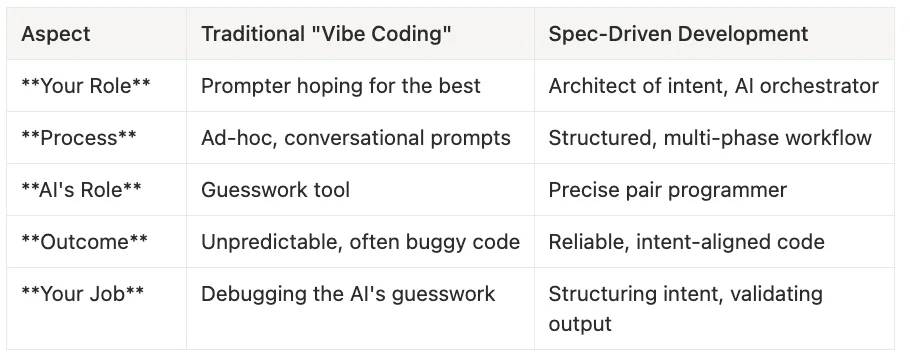
Side-by-Side Comparison
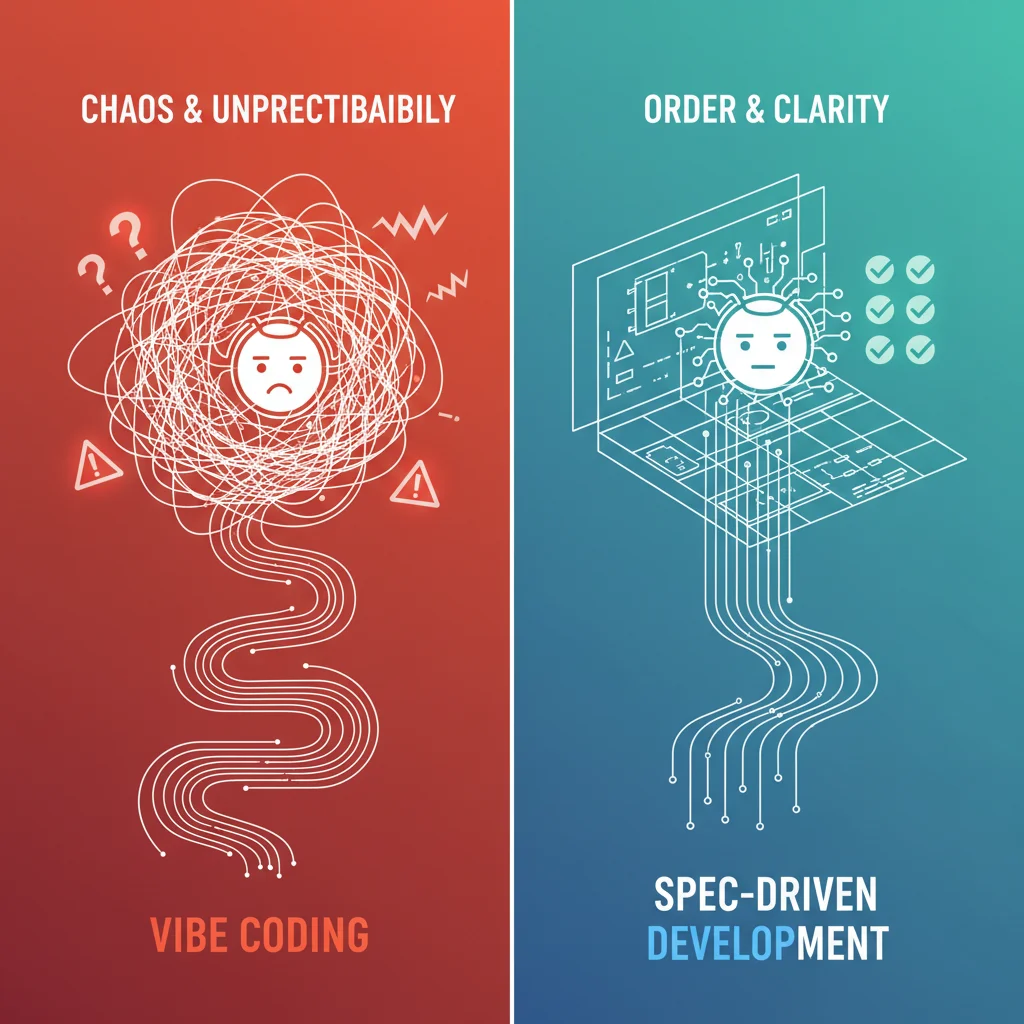
Your Role:
- Traditional "Vibe Coding": Prompter hoping for the best
- Spec-Driven Development: Architect of intent, AI orchestrator
Process:
- Traditional "Vibe Coding": Ad-hoc prompts -> iterative fixes
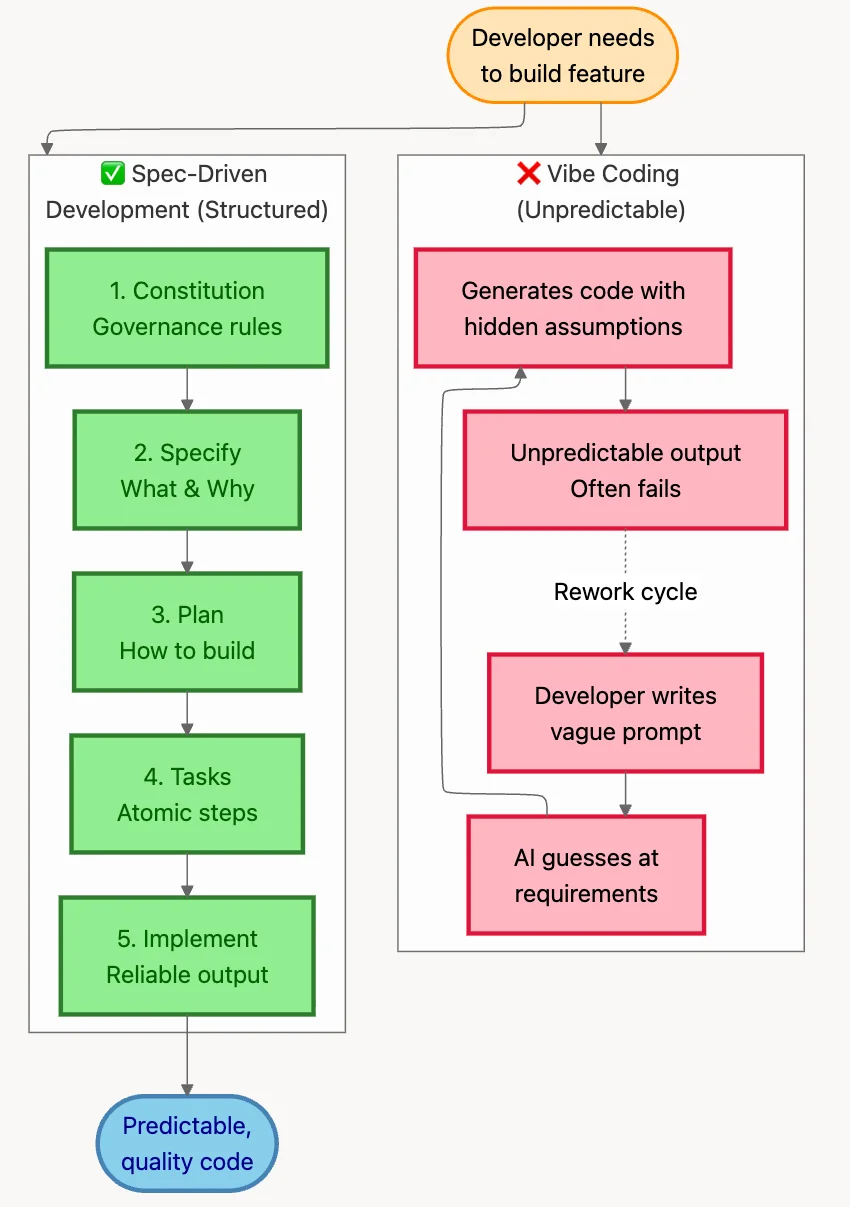
- Spec-Driven Development: Constitution -> Spec -> Plan -> Tasks -> Implementation
Reproducibility:
- Traditional "Vibe Coding": Low (depends on prompt phrasing, mood, context)
- Spec-Driven Development: High (same spec = same output)
Quality Control:
- Traditional "Vibe Coding": Post-hoc debugging
- Spec-Driven Development: Pre-defined validation at each phase
The Cumulative Quality Problem
A crucial insight that SDD addresses: without systematic validation, errors compound exponentially across AI-generated phases. Consider this cascade:
- AI generates a constitution with 10% error (misinterprets a project goal)
- Spec inherits that error + adds 10% more (missed edge case)
- Plan compounds errors further (wrong architecture choice)
- Tasks reflect flawed plan (incorrect dependencies)
- Implementation builds on faulty foundation
By the time you reach code, you might be working from a fundamentally incorrect understanding of the requirements. SDD's phased validation catches these errors early.
II. GitHub Spec Kit: Anatomy of an SDD Framework
GitHub Spec Kit (officially github/spec-kit) is an open-source implementation of SDD principles, released in late 2024 and actively developed throughout 2025.
Current Status (as of 2025)
- Version: 0.0.77 (experimental, pre-1.0)
- Maintainer: GitHub, Inc.
- License: MIT
- Active Development: 390+ open issues, rapidly evolving
Key Design Principles:
- Tool-Agnostic: Works with Copilot, Claude Code, Gemini CLI, Cursor, and more
- Open-Source: No vendor lock-in, extensible and customizable (MIT license)
- Markdown-Based: Specifications are simple, version-controlled .md files
- Git-Integrated: Designed to work seamlessly with your existing version control workflow
Architecture and Components
Spec Kit comprises several key elements working together:
- specify-cli Tool
A Python-based command-line tool that bootstraps projects by:
- Scaffolding the SDD directory structure
- Downloading templates from the github/spec-kit repository
- Initializing AI agent integration
- Verifying your development environment
- Core Templates
Markdown templates defining structure for each phase:
- spec-template.md - User stories and requirements
- plan-template.md - Technical architecture blueprint
- constitution-template.md - Project governance and constraints
- tasks-template.md - Atomic implementation units
- Slash Commands
AI-agent interface commands for workflow execution:
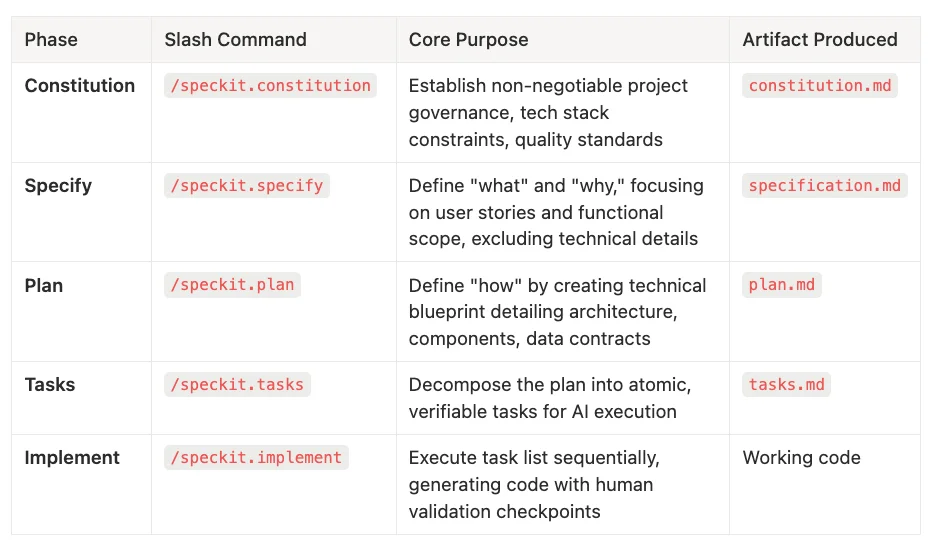
- /speckit.constitution - Create or update project constitution
- /speckit.specify - Generate specifications from requirements
- /speckit.plan - Create technical implementation plans
- /speckit.tasks - Break plans into atomic, executable tasks
- /speckit.implement - Execute tasks and generate code
- Directory Structure
A standardized project layout:
.specify/
├── constitution.md      # Project governance
├── specifications/
│   └── feature-name/
│       ├── spec.md      # Feature specification
│       ├── plan.md      # Technical plan
│       └── tasks.md     # Implementation tasks
└── templates/           # Customizable templates
The SDD Workflow: Five Phases
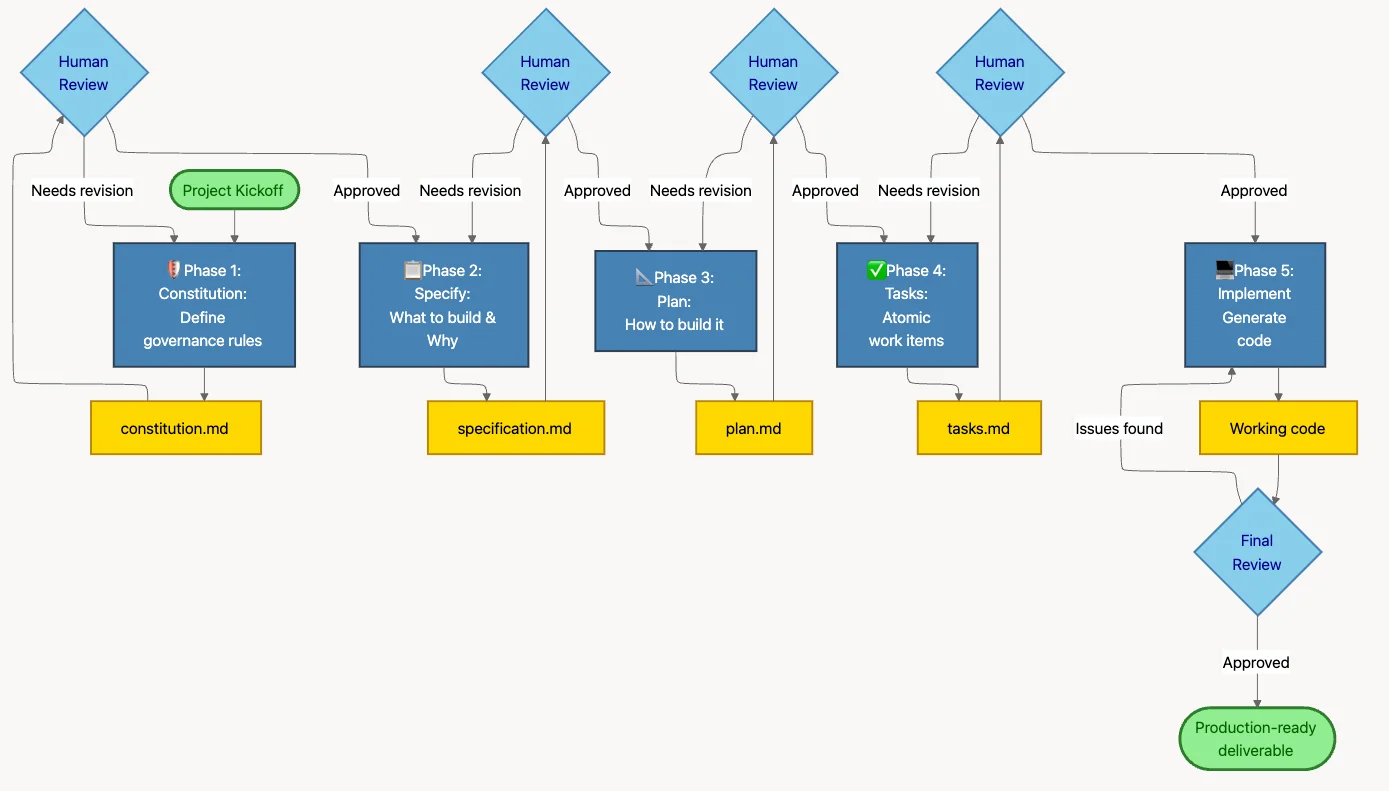
The core Spec Kit workflow follows five sequential phases:
Phase 1: Constitution - Establishes project-wide rules, constraints, and standards. Think of it as a "project DNA" that guides all subsequent decisions.
Phase 2: Specification - Defines what a feature should do in business terms, without prescribing how. Contains user stories, acceptance criteria, and non-functional requirements.
Phase 3: Plan - Creates a technical blueprint for implementing the specification. Includes architecture decisions, technology choices, and component designs.
Phase 4: Tasks - Breaks the plan into small, atomic, independently executable units. Each task should be completable in a single AI session.
Phase 5: Implementation - Executes tasks sequentially, generating code that adheres to the constitution, fulfills the specification, and follows the plan.
III. Stage 1: Your First SDD Project (Beginner)
Let's walk through creating a simple project using the full SDD workflow. We'll build a photo album web application to demonstrate each phase.
Prerequisites
Before starting, ensure you have:
- Python 3.10+ installed
- An AI coding assistant (Copilot, Claude Code, Cursor, etc.)
- Git for version control
- A terminal/command line environment
Step 1: Install Spec Kit
pip install specify-cli
Verify installation:
specify --version
Step 2: Initialize Your Project
Create a new project directory and initialize Spec Kit:
mkdir photo-album-app
cd photo-album-app
specify init
This creates the .specify/ directory structure with default templates.
Step 3: Create Your Constitution
The constitution establishes project-wide rules. Use the /speckit.constitution command:
/speckit.constitution
Create a constitution for a photo album web application focused on code quality, testing standards, user experience consistency, and performance requirements.
Example Output:
# Photo Album App - Project Constitution

## Project Principles

### Code Quality
1. **Modular Architecture:** Separate concerns (UI, data, storage)
2. **Functional Programming:** Prefer pure functions, minimize side effects
3. **Explicit Error Handling:** All errors must be caught and handled gracefully
4. **Documentation:** All functions must have JSDoc comments

### Security & Privacy
1. **Local-First:** No cloud uploads, all data stored locally
2. **Input Sanitization:** All user inputs must be sanitized
3. **Path Validation:** File paths must be validated to prevent directory traversal
4. **No External CDNs:** All assets must be bundled locally

### User Experience
1. **Responsive Design:** Must work on desktop and tablet (mobile optional)
2. **Fast Load Times:** Tile previews must render in < 200ms
3. **Intuitive Drag-and-Drop:** Visual feedback during drag operations
4. **Accessible:** Keyboard navigation must be supported

### Technology Stack
1. **Build Tool:** Vite (latest stable version)
2. **Frontend:** Vanilla JavaScript (no frameworks for v1)
3. **Database:** SQLite via sql.js (WebAssembly)
4. **Styling:** CSS with CSS Variables for theming
Your Validation: Review the constitution and ensure it captures your project's core values and constraints. Modify as needed before proceeding.
Step 4: Create Your Specification
With the constitution in place, specify your feature:
/speckit.specify
Build an app for organizing photos into date-grouped albums with drag-and-drop reordering. No nested albums; tile previews displayed within albums.
The AI generates a specification document that includes:
- User stories with acceptance criteria
- Non-functional requirements (performance, accessibility)
- Edge cases and error scenarios
- Success metrics
Your Validation: Ensure all requirements are captured. Add missing edge cases. Clarify ambiguous acceptance criteria.
Step 5: Generate Your Plan
/speckit.plan
Use Vite, vanilla JS/HTML/CSS, and local SQLite for metadata. No cloud uploads. Implement drag-and-drop using HTML5 APIs.
Example Output:
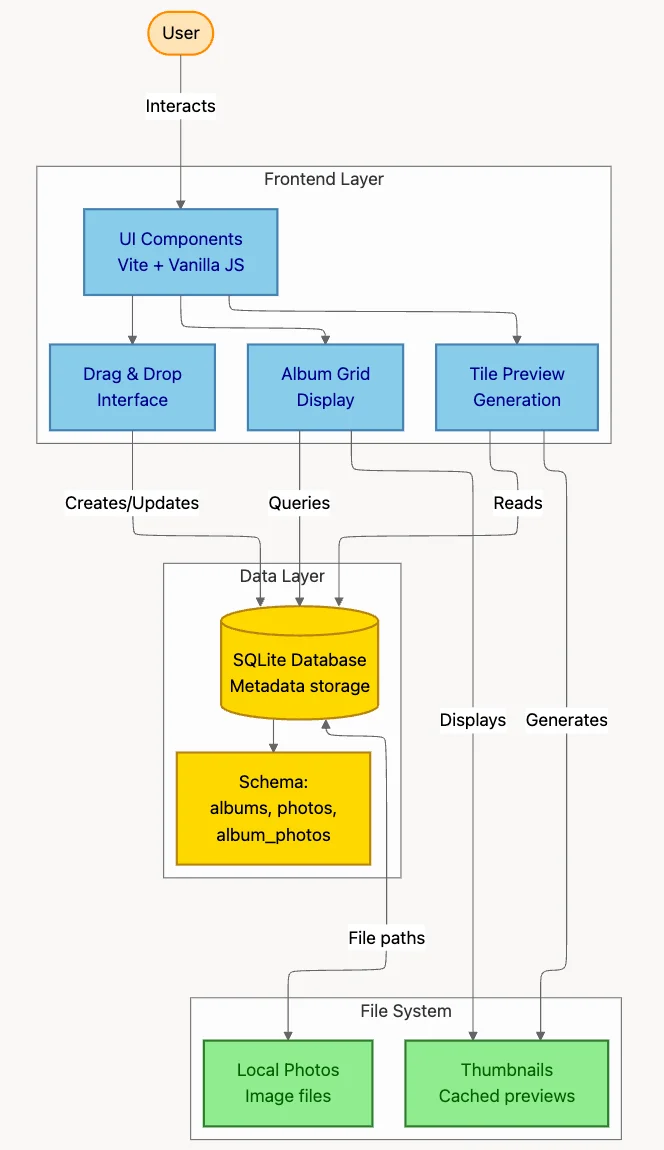
# Photo Album App - Technical Plan
## Architecture Overview
```mermaid
graph TB
subgraph Frontend["Frontend Layer"]
UI[UI Components<br/>Vite + Vanilla JS]
DND[Drag & Drop<br/>Interface]
Preview[Tile Preview<br/>Generation]
Grid[Album Grid<br/>Display]
end
subgraph DataLayer["Data Layer"]
SQLite[(SQLite Database<br/>Metadata storage)]
Schema[Schema:<br/>albums, photos,<br/>album_photos]
end
subgraph Storage["File System"]
Photos[Local Photos<br/>Image files]
Thumbs[Thumbnails<br/>Cached previews]
end
User([User]) -->|Interacts| UI
UI --> DND
UI --> Preview
UI --> Grid
DND -->|Creates/Updates| SQLite
Grid -->|Queries| SQLite
Preview -->|Reads| SQLite
SQLite --> Schema
SQLite <-->|File paths| Photos
Preview -->|Generates| Thumbs
Grid -->|Displays| Thumbs
Technology Stack
- Build Tool: Vite 5.x (fast HMR, optimized bundling)
- Runtime: Vanilla JavaScript (ES2022), no frameworks
- Database: sql.js (SQLite compiled to WebAssembly for browser)
- File System: File System Access API for local file management
- Drag-and-Drop: HTML5 Drag and Drop API
- Image Processing: Canvas API for thumbnail generation
Data Model
SQLite Schema
-- Albums table
CREATE TABLE albums (
  id INTEGER PRIMARY KEY AUTOINCREMENT,
  name TEXT NOT NULL,
  created_at DATETIME DEFAULT CURRENT_TIMESTAMP,
  photo_count INTEGER DEFAULT 0
);

-- Photos table
CREATE TABLE photos (
  id INTEGER PRIMARY KEY AUTOINCREMENT,
  filename TEXT NOT NULL,
  filepath TEXT NOT NULL,
  capture_date DATETIME,
  import_date DATETIME DEFAULT CURRENT_TIMESTAMP,
  album_id INTEGER REFERENCES albums(id)
);
Your Validation: Verify technology choices align with constitution. Check that the architecture supports all specified requirements.

## IV. Stage 2: Complete Workflow Walkthrough (Intermediate)

Now let's complete the workflow with tasks and implementation.

## Step 6: Generate Tasks
/speckit.tasks
Example Output:

```markdown
# Photo Album App - Implementation Tasks

## Database Setup
- [ ] Task 1: Initialize sql.js and IndexedDB persistence
- [ ] Task 2: Create SQLite schema (albums and photos tables)
- [ ] Task 3: Create database indexes for performance
- [ ] Task 4: Implement database wrapper functions (connect, query, close)

## Album Management
- [ ] Task 5: Implement `createAlbum(name)` function
- [ ] Task 6: Implement `getAlbums()` with date sorting
- [ ] Task 7: Implement `deleteAlbum(id)` with cascade logic
- [ ] Task 8: Implement `renameAlbum(id, newName)`

## Photo Import
- [ ] Task 9: Add file input UI element with accept filter
- [ ] Task 10: Implement file selection handler
- [ ] Task 11: Extract EXIF capture date from photo files
- [ ] Task 12: Determine target album based on capture date
- [ ] Task 13: Generate thumbnail using Canvas API
- [ ] Task 14: Store photo metadata in database
- [ ] Task 15: Display import progress indicator

## Drag-and-Drop
- [ ] Task 16: Add draggable attribute to photo tiles
- [ ] Task 17: Implement dragstart/dragend handlers
- [ ] Task 18: Implement dragover/drop handlers for albums
- [ ] Task 19: Update database on successful drop
- [ ] Task 20: Add visual feedback during drag operations

## UI Components
- [ ] Task 21: Create album grid component
- [ ] Task 22: Create photo tile component
- [ ] Task 23: Create album detail view
- [ ] Task 24: Implement responsive CSS grid layout
- [ ] Task 25: Add keyboard navigation support
Your Validation: Ensure tasks are atomic (completable in one session), ordered correctly (dependencies respected), and comprehensive (no missing steps).
Step 7: Implement Tasks
Execute implementation one task at a time:
/speckit.implement
The AI will work through tasks sequentially. For Task 2, you might see:
Sample Generated Code (Task 2: Create SQLite Schema):
// src/db.js
import initSqlJs from 'sql.js';

let db = null;

export async function initDatabase() {
  const SQL = await initSqlJs({
    locateFile: file => `https://sql.js.org/dist/${file}`
  });

  db = new SQL.Database();

  // Create albums table
  db.run(`
    CREATE TABLE IF NOT EXISTS albums (
      id INTEGER PRIMARY KEY AUTOINCREMENT,
      name TEXT NOT NULL,
      created_at DATETIME DEFAULT CURRENT_TIMESTAMP,
      photo_count INTEGER DEFAULT 0
    )
  `);

  // Create photos table
  db.run(`
    CREATE TABLE IF NOT EXISTS photos (
      id INTEGER PRIMARY KEY AUTOINCREMENT,
      filename TEXT NOT NULL,
      filepath TEXT NOT NULL,
      capture_date DATETIME,
      import_date DATETIME DEFAULT CURRENT_TIMESTAMP,
      album_id INTEGER REFERENCES albums(id)
    )
  `);

  return db;
}

export function getDatabase() {
  if (!db) throw new Error('Database not initialized');
  return db;
}
Your Validation:
Code compiles without errors
Follows constitution guidelines (modular, documented)
Implements the task requirement completely
Edge cases handled
Error handling for uninitialized database
Foreign key constraint implemented
Missing: IndexedDB persistence (would be added in a subsequent task)
This iterative, test-as-you-go process is far more manageable than reviewing thousands of lines at once.
The Critical Math: Why Human Validation Matters
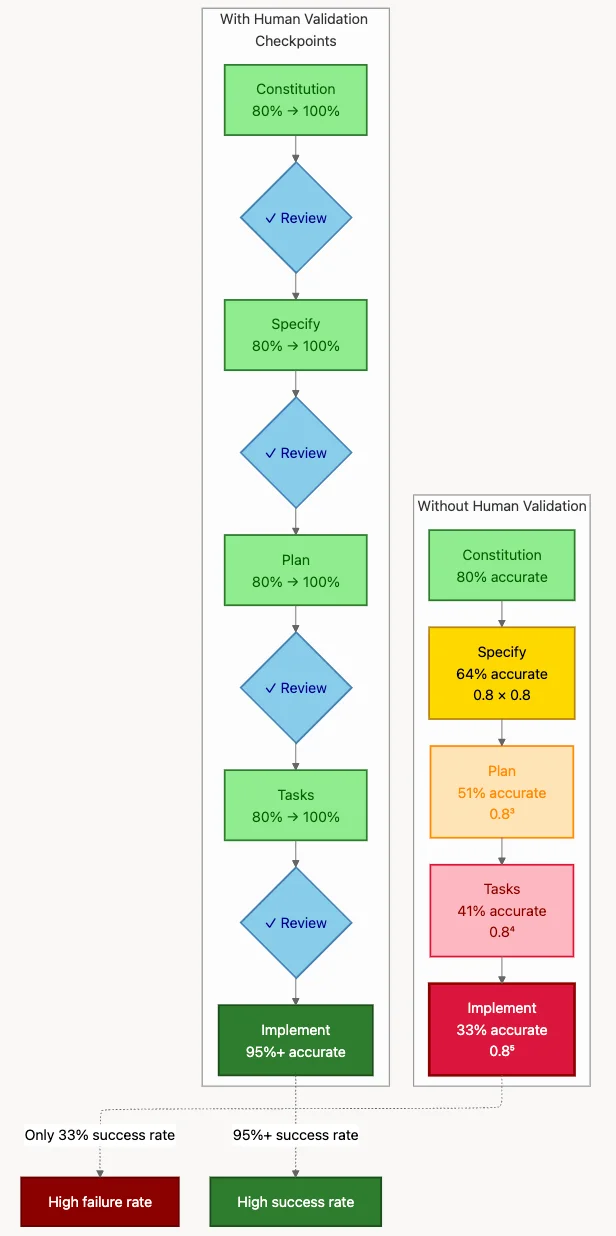
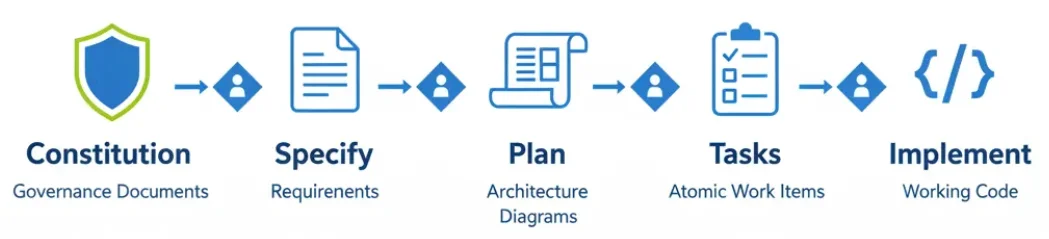
Remember the cumulative quality problem mentioned earlier? Here's the visualization:
This diagram powerfully illustrates the cumulative quality problem. Even if the AI is 80% accurate at each phase (quite good!), errors multiply without human intervention:
- Constitution: 80% accurate
- Specification: 0.8 x 0.8 = 64% accurate
- Plan: 0.8^3 = 51% accurate
- Tasks: 0.8^4 = 41% accurate
- Implementation: 0.8^5 = 33% accurate
Human validation checkpoints (blue diamonds in the bottom row) prevent this degradation, correcting the 20% error margin at each stage before it compounds.
This is why SDD is not a push-button automation solution - it's a methodology for managing error cascades through disciplined human oversight.
What We've Learned (Stage 2)
This complete workflow demonstrated five critical insights:
- Phased Progression: Each phase builds on validated prior work
- Cumulative Context: AI has access to constitution, spec, and plan during implementation
- Human-in-the-Loop: Validation at every checkpoint prevents quality degradation
- Atomic Tasks: Breaking work into small pieces makes validation manageable
- Role Transformation: Developer shifts from coder to architect/orchestrator
You now have a working photo album application generated through structured AI collaboration. But real-world adoption involves challenges beyond technical implementation.
VI. Stage 3: Advanced Patterns & Real-World Challenges
You've mastered the basic and intermediate workflows. Now let's tackle complex scenarios, organizational challenges, and strategic decisions for real-world adoption.
The "Brownfield Gap": SDD's Most Critical Limitation
While Spec Kit excels with greenfield projects (new codebases starting from scratch), it faces significant challenges with brownfield development - working on existing, complex codebases. This limitation, extensively documented in real-world usage reports, is the framework's most critical weakness.
What is the Brownfield Gap?
The brownfield gap refers to SDD's difficulty understanding and working with existing codebases that have:
- Complex, undocumented architecture
- Years of accumulated technical debt
- Implicit conventions and patterns
- Extensive interconnected dependencies
- Legacy code without clear specifications
Real-World Experience: GitHub Issue #75
A detailed user report illustrates the challenge vividly:
Real World Comment:
"For proper incremental work on an existing codebase, Spec Kit only complicates the work. The AI agent completely loses the essence of the work, ignores the existing project structure, attempts to create new modules, misunderstands the import system, and gets lost. These are all symptoms of AI agents working without proper context of your existing codebase."
This isn't a bug - it's a fundamental limitation of current AI capabilities. LLMs struggle with:
- Codebase archaeology: Understanding why code is structured a certain way
- Implicit knowledge: Conventions that "everyone knows" but aren't documented
- Dependency graphs: Tracing how changes ripple through interconnected systems
- Legacy constraints: Technical debt that limits what solutions are viable
Mitigation Strategies
While there's no perfect solution, several strategies can help:
- Greenfield within Brownfield: Extract new features as isolated modules with clean interfaces
- Specification Archaeology: Create specs for existing code before modifying it
- Constitution Enhancement: Encode existing patterns and conventions in the constitution
- Bounded Context: Use SDD for new bounded contexts, traditional development for modifications
- Incremental Documentation: As you work, document implicit knowledge for future AI sessions
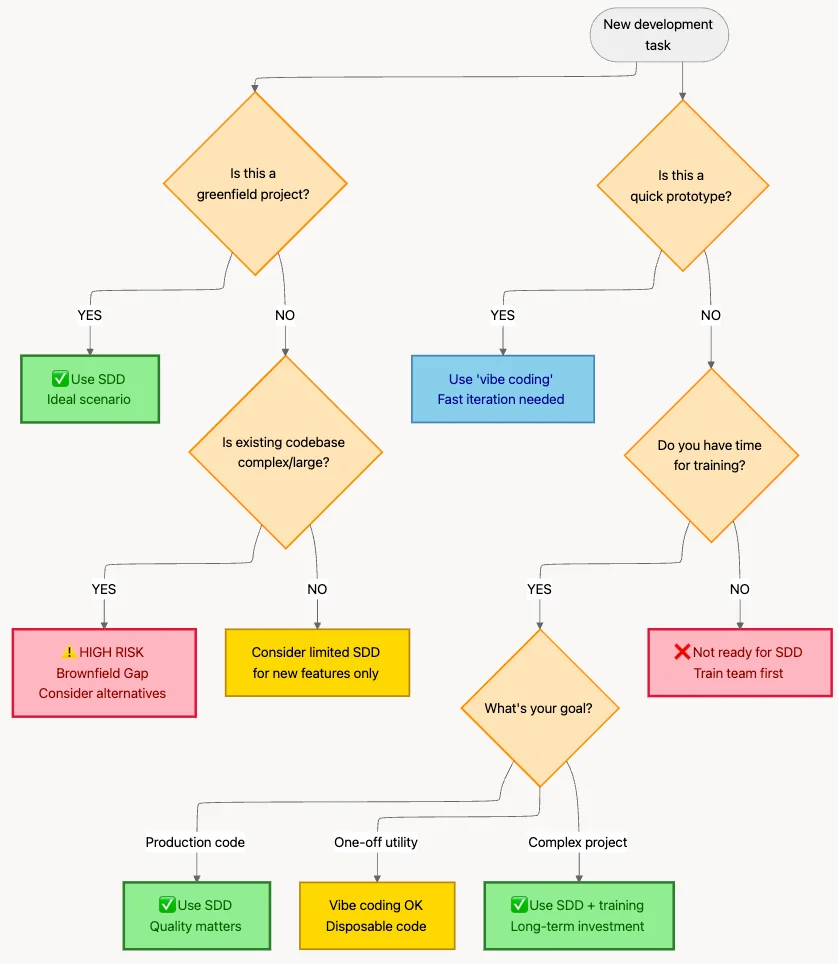
When to Use SDD (Decision Framework)
# Team SDD Guidelines

## Default Approach by Context

| Code Type | Primary Method | Spec Detail Level |
|-----------|----------------|-------------------|
| Core Business Logic | SDD (full workflow) | Comprehensive |
| API Endpoints (new) | SDD (plan + tasks) | Moderate |
| UI Components (new) | SDD (spec + light plan) | Basic |
| Bug Fixes | Vibe coding | None |
| Prototypes | Vibe coding | None |
| Refactoring | Manual or Vibe coding | None (high brownfield risk) |

## Decision Framework
1. **Will this code be maintained for >6 months?** -> SDD
2. **Do multiple people need to understand it?** -> SDD
3. **Is it greenfield?** -> SDD
4. **Is it a prototype or throwaway?** -> Vibe coding
5. **Is it modifying complex existing code?** -> Manual (brownfield risk)
Multi-Feature Projects
For larger projects with multiple features, organize your .specify/ directory hierarchically:
project/
├── constitution.md (single, project-wide)
├── features/
│   ├── user-auth/
│   │   ├── specification.md
│   │   ├── plan.md
│   │   └── tasks.md
│   ├── photo-upload/
│   │   ├── specification.md
│   │   ├── plan.md
│   │   └── tasks.md
│   └── search/
│       ├── specification.md
│       ├── plan.md
│       └── tasks.md
└── shared/
    ├── data-models.md
    └── api-contracts.md
Key Patterns:
- One constitution governs the entire project
- Each feature has its own spec/plan/tasks
- Shared artifacts (data models, API contracts) live in a common directory
- Features can reference shared artifacts
Git Integration Pattern
# Create feature branch with spec
git checkout -b feature/user-auth
specify init --feature user-auth

# Work through SDD workflow
# /speckit.specify, /speckit.plan, etc.

# Commit artifacts at each phase
git add features/user-auth/specification.md
git commit -m "spec: user authentication requirements"

git add features/user-auth/plan.md
git commit -m "plan: user authentication architecture"

# Implement and create PR
# PR includes spec, plan, tasks, and code for review
Benefits:
- Specifications are code-reviewed alongside implementation
- Historical record of requirements and design decisions
- Easy to trace why code exists (link commits to specs)
Team Adoption: Collaborative Constitution
For large teams, the constitution becomes a collaborative governance document:
# Project Constitution (organization-wide)
- Security: OWASP Top 10 compliance mandatory
- Testing: 80%+ coverage required
- Documentation: All public APIs must have docs

# Team Constitution (team-specific)
- Tech Stack: React 18+, TypeScript 5+, Tailwind CSS
- State Management: Zustand (not Redux)
- API Style: REST (not GraphQL for v1)

# Feature Constitution (feature-specific overrides)
- Photo Upload: WebAssembly for image processing
- Search: Elasticsearch required (exception to REST-only)
This hierarchy allows:
- Organization-wide standards
- Team autonomy within guardrails
- Feature-specific exceptions when justified
Enterprise Adoption Playbook
For organizations considering SDD adoption, here's a structured approach:
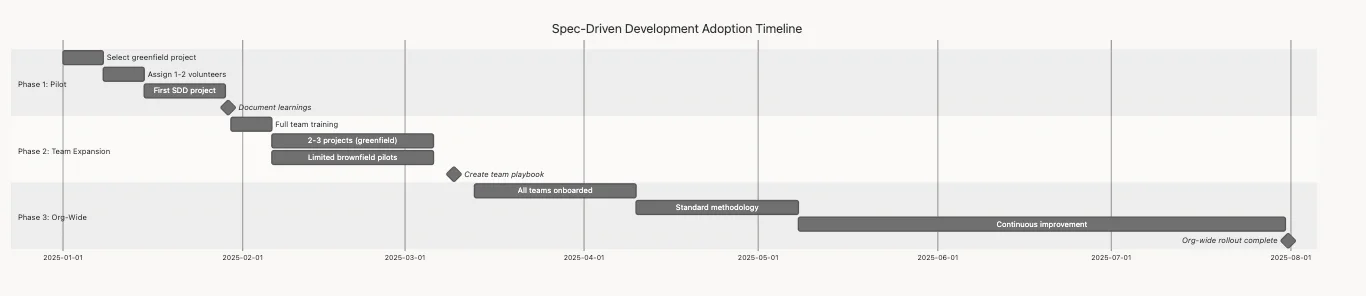
Phase 1: Pilot (1-2 months)
Objective: Validate SDD effectiveness with minimal risk.
Activities:
- Select 1-2 greenfield pilot projects
- Choose enthusiastic early adopters (not skeptics)
- Provide dedicated training and support
- Document lessons learned extensively
Success Criteria:
- Pilot teams report improved code quality
- Measurable reduction in post-merge bugs
- Positive developer experience feedback
- Realistic understanding of learning curve
Phase 2: Expansion (2-4 months)
Objective: Scale to multiple teams with refined processes.
Activities:
- Train additional teams based on pilot learnings
- Develop organization-specific templates
- Integrate SDD into CI/CD pipelines (spec validation)
- Create internal champions network
Success Criteria:
- 3-5 teams actively using SDD
- Established best practices documentation
- Integration with existing development workflows
- Metrics showing improved velocity and quality
Phase 3: Institutionalization (4-6 months)
Objective: Establish SDD as a standard, supported methodology across all appropriate new development work.
Activities:
- Make playbook, training materials, and best practices available organization-wide
- Provide guidance on selecting appropriate use cases (greenfield vs. brownfield)
- Establish community of practice for sharing learnings
- Continuously iterate on methodology based on feedback
- Track long-term metrics and ROI
Success Criteria:
- SDD is standard practice for greenfield projects
- Clear guidelines exist for when to use vs. not use SDD
- Internal champions support other teams
- Measurable org-wide impact (velocity, quality, satisfaction)
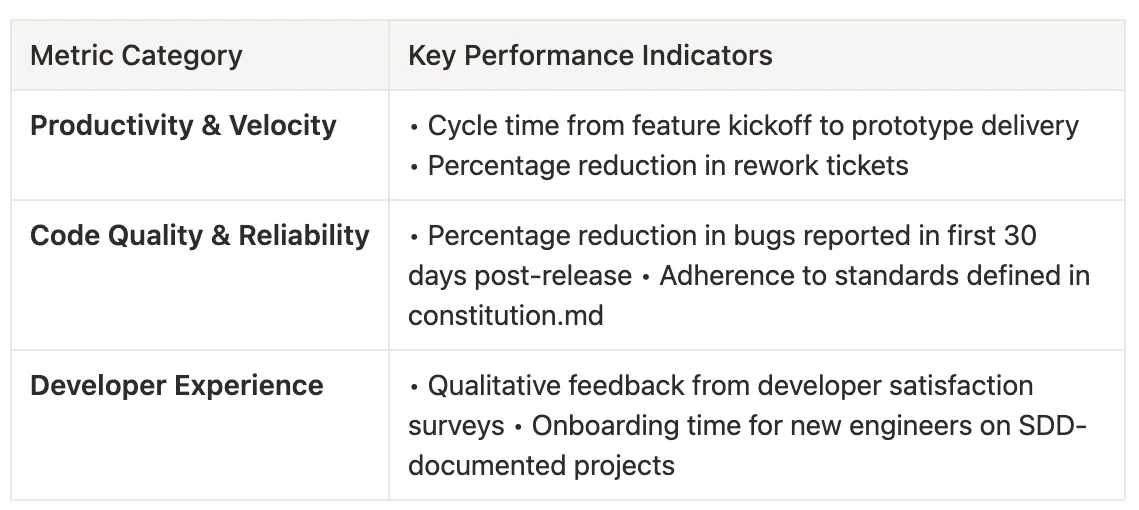
Key Metrics to Track:
Productivity & Velocity
- Cycle time from feature kickoff to prototype delivery
- Percentage reduction in rework tickets
Code Quality & Reliability
- Percentage reduction in bugs reported in first 30 days post-release
- Adherence to standards defined in constitution
Developer Experience
- Net promoter score (NPS) from developers using SDD
- Percentage of developers preferring SDD for greenfield projects
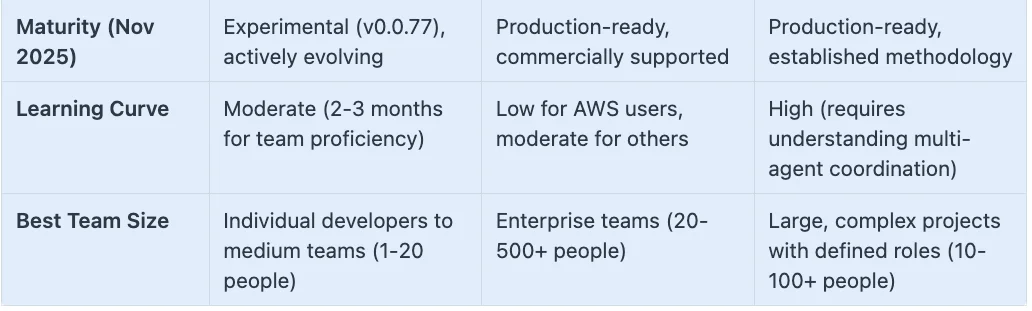
VII. Competitive Landscape: How Spec Kit Compares
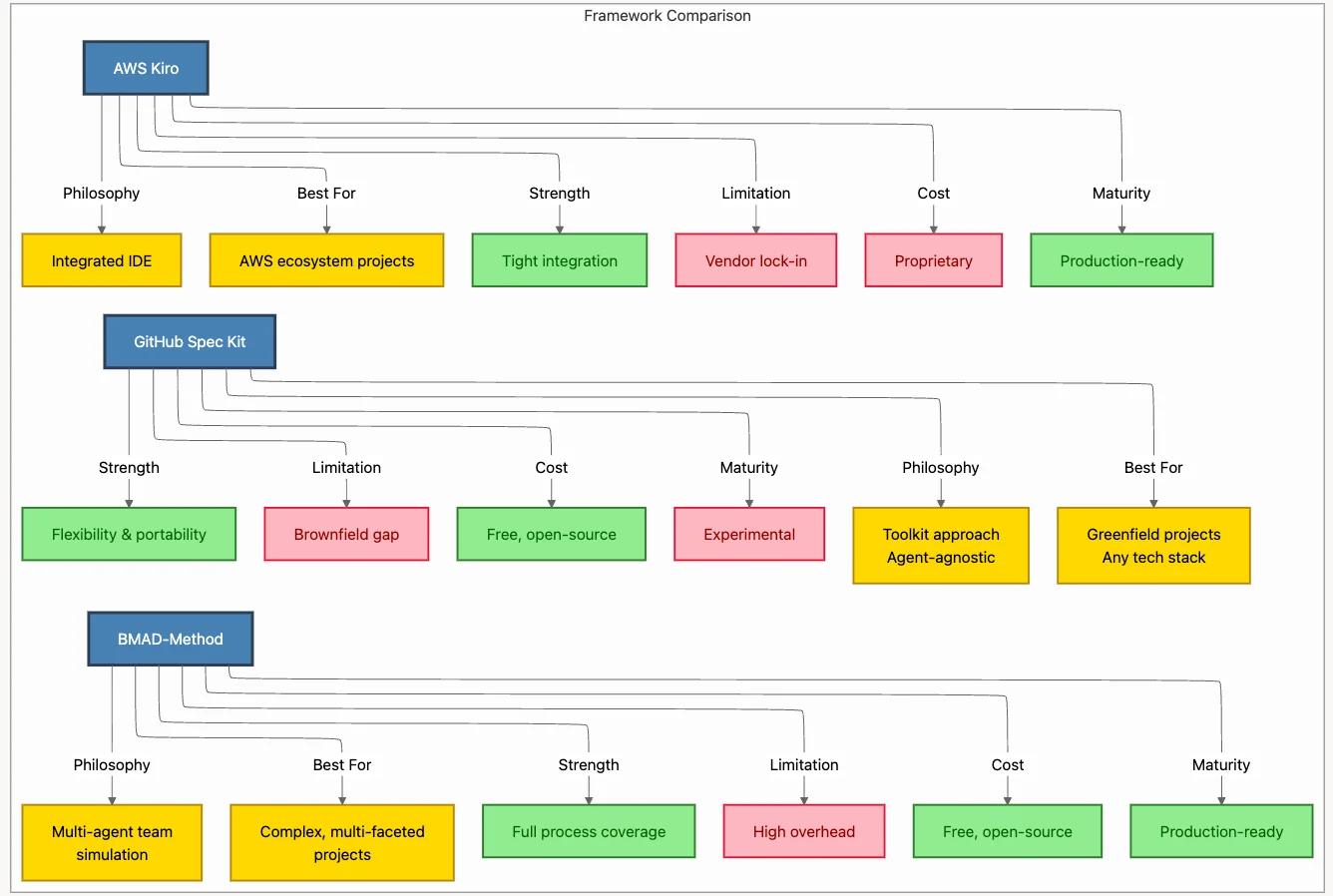
SDD is a methodology; Spec Kit is one implementation. Let's compare it to alternatives.
AWS Kiro
AWS Kiro, released in 2025, is Amazon's proprietary SDD implementation built into a dedicated IDE (fork of VS Code).
Architecture:
- GitHub Spec Kit: Lightweight CLI (specify-cli) + Markdown templates in .specify/ directory
- AWS Kiro: Fully integrated VS Code fork with built-in SDD tooling
- BMAD-Method: Heavyweight framework of specialized, collaborative AI agents
Ecosystem:
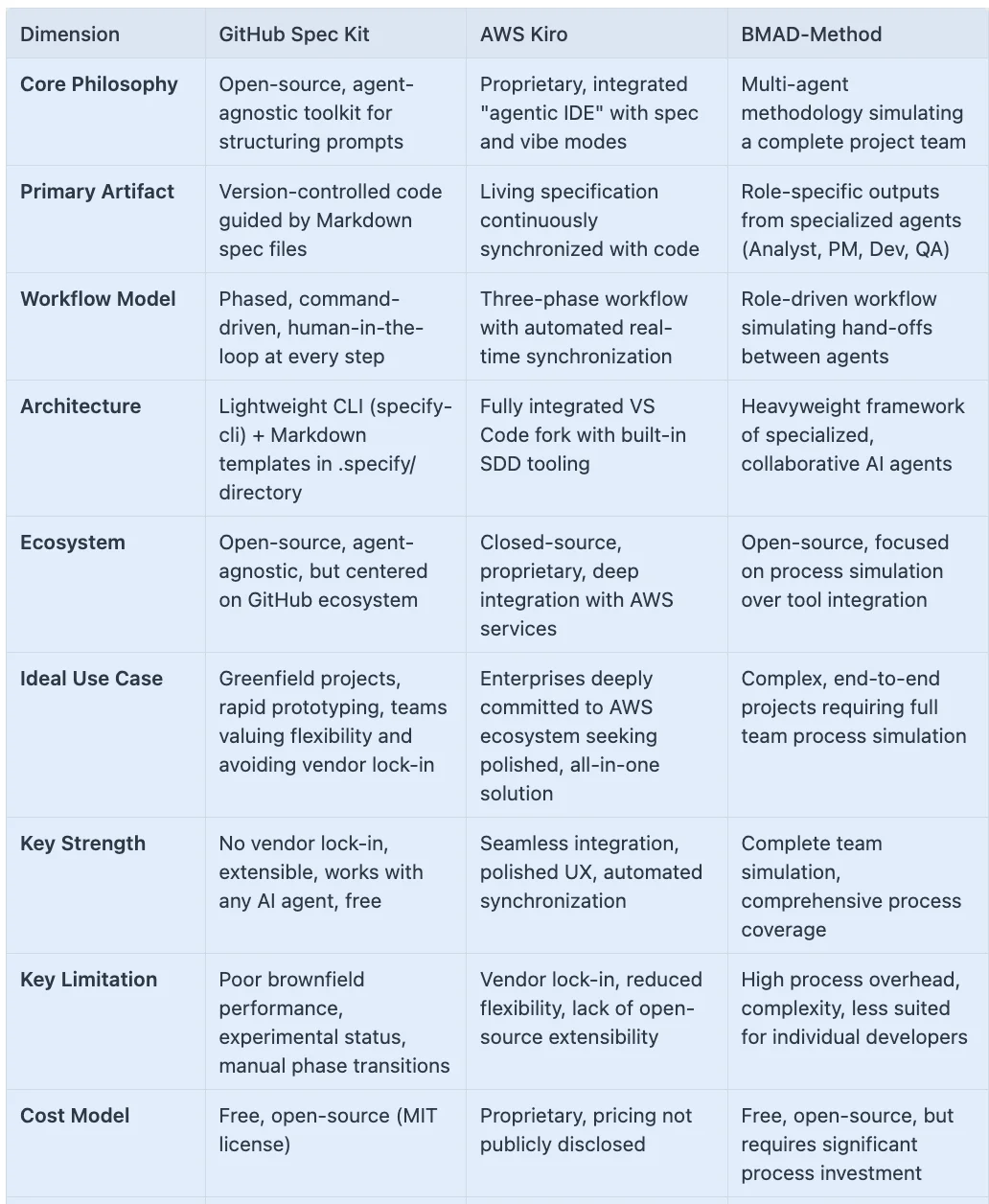
- GitHub Spec Kit: Open-source, agent-agnostic, but centered on GitHub ecosystem
- AWS Kiro: Closed-source, proprietary, deep integration with AWS services
- BMAD-Method: Open-source, focused on process simulation over tool integration
Ideal Use Case:
- GitHub Spec Kit: Greenfield projects, rapid prototyping, teams valuing flexibility and avoiding vendor lock-in
- AWS Kiro: Enterprises deeply committed to AWS ecosystem seeking polished, all-in-one solution
- BMAD-Method: Complex, end-to-end projects requiring full team process simulation
Key Strength:
- GitHub Spec Kit: No vendor lock-in, extensible, works with any AI agent, free
- AWS Kiro: Seamless integration, polished UX, automatic context management
- BMAD-Method: Role specialization, realistic team dynamics simulation
Key Weakness:
- GitHub Spec Kit: Experimental status, brownfield gap, requires manual context management
- AWS Kiro: Vendor lock-in, cost, limited to AWS ecosystem
- BMAD-Method: Complexity, learning curve, heavy cognitive overhead
The Strategic Question
If your organization is heavily invested in AWS and values polish over flexibility, Kiro may be appropriate. If you value open standards, multi-vendor AI support, and extensibility, Spec Kit is the safer long-term choice.
VIII. Best Practices & Anti-Patterns
Do's and Don'ts for SDD Success
DO: Invest in Spec-Writing Training
Why It Matters: The #1 success factor reported by teams is learning to write clear, unambiguous specifications. Inadequate specs consistently lead to poor AI output and wasted effort.
How to Do It:
- Conduct hands-on workshops with real project examples
- Create a library of "good spec" vs. "bad spec" examples
- Pair junior developers with spec-writing mentors
- Budget 2-3 months for team proficiency
- Celebrate great specs in team meetings
Example:
Bad Spec:
"Build a search feature"
Good Spec:
"As a user, I want to search products by name, category, or SKU so that I can quickly find items to purchase. Search must:
- Support partial matching (e.g., 'red sh' matches 'red shirt')
- Return results in < 500ms for catalogs up to 10,000 items
- Highlight matching terms in results
- Show 'No results found' message with suggested filters when appropriate
- Exclude out-of-stock items unless user toggles 'Show all' filter"
DO: Start with Pilot Programs
Why It Matters: SDD requires new skills and mindsets. Forcing adoption without preparation guarantees failure.
How to Do It:
- Select 1-2 greenfield pilot projects with motivated teams
- Provide dedicated training and coaching
- Allow 3-6 months for teams to develop proficiency
- Document lessons learned for wider rollout
- Celebrate and publicize pilot successes
DO: Match Tool to Task (Hybrid Approach)
Why It Matters: SDD is not universally optimal. Using it for everything wastes effort.
How to Do It:
- Use SDD for: New features, core business logic, code requiring long-term maintenance
- Use vibe coding for: Prototypes, one-off scripts, simple utilities, experiments
- Use manual development for: Brownfield modifications, complex legacy integration
- Maintain a clear decision framework
DON'T: Force SDD onto Brownfield Projects
Why It Fails: Current AI capabilities cannot reliably understand complex existing codebases.
Instead:
- Clearly identify project type (greenfield vs. brownfield)
- Use SDD for new, isolated modules within brownfield projects
- Accept that some work is better done traditionally
- Extract and rebuild if legacy modernization is needed
- Acknowledge SDD's limitations openly
DON'T: Bypass Validation Checkpoints
Why It Fails: Skipping human review allows errors to compound, reducing final quality to 33%.
Instead:
- Enforce checkpoint reviews before phase progression
- Make validation collaborative, not bureaucratic
- Budget time for 2-3 refinement cycles
- Use checklists to ensure thoroughness
DON'T: Expect Instant Productivity Gains
Why It Fails: Upfront investment in specs and plans feels like overhead initially.
Instead:
- Measure success on quality metrics (bugs, rework) not just speed
- Expect ROI after 2-3 months of practice
- Communicate realistic expectations to leadership
- Track long-term benefits (maintainability, onboarding speed)
DON'T: Ignore the Experimental Status
Why It Fails: Spec Kit (v0.0.77) is officially experimental, meaning bugs, breaking changes, and instability are expected.
Instead:
- Pin to specific versions in production
- Test updates in staging before production
- Maintain fallback processes if tools fail
- Contribute bug reports and feature requests
- Stay informed about breaking changes
IX. The Future of AI-Assisted Development
The Methodology Matures While Tools Evolve
An important insight from 2025: SDD methodology is maturing faster than individual tools. While GitHub Spec Kit is still experimental (v0.0.77), the core principles of Spec-Driven Development have solidified:
Stable Principles (Unlikely to Change):
- Separate "what" from "how"
- Specs as first-class, executable artifacts
- Human-in-the-loop validation at checkpoints
- Living documentation that evolves with code
- Phased, structured workflow
Evolving Tooling (Expect Changes):
- Better brownfield support (solving the gap)
- Improved AI context management
- Automated spec-code synchronization
- IDE integrations and workflow automation
- Multi-agent coordination
Strategic Implication: Invest in learning SDD principles and spec-writing skills, not just specific tool knowledge. The methodology will outlast any individual toolkit.
What's Next for SDD?
Industry watchers expect several key developments:
Brownfield Solutions: The most pressing need. Expect advances in codebase understanding and context injection.
Spec-Code Synchronization: Automatic detection when code drifts from spec, with AI-assisted remediation.
Multi-Agent Orchestration: Specialized agents for different phases (spec agent, plan agent, implementation agent) working collaboratively.
IDE Deep Integration: Native SDD support in VS Code, JetBrains, and other IDEs beyond Kiro.
Enterprise Features: Role-based permissions, audit trails, compliance integration, and advanced analytics.
X. Key Takeaways
Vibe Coding is Broken: Imprecise prompts produce unpredictable results. The solution is structured communication, not better prompts.
SDD is a Methodology, Not Just a Tool: The principles (what/how separation, phased validation, spec-as-artifact) are more important than any specific implementation.
Spec-Writing is the New Core Skill
Learning to write clear, unambiguous specifications is more important than tool mastery. Inadequate specs lead to poor AI output and wasted effort.
- Not a Silver Bullet: Know the Limitations
- Brownfield Gap: SDD struggles with existing complex codebases
- Experimental Status: Spec Kit (v0.0.77) is not yet production-ready
- Learning Curve: Expect 2-3 months for team proficiency
- Upfront Investment: Initial projects may feel slower
- Hybrid Approaches Are Optimal
Use SDD for production code and complex features. Use "vibe coding" for prototypes, utilities, and simple fixes. Use manual development for brownfield modifications. The right tool for the right job.
- The Developer's Role Is Transforming
From writing code line by line to architecting intent and orchestrating AI. The most valuable future skill may not be coding syntax, but writing perfect specifications.
- Methodology Outlasts Tools
While Spec Kit is experimental, SDD principles are solidifying. Invest in methodology understanding, not just tool knowledge.
Getting Started Today
Install Spec Kit:
pip install specify-cliTry a Small Project: Use the photo album example from this article as a starting point.
Practice Spec Writing: Focus on clarity, completeness, and testability.
Join the Community: Follow the github/spec-kit repository, report issues, and contribute.
Be Patient: Allow 2-3 months for proficiency. The investment pays dividends.
The era of vibe coding is ending. The era of spec-driven AI collaboration is beginning. The developers who master this methodology will define the next generation of software development.
About the Author
Rick Hightower is a seasoned software architect and technology leader with over 20 years of experience building systems at companies like Apple, Capital One, and the NFL. He specializes in AI-assisted development, cloud architecture, and helping organizations adopt emerging technologies effectively.
Connect with Rick:
Discover AI Agent Skills
Browse our marketplace of 41,000+ Claude Code skills, agents, and tools. Find the perfect skill for your workflow or submit your own.