
Claude Agent SDK vs. OpenAI AgentKit: A Developer's Guide to Building AI Agents
The AI agent landscape is evolving rapidly, and two major players have emerged with distinct approaches to building autonomous AI systems: Anthropic's Claude Agent SDK and OpenAI's AgentKit. This guide breaks down the core distinctions between these frameworks, helping you make an informed choice for your next AI agent project.
Design Philosophy: Two Paths to Agent Development
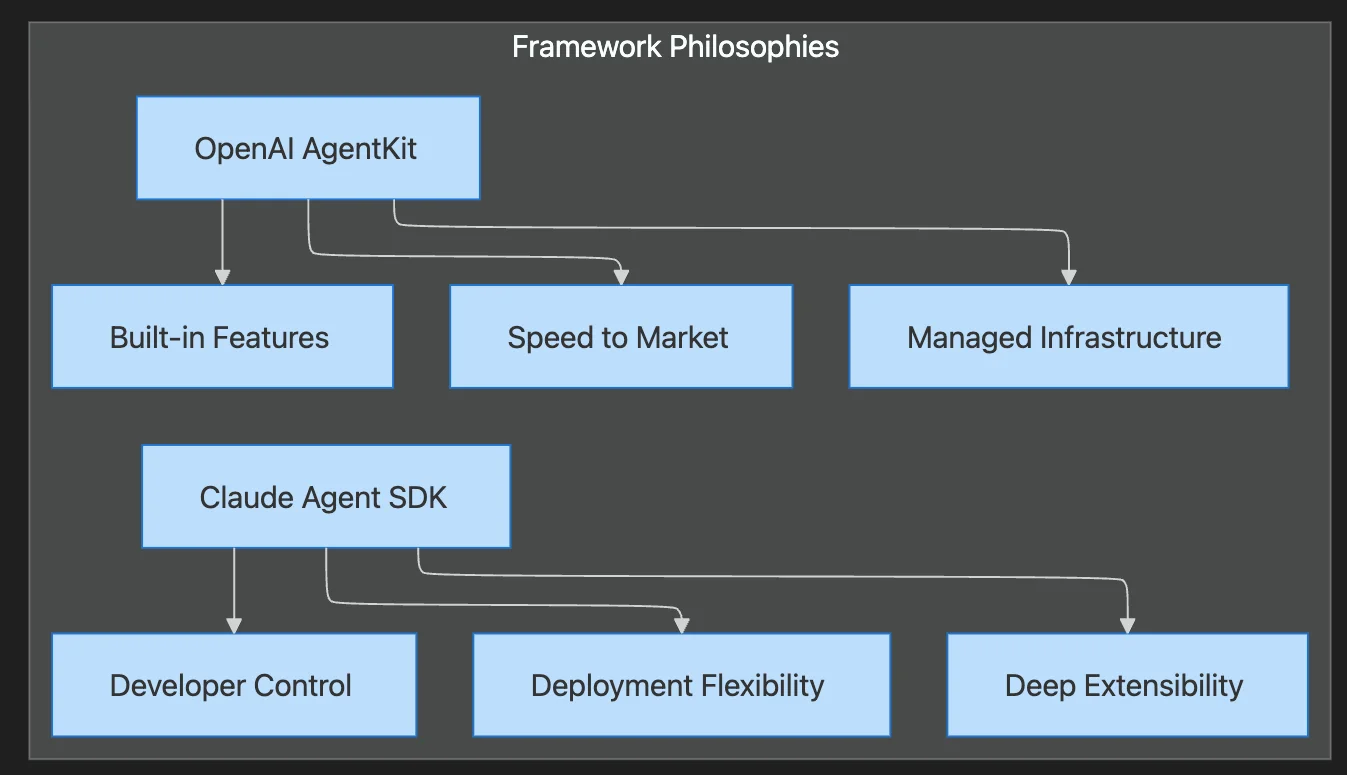
The fundamental difference between these frameworks lies in their core philosophy:
AgentKit prioritizes speed with managed infrastructure, while Claude Agent SDK emphasizes developer control with flexible deployment options.
OpenAI AgentKit: Centralized, Product-First
AgentKit follows a centralized, product-first approach. It integrates visual builders, embedded UIs, and evaluation tools within the ChatGPT ecosystem. The platform targets rapid iteration and product-team accessibility.
Key characteristics:
- Speed over control: Optimized for quick deployment and iteration
- Managed infrastructure: OpenAI handles the runtime complexity
- Visual-first: Agent Builder provides a low-code interface
- Integrated ecosystem: Tight coupling with ChatGPT and OpenAI services
Claude Agent SDK: Decentralized, Developer-First
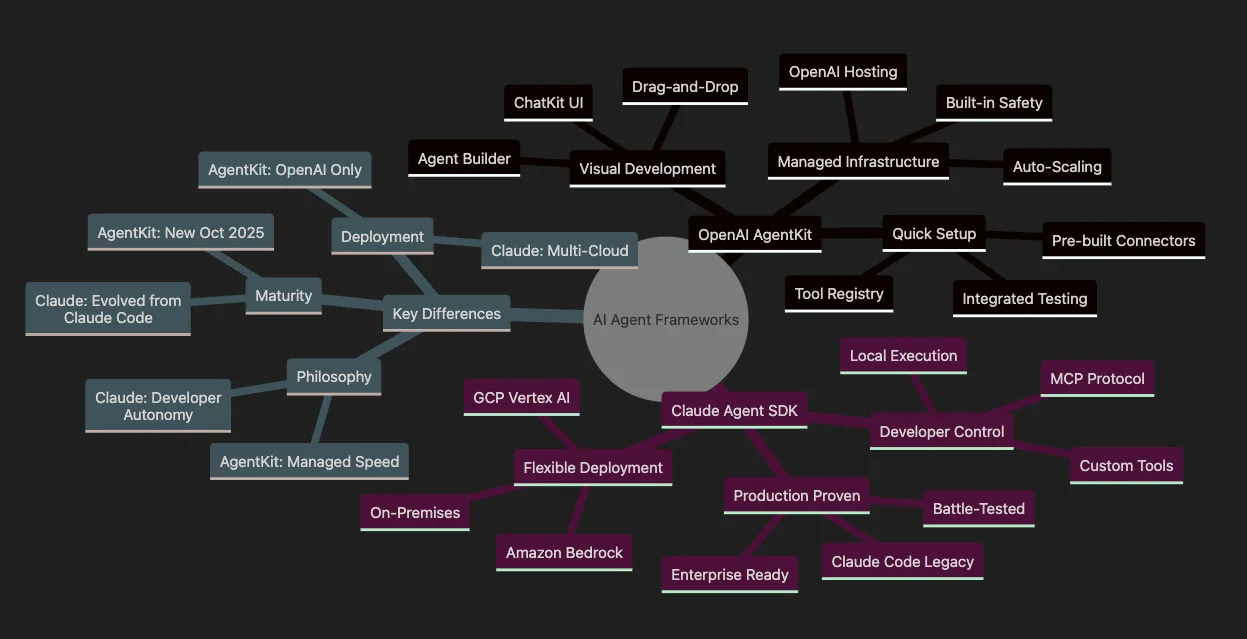
Claude Agent SDK adopts a decentralized, developer-centric model. It leverages the Model Context Protocol (MCP) to enable local execution, explicit tool registration, and organizational control over data flows.
Key characteristics:
- Control over convenience: Full ownership of execution environment
- Flexible deployment: Local, on-premises, or multi-cloud options
- Explicit composability: Typed schemas and deliberate integrations
- Enterprise-ready: Built for compliance and data governance
Architecture Comparison
| Dimension | AgentKit | Claude Agent SDK |
|---|---|---|
| Setup | Visual builder + minimal infrastructure | SDK installation + explicit MCP server configuration |
| Tool Integration | Pre-built nodes, curated connector registry | MCP servers with typed schemas and permissioning |
| Execution Model | Provider-managed runtime (OpenAI infrastructure) | User-controlled execution (local, external, or hybrid) |
| Memory/State | Integrated ChatGPT patterns | Custom resource exposure via MCP |
| Custom Logic | Visual nodes with guardrails | Full programmatic control with explicit flows |
The Model Context Protocol (MCP)
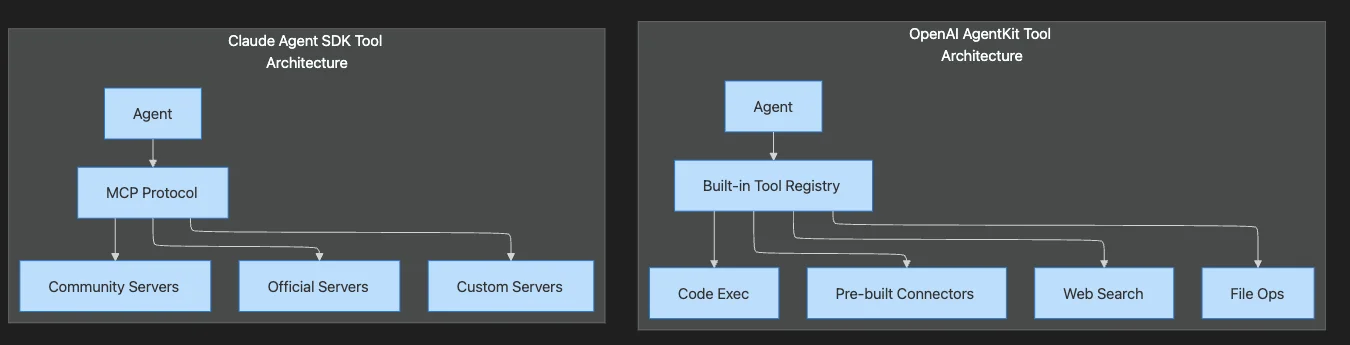
At the heart of Claude Agent SDK is the Model Context Protocol (MCP), which Anthropic describes as "the USB-C for AI tools." MCP treats tool access and context as first-class resources, fundamentally changing how agents interact with external systems.
How MCP Works
Rather than embedding tools directly into the agent, MCP exposes them as explicitly declared servers with typed tool signatures, resources, and prompts. This means your team registers and runs these servers—either as HTTP/SSE endpoints or in-process functions—enabling:
- Auditable integrations: Every tool call is traceable
- Local testing: Run MCP servers in development environments
- Organizational control: Tie execution to internal audit logs
- Flexible deployment: Server-to-client for distributed systems, in-process for low-latency
MCP vs. Centralized Registry
AgentKit takes a different approach with its Connector Registry—a centralized catalog of pre-vetted tools and OAuth flows for popular services like Salesforce, Slack, and Google Drive. This dramatically reduces the friction of writing custom integrations but concentrates control with OpenAI.
| Aspect | MCP (Claude SDK) | Connector Registry (AgentKit) |
|---|---|---|
| Control | Developer-owned | OpenAI-managed |
| Customization | Full flexibility | Limited to available connectors |
| Setup effort | Higher | Lower |
| Auditability | Built-in | Platform-dependent |
| Data residency | Your choice | OpenAI infrastructure |
Code Examples
Let's look at how each framework approaches agent creation.
Claude Agent SDK: Simple Agent with Built-in Tools
Using the Claude Agent SDK Python library:
from claude_agent_sdk import query
import asyncio

async def code_review_agent():
    async for message in query({
        "prompt": "Analyze the code in main.py and fix any bugs.",
        "options": {
            "model": "claude-sonnet-4-20250514",
            "maxTurns": 50,
            "allowedTools": ["Read", "Write", "Bash"]
        }
    }):
        if message.type == "assistant":
            for block in message.message.content:
                if "text" in block:
                    print(block.text)
        if message.type == "result":
            print("Agent completed:", message.subtype)

asyncio.run(code_review_agent())
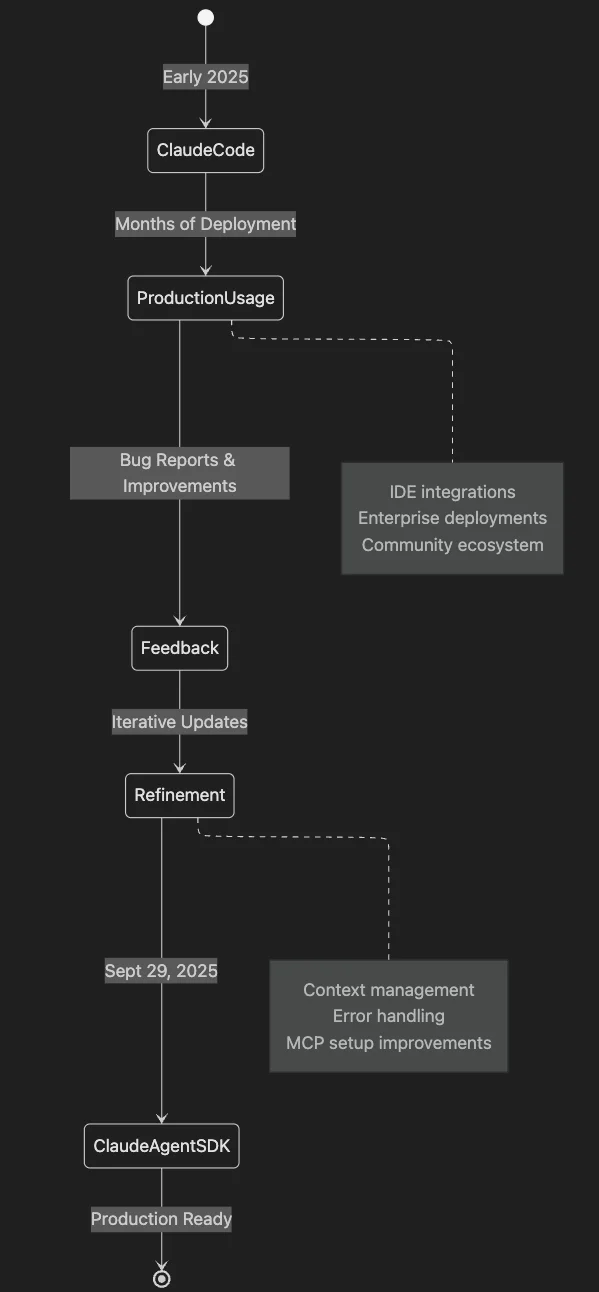
The SDK's built-in agent loop handles the gather context → take action → verify → repeat cycle automatically.
Claude Agent SDK: Custom Tools with MCP
from anthropic import Anthropic

client = Anthropic(api_key="your-api-key")

# Define custom tools with typed schemas
tools = [
    {
        "name": "get_weather",
        "description": "Get current weather for a city",
        "input_schema": {
            "type": "object",
            "properties": {
                "city": {"type": "string", "description": "City name"}
            },
            "required": ["city"]
        }
    },
    {
        "name": "search_database",
        "description": "Search internal customer database",
        "input_schema": {
            "type": "object",
            "properties": {
                "query": {"type": "string"},
                "limit": {"type": "integer", "default": 10}
            },
            "required": ["query"]
        }
    }
]

# Custom tool executor
def execute_tool(name: str, input: dict) -> str:
    if name == "get_weather":
        city = input.get("city")
        # In production, call weather API
        return f"Weather in {city}: 72°F, sunny."
    elif name == "search_database":
        query = input.get("query")
        # In production, query your database
        return f"Found 3 customers matching '{query}'"
    raise ValueError(f"Unknown tool: {name}")

# Manual agent loop for full control
messages = [{"role": "user", "content": "What's the weather in Tokyo?"}]
response = client.messages.create(
    model="claude-sonnet-4-20250514",
    tools=tools,
    messages=messages,
    max_tokens=1024
)

while response.stop_reason == "tool_use":
    messages.append({"role": "assistant", "content": response.content})
    tool_results = []

    for block in response.content:
        if block.type == "tool_use":
            result = execute_tool(block.name, block.input)
            tool_results.append({
                "type": "tool_result",
                "tool_use_id": block.id,
                "content": result
            })

    messages.append({"role": "user", "content": tool_results})
    response = client.messages.create(
        model="claude-sonnet-4-20250514",
        tools=tools,
        messages=messages,
        max_tokens=1024
    )

print(response.content[0].text)
OpenAI AgentKit: Assistant-Based Agent
Using the OpenAI Agents SDK:
from openai import OpenAI

client = OpenAI(api_key="your-openai-key")

# Create a persistent assistant (agent)
assistant = client.beta.assistants.create(
    name="Code Reviewer",
    instructions="Review code and suggest improvements. Be thorough but concise.",
    model="gpt-4o",
    tools=[
        {"type": "code_interpreter"},
        {"type": "file_search"}
    ]
)

# Create a thread (conversation session)
thread = client.beta.threads.create()

# Add a message to the thread
message = client.beta.threads.messages.create(
    thread_id=thread.id,
    role="user",
    content="Review this Python function and suggest improvements:\n\ndef add(a,b): return a+b"
)

# Run the assistant
run = client.beta.threads.runs.create(
    thread_id=thread.id,
    assistant_id=assistant.id
)

# Poll for completion
while run.status not in ["completed", "failed", "cancelled"]:
    run = client.beta.threads.runs.retrieve(
        thread_id=thread.id,
        run_id=run.id
    )

    # Handle tool calls if needed
    if run.status == "requires_action":
        tool_outputs = []
        for tool_call in run.required_action.submit_tool_outputs.tool_calls:
            # Process each tool call
            output = process_tool_call(tool_call)
            tool_outputs.append({
                "tool_call_id": tool_call.id,
                "output": output
            })

        run = client.beta.threads.runs.submit_tool_outputs(
            thread_id=thread.id,
            run_id=run.id,
            tool_outputs=tool_outputs
        )

# Get the response
messages = client.beta.threads.messages.list(thread_id=thread.id)
print(messages.data[0].content[0].text.value)
Deployment Options
Claude Agent SDK Deployment
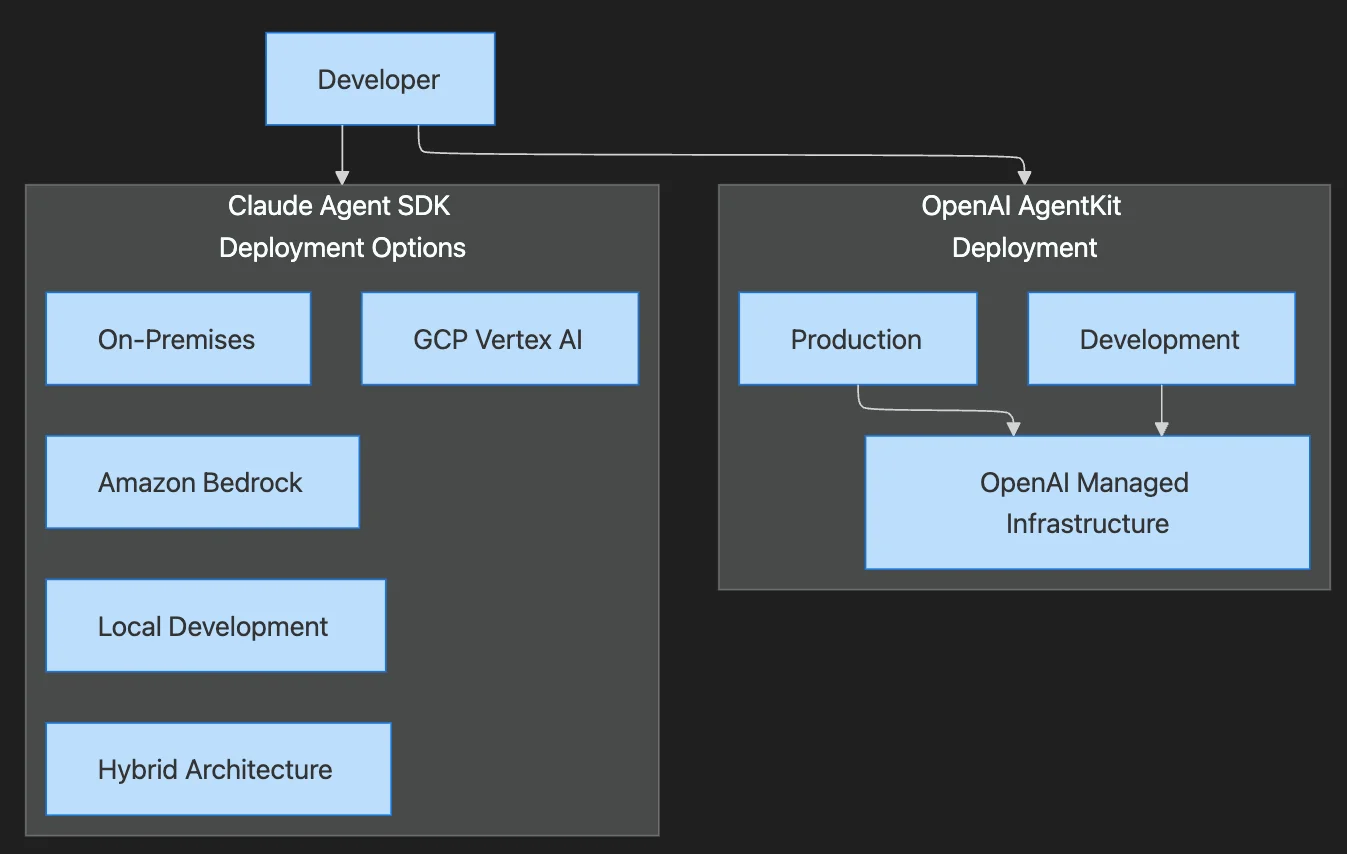
Claude Agent SDK offers maximum flexibility:
- Local execution: Run agents on developer machines or internal servers
- On-premises: Deploy within corporate networks for data residency
- Cloud providers: AWS (via Amazon Bedrock), GCP, Azure, or any cloud
- Hybrid: Mix local MCP servers with cloud-hosted agents
Example with Amazon Bedrock:
from claude_agent_sdk import query

async def bedrock_agent():
    async for message in query({
        "prompt": "Analyze quarterly reports",
        "options": {
            "model": "anthropic.claude-3-5-sonnet-20241022-v2:0",
            "provider": "bedrock",
            "region": "us-east-1",
            "allowedTools": ["Read", "WebSearch"]
        }
    }):
        handle_message(message)
AgentKit Deployment
AgentKit concentrates runtime with OpenAI:
- ChatGPT embeds: Deploy agents as ChatGPT widgets
- Responses API: Integrate via API for custom interfaces
- Agent Builder: Visual deployment through OpenAI platform
This reduces DevOps burden but limits deployment flexibility.
Memory and Context Management
Claude Agent SDK Approach
Memory and state are explicit MCP resources you expose through servers:
# MCP server exposing memory resources
from mcp import Server

server = Server("memory-server")

@server.resource("conversation_history")
async def get_history(session_id: str):
    # Retrieve from your storage
    return await db.get_conversation(session_id)

@server.tool("save_memory")
async def save_memory(key: str, value: str, session_id: str):
    # Store with full control over encryption, retention
    await db.store(session_id, key, value, encrypt=True, ttl=86400)
    return "Memory saved"
This requires more engineering work but grants full control over retention, encryption, and compliance.
AgentKit Approach
AgentKit inherits memory patterns from ChatGPT:
- Automatic conversation state: Built into threads
- File storage: Managed by OpenAI
- Memory persistence: Platform-controlled
Convenient for rapid development but memory decisions remain with OpenAI's infrastructure.
Real-World Use Cases
Customer Support
AgentKit excels here with its templates and connector registry accelerating ticket-triage agents with CRM integration. The platform suits customer-facing widgets requiring rapid productization.
AgentKit → CRM Connector → Ticket System → Customer Widget
Developer Tools
Claude SDK is preferred by teams building code assistants, running MCP code tools locally while keeping repository access within corporate networks.
Claude SDK → Local MCP Server → Git Repository → IDE Integration
Research Pipelines
Both see adoption, but:
- AgentKit: Dominates for embeddable web research widgets
- Claude SDK: Chosen when reproducibility and local data access are mandatory
Regulated Industries
Claude SDK is the clear choice for healthcare, finance, and government applications where:
- Data must stay on-premises
- Audit trails are mandatory
- Compliance requires explicit control
Safety and Oversight
Both platforms address safety but through different mechanisms:
AgentKit Safety
- Built-in guardrails: Platform-level content filtering
- Preview modes: Test agents before deployment
- Evaluation tooling: Integrated testing frameworks
- Centralized monitoring: OpenAI observability
Claude SDK Safety
- Explicit tool permissioning: Every tool requires authorization
- Host-side control: Organization remains the ultimate gate
- Audit logging: Full trace of all agent actions
- Custom guardrails: Implement your own safety layers
# Claude SDK: Pre-tool hook for safety
def pre_tool_hook(tool_name: str, tool_input: dict, tool_use_id: str):
    # Log all tool usage
    audit_log.record(tool_name, tool_input, user_id)

    # Block dangerous operations
    if tool_name == "Bash" and "rm -rf" in tool_input.get("command", ""):
        raise PermissionError("Destructive commands blocked")

    return tool_input  # Allow execution
Selection Framework
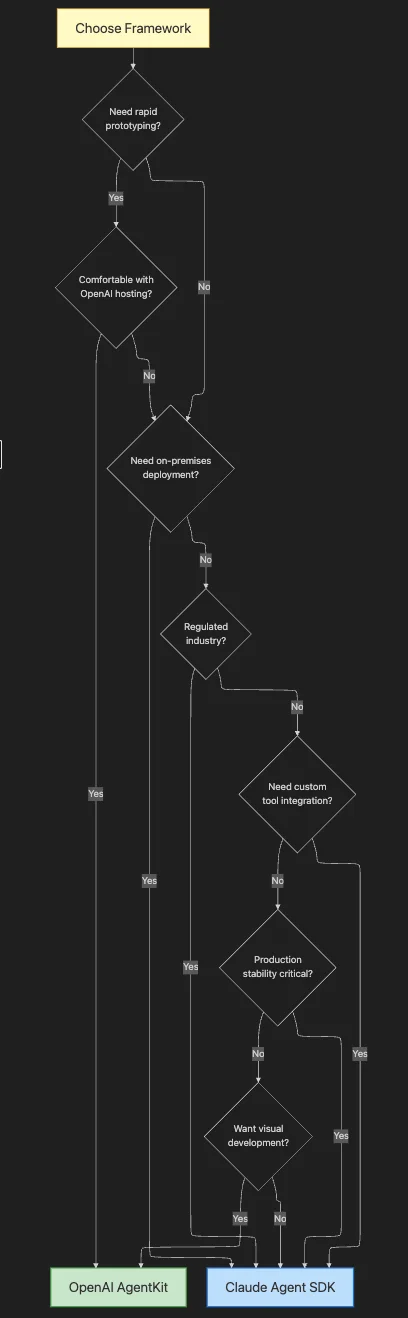
Choose AgentKit If:
- ✅ Rapid customer-facing agent deployment is the priority
- ✅ Built-in tools (web search, file access, compute) reduce connector overhead
- ✅ Product iteration speed matters more than infrastructure ownership
- ✅ Your team prefers visual/low-code development
- ✅ You're already invested in the OpenAI ecosystem
Choose Claude Agent SDK If:
- ✅ On-premises execution or strict data residency compliance is required
- ✅ Explicit tool schemas and typed integrations align with security practices
- ✅ Your team owns connector lifecycle and infrastructure decisions
- ✅ You need multi-cloud or hybrid deployment flexibility
- ✅ Audit trails and compliance are non-negotiable
The Developer Experience Trade-off
The core trade-off is "magic" versus explicitness:
OpenAI AgentKit prioritizes minimal boilerplate for standard patterns. One-line agent creation, visual canvases, and SDK helpers optimize for product owners and rapid prototyping.
Claude Agent SDK's intentional verbosity—requiring explicit tool server setup, schema declaration, and control loop management—forces teams to make safety and integration choices transparent. This friction surfaces important decisions during development rather than in production.
Conclusion
There's no universal "better" framework—the right choice depends on your specific needs:
| Factor | Choose AgentKit | Choose Claude SDK |
|---|---|---|
| Time to market | ✅ Faster | Slower |
| Infrastructure control | Limited | ✅ Full |
| Customization depth | Moderate | ✅ Unlimited |
| Compliance requirements | Basic | ✅ Enterprise-grade |
| Team expertise | Product-focused | ✅ Engineering-focused |
| Deployment flexibility | OpenAI only | ✅ Any environment |
Both frameworks represent the cutting edge of AI agent development. AgentKit lowers the barrier to entry, making agent development accessible to product teams. Claude Agent SDK empowers engineering teams with the control needed for enterprise-grade, compliant AI systems.
The best choice is the one that aligns with your team's capabilities, your organization's requirements, and your product's needs. And remember—you can always start with one and migrate to the other as your needs evolve.
What's your experience with these frameworks? Are you building agents with AgentKit, Claude SDK, or both? Share your insights in the comments.
Discover AI Agent Skills
Browse our marketplace of 41,000+ Claude Code skills, agents, and tools. Find the perfect skill for your workflow or submit your own.