
Anthropic's Claude and MCP: A Deep Dive into Content-Based Tool Integration
The devil is in the details when integrating AI models with external tools. While OpenAI uses function calling and LiteLLM provides a universal interface, Anthropic's Claude takes a distinctly different approach with its content-based message structure. This article explores how to integrate Claude with the Model Context Protocol (MCP), revealing the unique patterns and considerations that make Anthropic's implementation powerful and elegant.
We'll dive deep into the code, comparing Anthropic's approach with OpenAI and LiteLLM to help you understand when and why you should choose each integration method. By the end, you'll thoroughly understand how Claude's content-based architecture shapes its MCP integration.
About Our MCP Server: The Customer Service Assistant
Before exploring how Claude connects to MCP, let's understand what we're linking to. In our FastMCP article, we built an example customer service MCP server using FastMCP. This server serves as our foundation for demonstrating different Anthropic Claude API integrations.
Our MCP server exposes three powerful tools that any AI system can leverage:
Available Tools:
get_recent_customers: Retrieves a list of recently active customers with their current statuscreate_support_ticket: Creates new support tickets with customizable priority levelscalculate_account_value: Analyzes purchase history to calculate total account value
The beauty of MCP is that these same tools work identically whether accessed by Claude, GPT-4, or any other AI model - only the integration pattern differs.
Understanding Anthropic's Content-Based Architecture
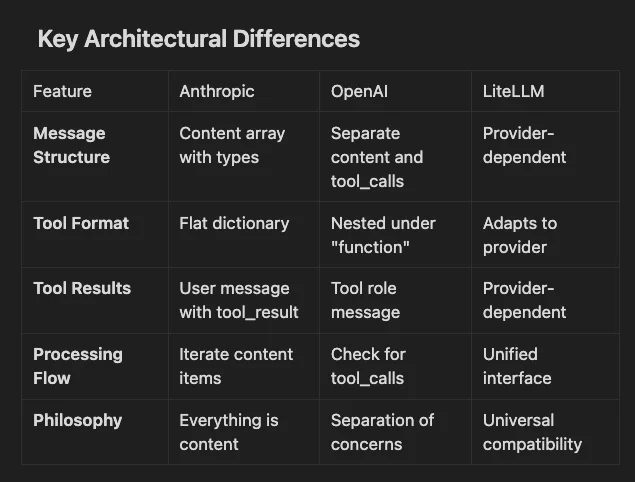
Before diving into the code, it's crucial to understand what makes Anthropic's approach unique. While OpenAI separates message content from function calls, Claude treats everything as content items within a message. This design philosophy leads to several key differences:
- Unified Content Model: Text and tool uses are content items in the same array.
- Message Role Semantics: Tool results are user messages, not a separate role.
- Inline Processing: Tool calls flow naturally within the conversation.
- Type-Based Routing: Content type determines processing logic.
Let's see how these principles manifest in actual code.
Building the Anthropic MCP Integration
Step 1: Setting Up the Connection
The initial setup looks similar to OpenAI, but watch for the subtle differences:
class AnthropicMCPChatBot:
    def __init__(self, api_key: str):
        self.anthropic = Anthropic(api_key=api_key)
        self.sessions = []
        self.exit_stack = AsyncExitStack()
        self.available_tools = []
        self.tool_to_session = {}
The structure mirrors OpenAI's implementation, showing that MCP provides a consistent foundation regardless of the AI provider. The real differences emerge when we start handling tools and messages.
Step 2: Tool Format Mapping
Here's where Anthropic's approach first diverges. Let's examine how tools are converted from MCP format to Anthropic's expected structure:
async def connect_to_server(self, server_name: str, server_config: dict) -> None:
    """Connect to a single MCP server."""
    # ... connection setup code ...

    # List available tools for this session
    response = await session.list_tools()
    tools = response.tools

    for tool in tools:
        self.tool_to_session[tool.name] = session
        # Anthropic's tool format is simpler than OpenAI's
        self.available_tools.append({
            "name": tool.name,
            "description": tool.description,
            "input_schema": tool.inputSchema,  # Note: not 'parameters'
        })
Key Difference: Compare this with OpenAI's format:
# OpenAI format
openai_tool = {
    "type": "function",
    "function": {
        "name": tool.name,
        "description": tool.description,
        "parameters": tool.inputSchema,  # Different field name
    }
}

# Anthropic format - flatter structure
anthropic_tool = {
    "name": tool.name,
    "description": tool.description,
    "input_schema": tool.inputSchema,
}
Anthropic's flatter structure reflects its philosophy of simplicity and directness. There's no wrapper object or type specification - a tool is just a tool.
Step 3: The Content-Based Message Processing
This is where Anthropic's unique architecture truly shines. Instead of checking for separate tool_calls, we iterate through content items:
async def process_query(self, query: str):
    """Process a query using Claude with MCP tools."""
    messages = [{"role": "user", "content": query}]

    response = self.anthropic.messages.create(
        max_tokens=2024,
        model=Config.ANTHROPIC_MODEL,
        tools=self.available_tools,
        messages=messages,
    )

    process_query = True
    while process_query:
        assistant_content = []
        for content in response.content:
            if content.type == "text":
                print(content.text)
                assistant_content.append(content)
                # If only text, we're done
                if len(response.content) == 1:
                    process_query = False
            elif content.type == "tool_use":
                assistant_content.append(content)
                # More processing needed...
This approach treats the response as a stream of content items, each with its type. Let's break down what happens with each type:
Text Content:
- Displayed immediately to the user
- Added to assistant_content for conversation history
- If it's the only content, the interaction is complete
Tool Use Content:
- Contains the tool to call and its arguments
- Triggers tool execution
- Requires sending results back to Claude
Step 4: Tool Execution and Result Handling
Here's where Anthropic's approach differs most significantly from OpenAI:
elif content.type == "tool_use":
    assistant_content.append(content)

    # First, we need to acknowledge the assistant's tool use
    messages.append({"role": "assistant", "content": assistant_content})

    # Extract tool information
    tool_id = content.id  # Unique ID for this tool use
    tool_args = content.input  # Arguments as a dict
    tool_name = content.name

    print(f"Calling tool {tool_name} with args {tool_args}")

    # Execute the tool through MCP
    session = self.tool_to_session[tool_name]
    result = await session.call_tool(tool_name, arguments=tool_args)

    # HERE'S THE KEY DIFFERENCE: Tool results are user messages!
    messages.append({
        "role": "user",  # Not "tool" like OpenAI
        "content": [{
            "type": "tool_result",
            "tool_use_id": tool_id,  # Links to the tool_use
            "content": result.content,
        }]
    })

    # Continue the conversation with the tool result
    response = self.anthropic.messages.create(
        max_tokens=2024,
        model=Config.ANTHROPIC_MODEL,
        tools=self.available_tools,
        messages=messages,
    )
Critical Insight: Anthropic treats tool results as user messages with special content. This maintains a clean conversation flow where only users and assistants exist - tools are just a type of content, not separate entities.
Comparing the Three Approaches
Let's visualize how each integration handles the same tool interaction:
Key Architectural Differences
Deep Dive: Understanding Anthropic's Design Philosophy
Anthropic's content-based approach reflects several design principles:
1. Conversational Naturalness
By treating tool results as user messages, Anthropic maintains a natural conversation flow:
# The conversation looks like:
# User: "What's the account value?"
# Assistant: [Decides to use tool]
# User: [Provides tool result]
# Assistant: "The value is $X"
This mirrors how a human assistant might ask for information and receive it.
2. Unified Content Model
Everything being content simplifies the mental model:
# All responses follow the same pattern
for content in response.content:
    match content.type:
        case "text":
            handle_text(content)
        case "tool_use":
            handle_tool(content)
        case "image":
            handle_image(content)  # Future capability
3. Explicit State Management
The conversation state is always clear:
# You always know exactly what was said and by whom
messages = [
    {"role": "user", "content": "Help me"},
    {"role": "assistant", "content": [
        {"type": "text", "text": "I'll check that"},
        {"type": "tool_use", "name": "check_status"}
    ]},
    {"role": "user", "content": [
        {"type": "tool_result", "content": "Status: OK"}
    ]},
    {"role": "assistant", "content": "Everything looks good!"}
]
Practical Considerations
When to Use Anthropic's Direct Integration
Choose Anthropic's native integration when:
- You need fine-grained control over the conversation flow
- You're building Claude-specific features that leverage its unique capabilities
- You want to minimize abstraction layers for performance
- Your application deeply integrates with Claude's content model
When to Consider Alternatives
Consider OpenAI or LiteLLM when:
- You need provider flexibility (might switch between models)
- You're building provider-agnostic tools
- You want to leverage existing OpenAI-compatible tooling
- You need to support multiple providers simultaneously
Advanced Patterns with Anthropic
Pattern 1: Multi-Step Tool Chains
Anthropic's content model makes complex tool chains intuitive:
# Claude can naturally chain tools in a single response
response.content = [
    {"type": "text", "text": "I'll help you with that. First, let me look up the customer."},
    {"type": "tool_use", "name": "get_customer_info", "id": "1"},
    {"type": "text", "text": "Now I'll check their recent orders."},
    {"type": "tool_use", "name": "get_orders", "id": "2"},
]
Pattern 2: Conditional Tool Usage
The content array allows for sophisticated decision-making:
# Process each content item and decide next steps
for content in response.content:
    if content.type == "tool_use" and content.name == "check_permission":
        result = await execute_tool(content)
        if not result.allowed:
            # Don't execute subsequent tools
            break
Pattern 3: Parallel Tool Execution
When Claude requests multiple tools, you can execute them in parallel:
# Collect all tool uses
tool_uses = [c for c in response.content if c.type == "tool_use"]

# Execute in parallel
results = await asyncio.gather(*[
    session.call_tool(tool.name, tool.input)
    for tool in tool_uses
])

# Send all results back at once
messages.append({
    "role": "user",
    "content": [
        {"type": "tool_result", "tool_use_id": tool.id, "content": result}
        for tool, result in zip(tool_uses, results)
    ]
})
Getting Started
Clone the example repository:
git clone git@github.com:RichardHightower/mcp_article1.git
cd mcp_article1
Install dependencies (follow README.md for accurate details):
poetry add anthropic python-mcp-sdk
Set up your API key:
export ANTHROPIC_API_KEY=your-key-here
Run the Anthropic integration:
poetry run python src/anthropic_integration.py
Key Takeaways
Understanding Anthropic's MCP integration reveals important lessons about AI tool integration:
- Design Philosophy Matters: Anthropic's content-based approach creates cleaner conversation flows
- Simpler Can Be Better: The flat tool structure reduces complexity
- Role Semantics Are Important: Treating tool results as user messages maintains conversational coherence
- One Size Doesn't Fit All: Different providers optimize for different use cases
Whether you choose Anthropic's elegant content model, OpenAI's structured approach, or LiteLLM's universal compatibility depends on your specific needs. The beauty of MCP is that your tools remain constant - only the integration pattern changes.
References
- GitHub Repository: MCP Article Examples - Complete working code for all integrations.
- Comprehensive MCP Guide: MCP: From Chaos to Harmony - Deep dive into MCP architecture
- Anthropic Documentation: Claude API Reference - Official documentation
Related Articles:
Next Steps
Now that you understand Anthropic's unique approach to tool integration:
- Read this article on building your own MCP server with FastMCP.
- Experiment with the content-based model to build more natural conversations
- Try implementing multi-step tool chains that leverage Claude's reasoning.
- Compare performance and user experience across different providers.
- Build provider-specific optimizations where they add value
The future of AI tool integration isn't about choosing one approach - it's about understanding each provider's strengths and using them appropriately. You can choose the best tool for each job with MCP as your foundation.
Ready to explore more integration patterns? Check out our guides on OpenAI's function calling, DSPy's self-optimizing approach, and LangChain's workflow orchestration.
If you like this article, follow Rick on LinkedIn or on Medium.
Discover AI Agent Skills
Browse our marketplace of 41,000+ Claude Code skills, agents, and tools. Find the perfect skill for your workflow or submit your own.