
Build Your First Claude Code Agent Skill: A Simple Project Memory System That Saves Hours
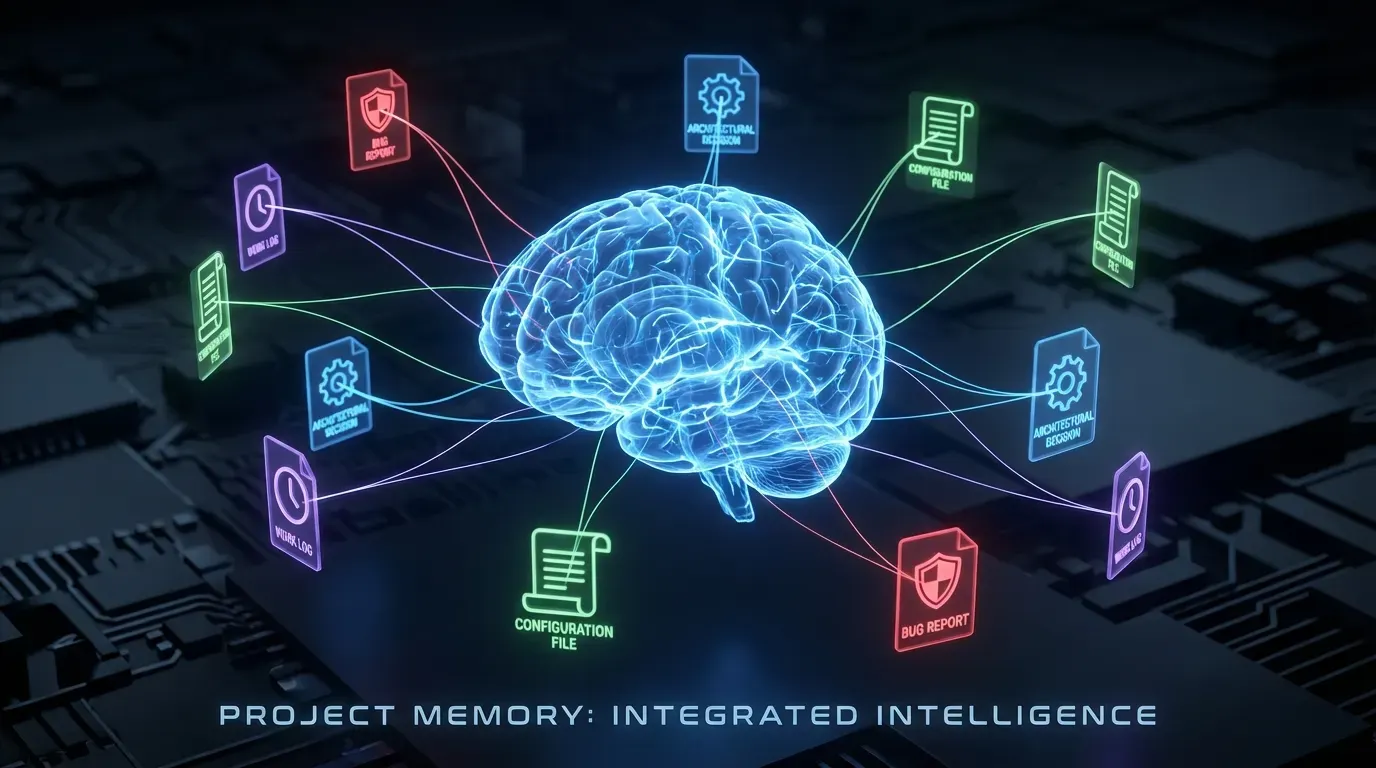
How a 300-line skill became my most-used productivity tool for AI-assisted development.
Picture this: It's 11 PM on a Tuesday. You're staring at an error message that feels hauntingly familiar. "Connection refused on port 5432". You've seen this before. You know you've solved it before. But where? When? The commit message just said "fixed db connection." Stack Overflow gives you twelve different answers. Your AI assistant cheerfully suggests solutions you've already tried.
This is AI amnesia in action, and it costs you more than you realize.
Every AI coding assistant shares the same frustrating limitation: they forget everything between sessions. Start a new chat, and Claude doesn't know that yesterday you spent 45 minutes discovering your staging environment uses port 5433, not 5432. It doesn't remember that you chose PostgreSQL over MongoDB because of your team's existing expertise. It can't recall that the "connection refused" error always means the VPN disconnected.
All that hard-won knowledge? Gone. Every. Single. Time.
I discovered a simple solution while watching a YouTube video about keeping Claude Code up-to-date with project context. The creator linked small markdown files from their CLAUDE.md to track decisions, bugs, and key facts. A lightbulb moment hit me: What if I could create a skill that manages this automatically?
That idea became project-memory, one of the very first skills I wrote for Claude Code. Despite being remarkably simple (under 300 lines), it has genuinely saved me hours upon hours of work. This tutorial shows you how to build your own project memory skill and, more importantly, how to think about creating skills that solve real problems.
The True Cost of AI Amnesia
Let me paint a picture you might recognize:
Month 1: The Discovery
Error: CORS policy blocked request from localhost:3000
[2 hours of debugging, trying proxy configs, header changes, nginx rewrites]
Solution: Add proxy configuration to package.json
Month 6: The Deja Vu
Error: CORS policy blocked request from localhost:3000
Developer: "This looks familiar... how did we fix this?"
[Searches old commits, checks Stack Overflow again, asks Claude who has no memory]
[1 hour to re-discover the exact same proxy config solution]
Sound familiar? Here's the uncomfortable truth: AI code assistants actually make this worse, not better. Without memory:
- Each new chat session starts from zero knowledge
- Every bug feels like you're solving it for the first time
- Solutions get "rediscovered" repeatedly (I once solved the same CORS issue four times in six months)
- No learning accumulates over time, for you or your AI assistant
The hidden cost is staggering. If you spend just 30 minutes per week re-solving problems you've already solved, that's 26 hours per year. At $100/hour, that's $2,600 of wasted time per developer.
But what if your AI assistant could remember?
What is a Claude Code Agent Skill?
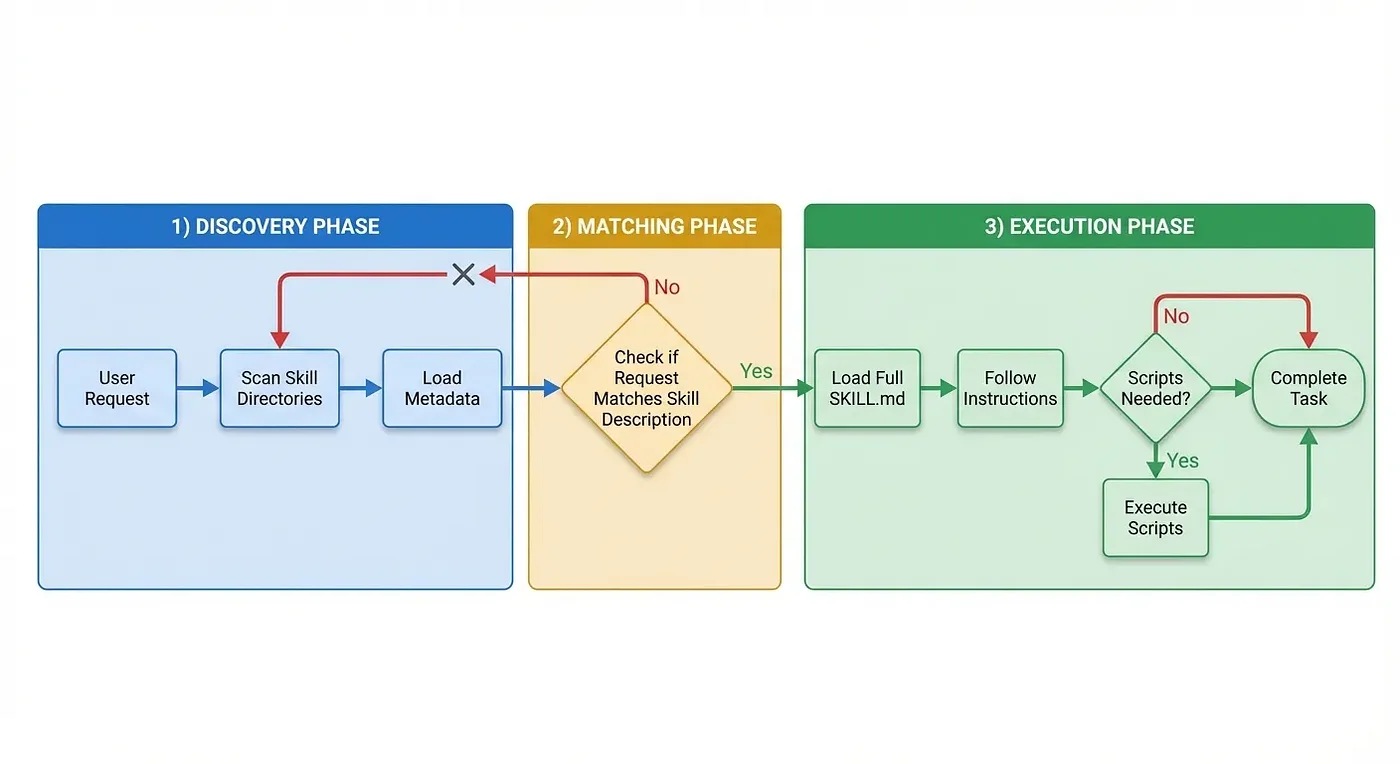
Before diving into project-memory, let's understand what skills actually are. If you've ever wished you could teach Claude a specific workflow or give it domain knowledge, skills are the answer.
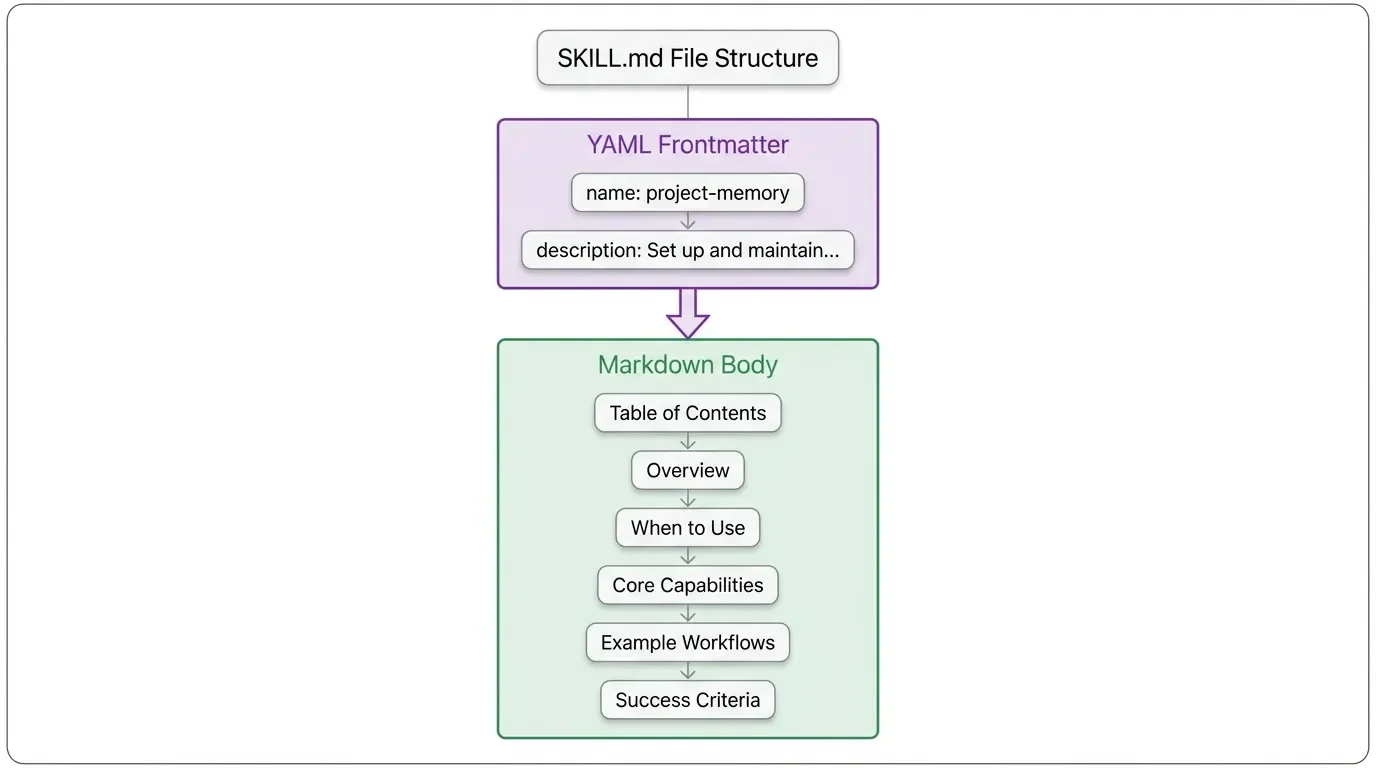
A agent skill is simply a folder containing a SKILL.md file and optional supporting resources. The SKILL.md file has two parts:
- YAML frontmatter: Metadata that tells Claude when to activate the skill
- Markdown body: Instructions Claude follows when the skill is active
Think of skills as reusable "expert modes" you can install. When you say "set up project memory," Claude doesn't just guess what you mean. It loads specific, tested instructions for exactly that task.
The Project Memory Agent Skill
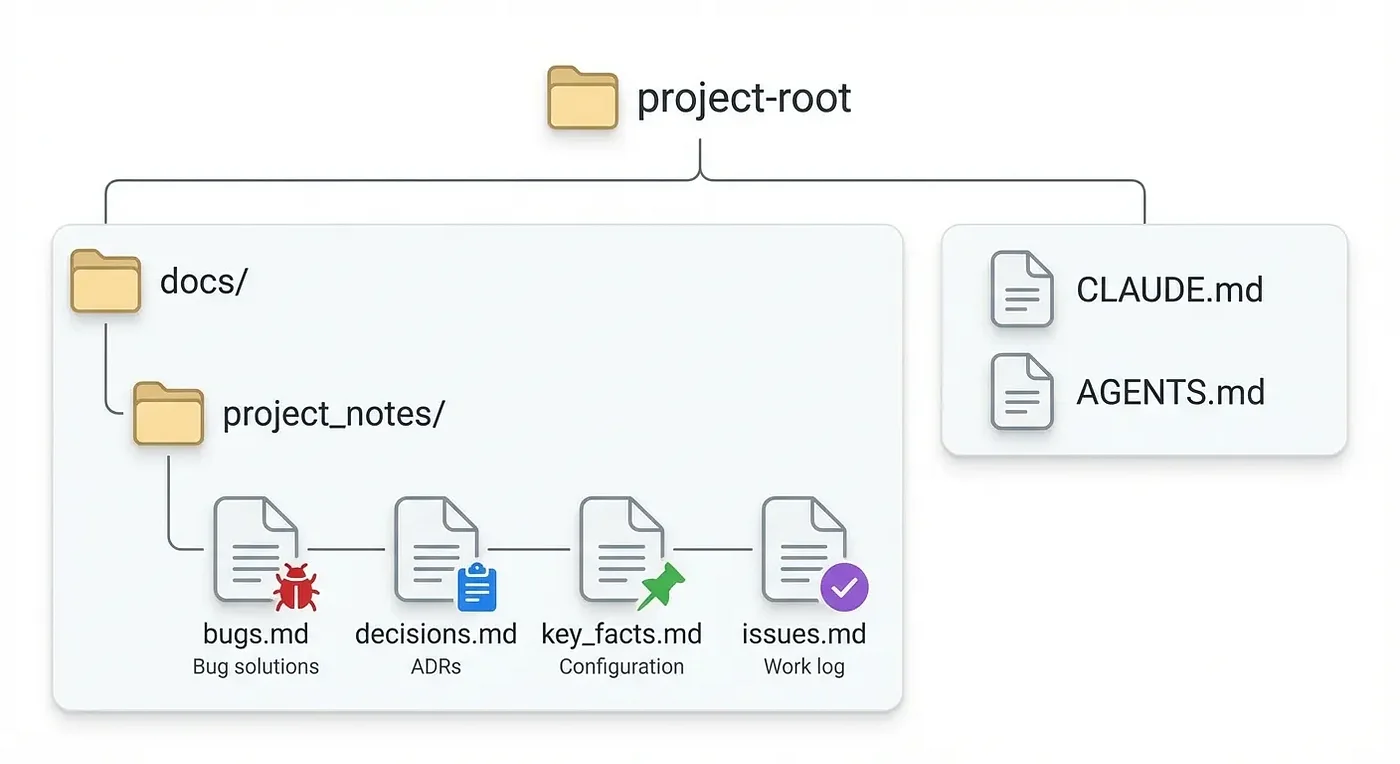
The project-memory skill creates a structured knowledge system in docs/project_notes/ with four specialized files. Each serves a distinct purpose in preserving and recalling project knowledge.
Memory File Structure
docs/
└── project_notes/
    ├── bugs.md        # Bug log with solutions
    ├── decisions.md   # Architectural Decision Records
    ├── key_facts.md   # Project configuration and constants
    └── issues.md      # Work log with ticket references
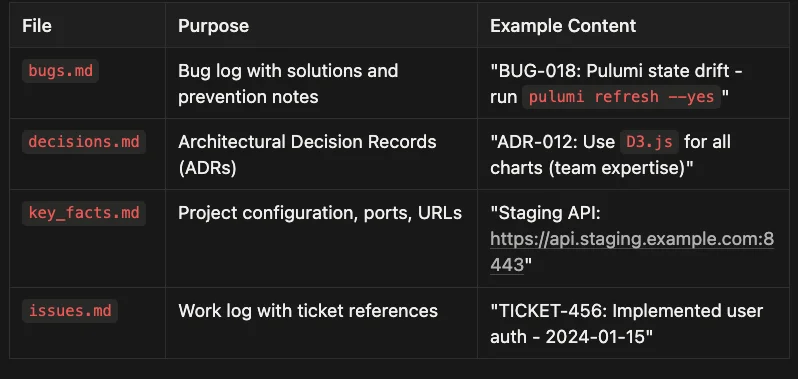
Each memory file serves a specific role:
- bugs.md: Acts as a searchable bug database where entries document both the problem and its solution
- decisions.md: Tracks architectural choices through ADRs (Architectural Decision Records)
- key_facts.md: Serves as a quick reference for essential project details
- issues.md: Maintains a chronological work log connecting completed work to specific tickets
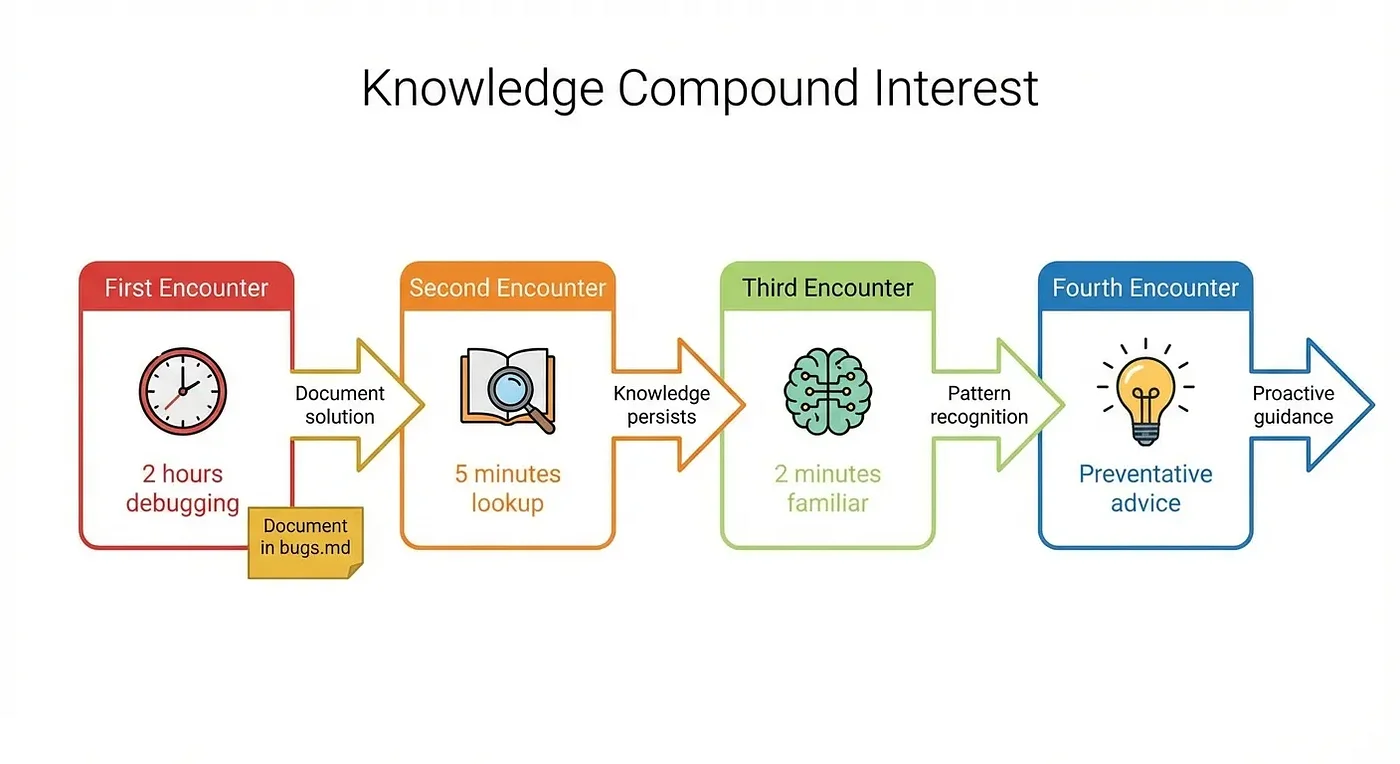
Real-World Impact: Knowledge Compound Interest
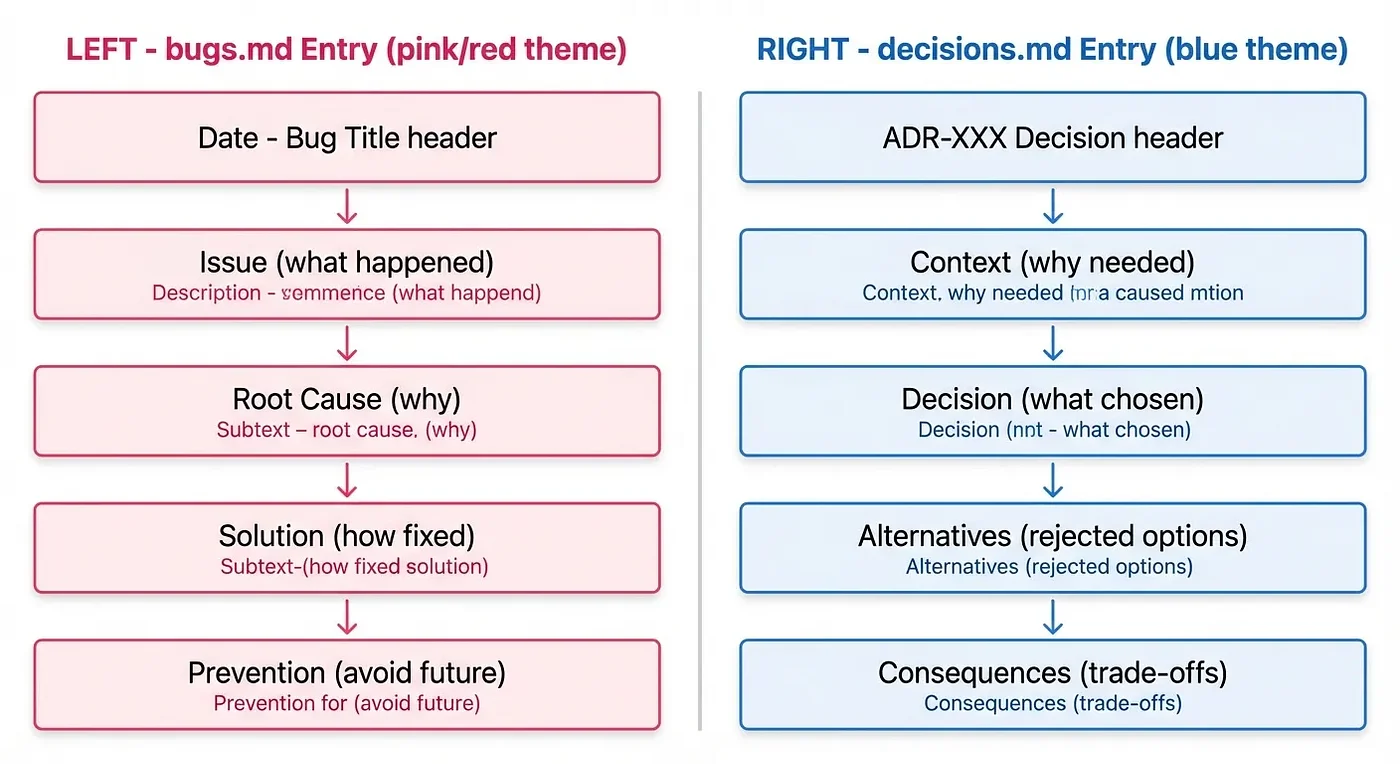
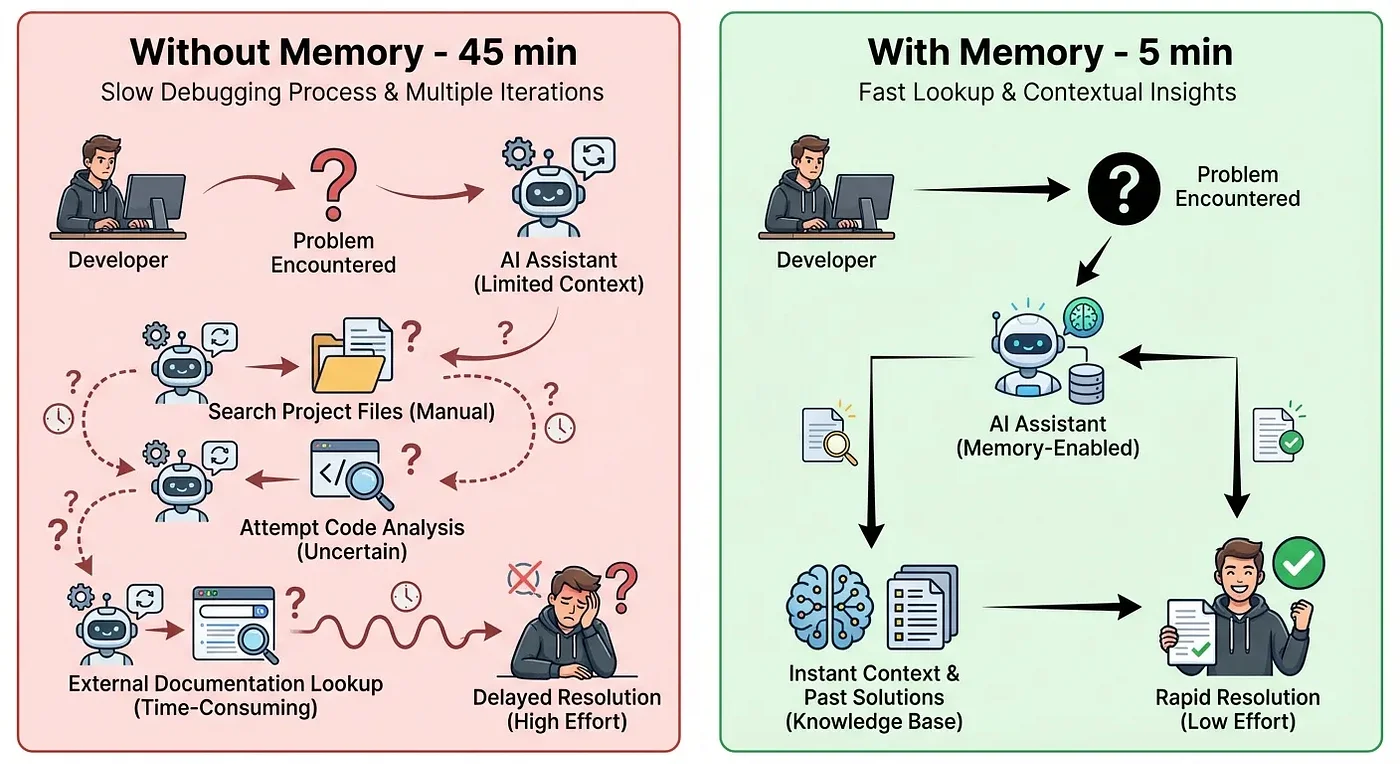
Example 1: Bug Resolution Speed (Real Numbers)
The Scenario: On October 20th, I encountered a Pulumi state drift error during deployment. After 45 minutes of debugging, I discovered the solution: pulumi refresh --yes to sync the state file.
I documented it as BUG-018:
### 2024-10-20 - BUG-018: Pulumi State Drift During Deploy
**Issue**: Deploy failed with cryptic "update failed" error
**Root Cause**: Pulumi state file out of sync with actual infrastructure
**Solution**: Run `pulumi refresh --yes` before deploy to sync state
**Prevention**: Add `pulumi refresh --yes` to CI/CD pipeline before deploys
Two days later, the same error appeared. This time:
- I told Claude about the error
- Claude checked bugs.md and found BUG-018
- Claude suggested
pulumi refresh --yes - Problem solved in 5 minutes
Result: 45 minutes reduced to 5 minutes. An 89% reduction in resolution time.
Example 2: Architectural Consistency
Without Memory:
User: "Add a bar chart to the dashboard"
Claude: "I'll add Chart.js for the bar chart. Let me install it..."
Result: Bundle size +85KB, duplicate charting dependencies, inconsistent styling
With Memory:
User: "Add a bar chart to the dashboard"
Claude: *Checking decisions.md...*
Found: ADR-012 - Use D3.js for all charts (team has D3 expertise, already in bundle)
Claude: "I see we've decided to use D3.js for charts. I'll create the bar chart using D3."
Result: Uses existing D3.js, consistent styling, no bundle increase
Cross-Platform: The Agent Skill Standard
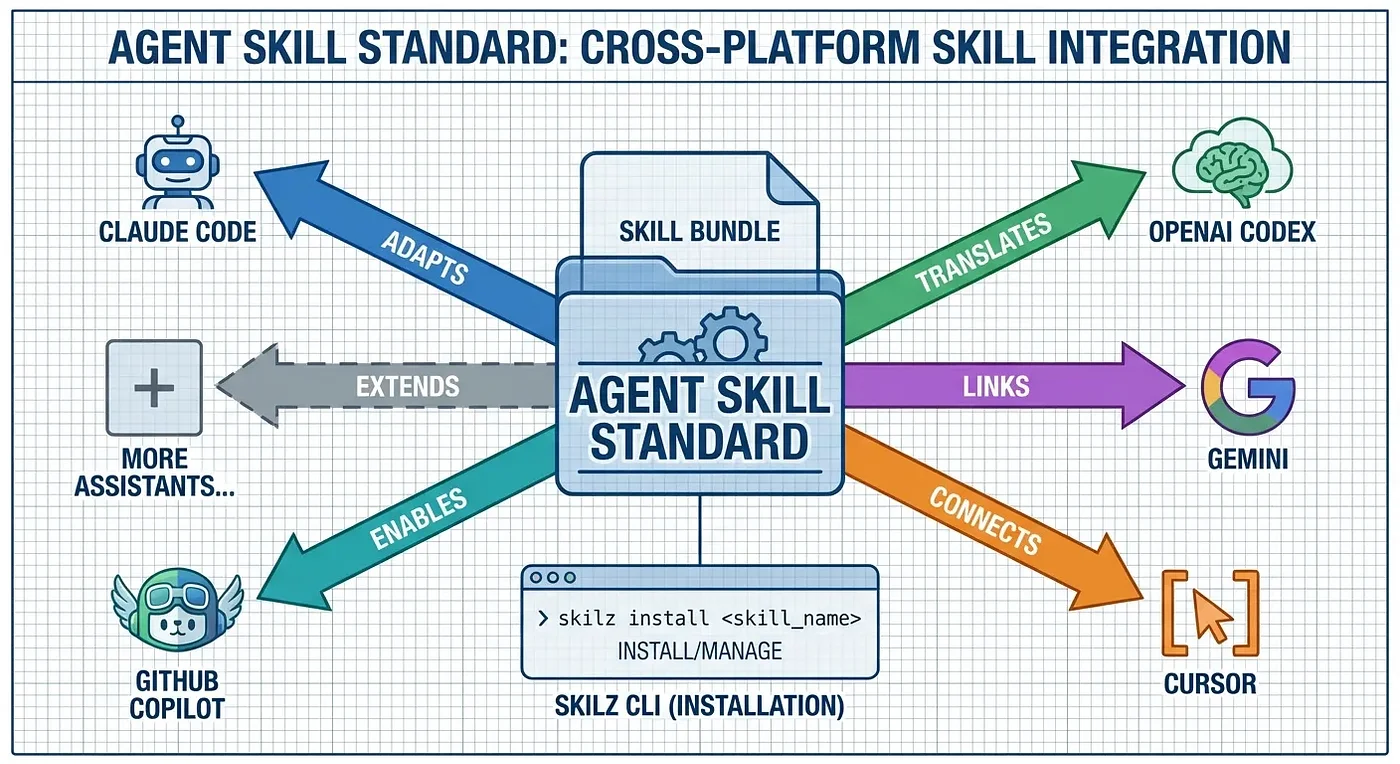
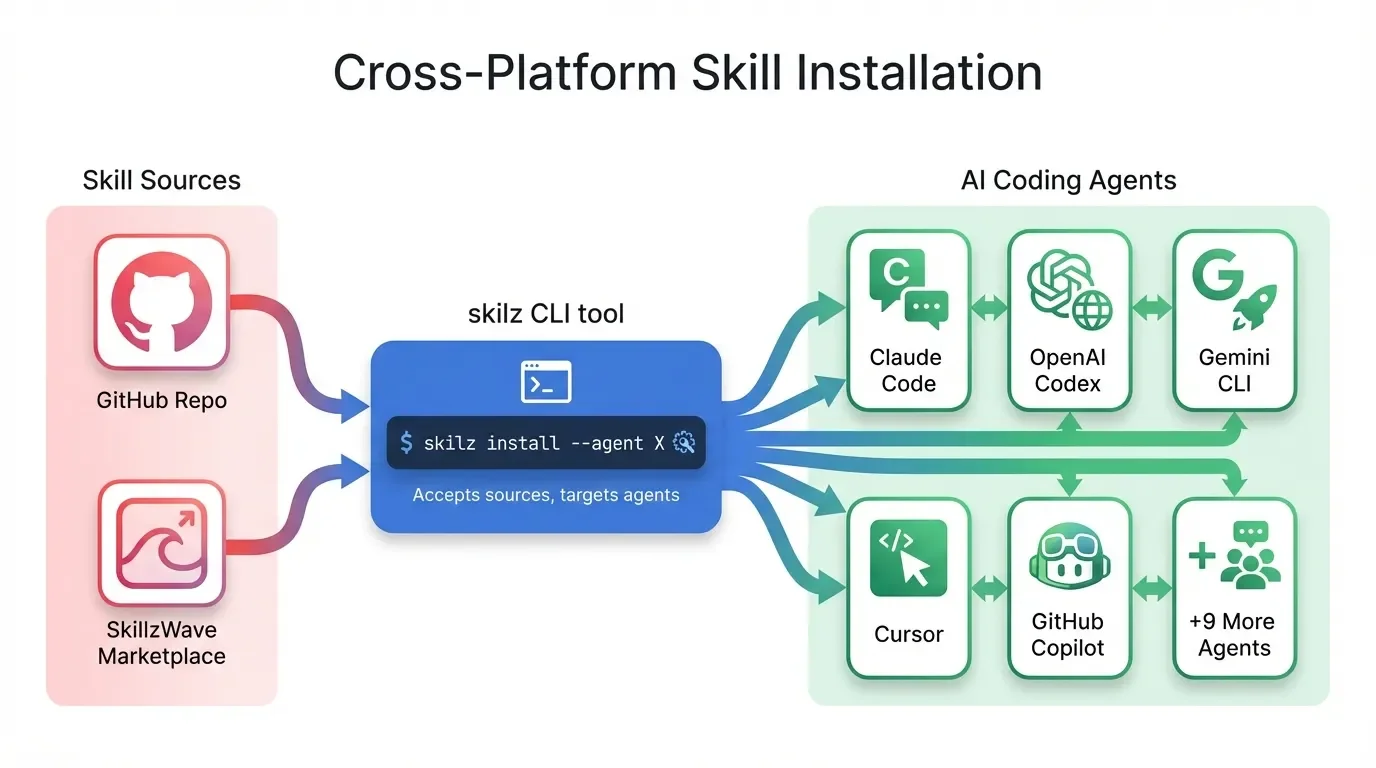
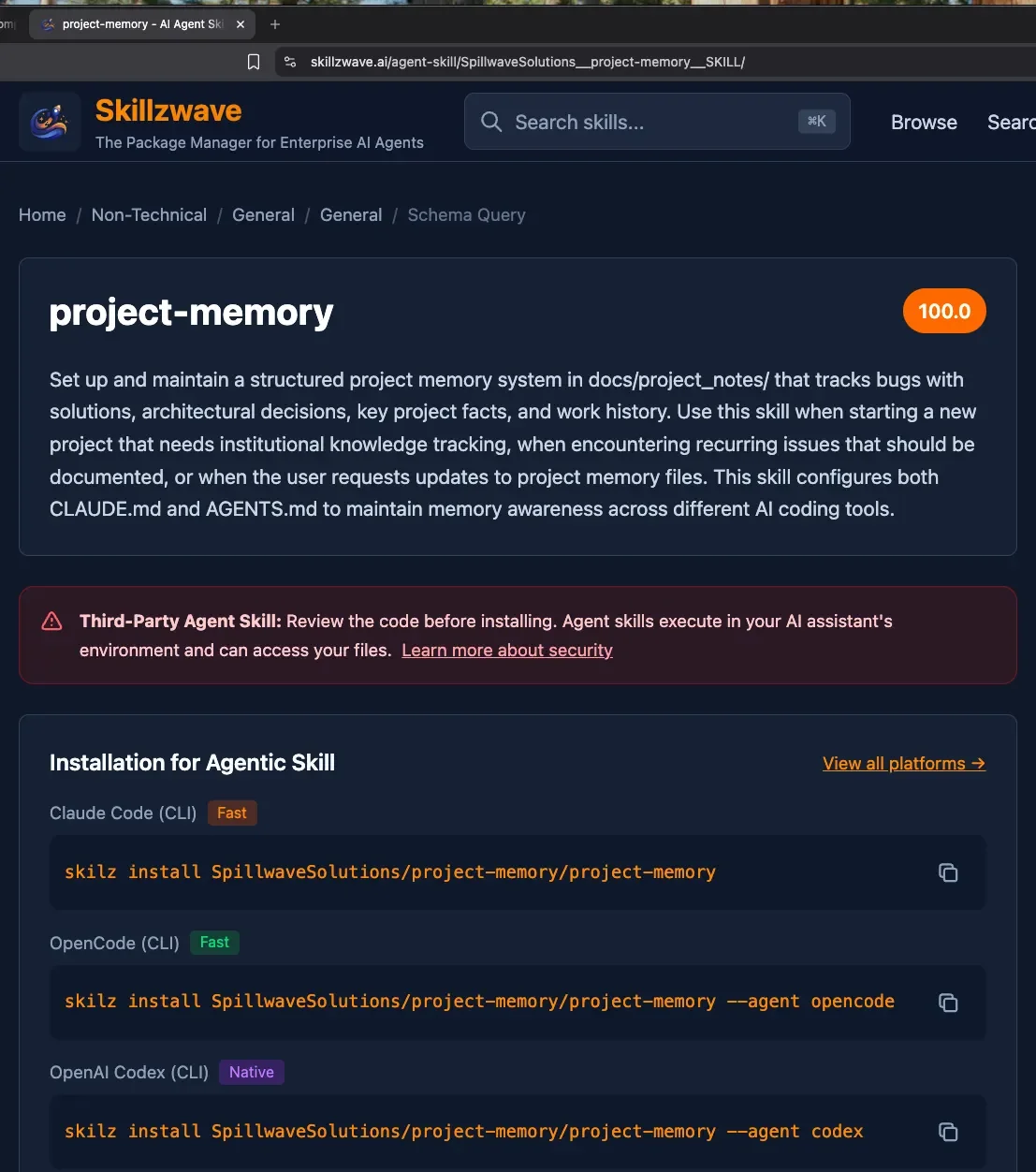
Here's something powerful: project-memory isn't just for Claude Code. It follows the Agent Skill Standard, which means the same skill works across 14+ AI coding assistants including Codex, GitHub Copilot, and OpenCode.
Cross-Platform Installation
# Install skilz CLI
pip install skilz

# Install for Claude Code (global)
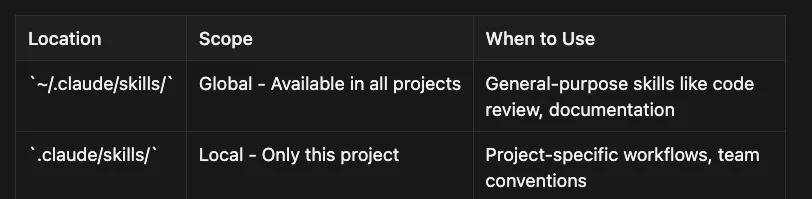
skilz install -g https://github.com/SpillwaveSolutions/project-memory

# Install for a specific project only
skilz install -g https://github.com/SpillwaveSolutions/project-memory --project

# Install for other agents
skilz install -g https://github.com/SpillwaveSolutions/project-memory --agent codex
skilz install -g https://github.com/SpillwaveSolutions/project-memory --agent gemini
skilz install -g https://github.com/SpillwaveSolutions/project-memory --agent cursor
skilz install -g https://github.com/SpillwaveSolutions/project-memory --agent opencode
Same knowledge, accessible from any AI coding tool you use.
Security: What You Must Never Store
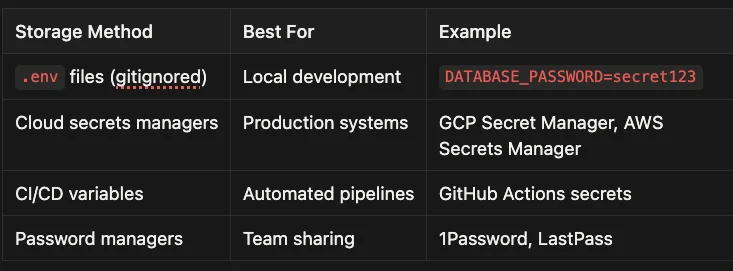
This section is critical. Read it carefully before using project memory.
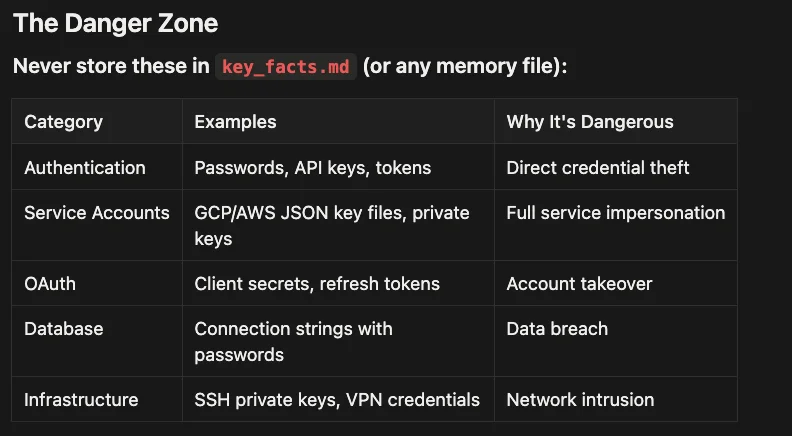
Never store these in key_facts.md:
- Authentication Credentials (passwords, API keys, access tokens)
- Service Account Keys (GCP/AWS JSON key files, private keys)
- OAuth Secrets (client secrets, refresh tokens)
- Database Credentials (connection strings containing passwords)
- Infrastructure Secrets (SSH private keys, VPN credentials)
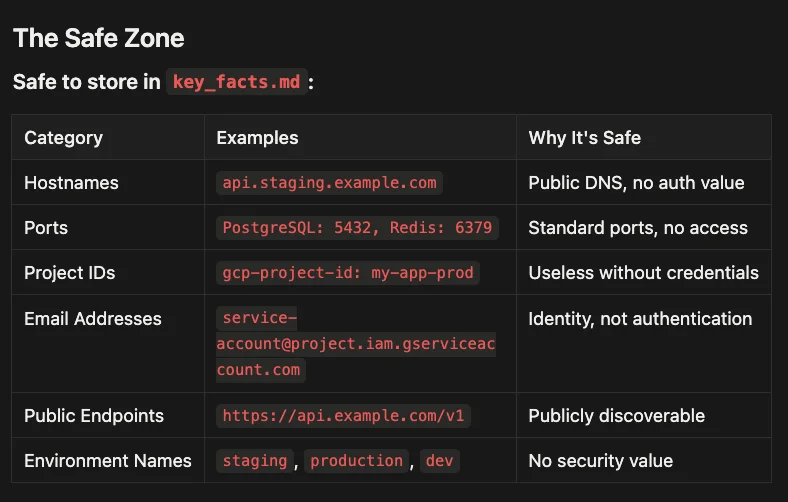
Safe to store in key_facts.md:
- Hostnames and URLs (public domain names)
- Port Numbers (standard ports like PostgreSQL: 5432)
- Project Identifiers (GCP project IDs, AWS account IDs)
- Service Account Email Addresses
- Environment Names (staging, production, dev)
- Public Endpoints
- Configuration Values (non-sensitive settings)
Building Your Own Agent Skills
The project-memory skill demonstrates key principles you can apply to any skill you create:
1. Solve a Real Problem You Actually Have
Build skills when you notice yourself:
- Repeating the same explanation to Claude (or teammates)
- Looking up the same information repeatedly
- Following the same multi-step process manually
- Wishing Claude "just knew" something about your project
2. Keep It Focused (One Skill = One Purpose)
Good: project-memory handles memory. code-review handles reviews. Bad: project-everything tries to manage memory, reviews, deployments, and coffee orders.
3. Use Clear, Natural Trigger Phrases
Your description should include specific phrases users might naturally say:
- "set up project memory"
- "log this bug"
- "update key facts"
- "track our decisions"
4. Make It Look Like Standard Documentation
Files in docs/ get maintained. Files in ai-stuff/ get ignored.
5. Include Templates and Examples
Show the exact format you want. Claude will follow examples more reliably than abstract instructions.
Try It Yourself
Ready to add project memory to your workflow? Here's how to start in the next five minutes.
Quick Start
# Install skilz CLI
pip install skilz

# Install project-memory agent skill globally (works in all projects)
skilz install https://github.com/SpillwaveSolutions/project-memory
Then open Claude Code in any project: "Set up project memory for this project"
Claude will create the memory infrastructure, configure your CLAUDE.md, and you're ready to go.
Your First Week Challenge
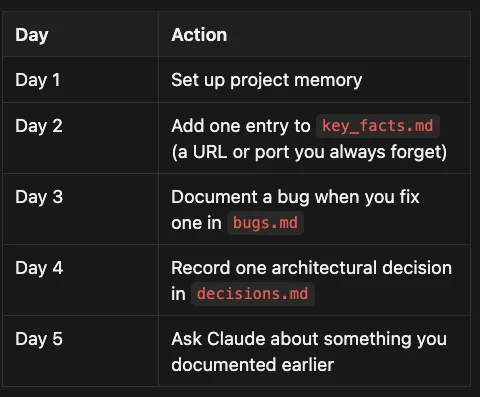
Don't try to document everything at once. Instead:
- Day 1: Set up project memory
- Day 2: Add one entry to key_facts.md (a URL or port you always forget)
- Day 3: Document a bug when you fix one in bugs.md
- Day 4: Record one architectural decision in decisions.md
- Day 5: Ask Claude about something you documented earlier
By Day 5, you'll experience that first "aha!" moment when Claude remembers something you told it days ago.
Conclusion: Start Small, Compound Fast
The project-memory skill is intentionally simple. It's a folder with a SKILL.md and some template files, probably under 300 lines total. Yet this minimal investment has saved me dozens of hours by:
- Eliminating repeated debugging sessions (the same bug never takes 45 minutes twice)
- Maintaining architectural consistency (no more accidental framework sprawl)
- Preserving project knowledge across sessions (context survives chat restarts)
- Working across multiple AI coding tools (team-wide benefits)
Here's my challenge to you: Install project-memory today. Document one bug, one decision, and one key fact this week. Experience the compound interest of remembered knowledge.
Then, when you find yourself explaining the same thing to Claude for the third time, build your own skill. Start small. Solve a real problem. Watch the time savings compound.
Your future self, the one who doesn't have to re-solve that CORS issue for the fifth time, will thank you.
Resources
- Project Memory Agent Skill on GitHub: Full source code and examples
- Agent Skill Standard: Cross-platform skill specification
- SkillzWave Marketplace: Browse and install community skills
- skilz CLI GitHub Repo: Installation and usage guide
- Project Memory on SkillzWave Marketplace: Browse skill details
About the Author
Rick Hightower is a technology executive and data engineer with extensive experience at a Fortune 100 financial services organization, where he led the development of advanced Machine Learning and AI solutions to optimize customer experience metrics. His expertise spans both theoretical AI frameworks and practical enterprise implementation.
Rick wrote the skilz universal agent skill installer that works with Gemini, Claude Code, Codex, OpenCode, Github Copilot CLI, Cursor, Aider, Qwen Code, Kimi Code and about 14 other coding agents as well as the co-founder of the world's largest agentic skill marketplace.
Connect with Rick Hightower on LinkedIn or Medium for insights on enterprise AI implementation and strategy.
Discover AI Agent Skills
Browse our marketplace of 41,000+ Claude Code skills, agents, and tools. Find the perfect skill for your workflow or submit your own.