
Mastering Agentic Skills: The Complete Guide to Building Effective Agent Skills

Transform your coding agents OpenCode, Claude Code, Codex and more from a general-purpose AI into a domain expert through well-crafted Skills that package your expertise into discoverable, autonomous capabilities.
Why Skills Matter
Ever wished you could teach your coding agent your team's specific workflows? Or give it instant expertise in your company's tools and processes? That's exactly what Claude Code Skills do.
And, now it is not just Claude Code but also Codex, Github Copilot and OpenCode have all announced support for Agentic Skills. There is even a marketplace for agentic skills that support Gemini, Aidr, Qwen Code, Kimi K2 Code, Cursor (14+ and counting) and more with Agentic Skill Support via a universal installer.
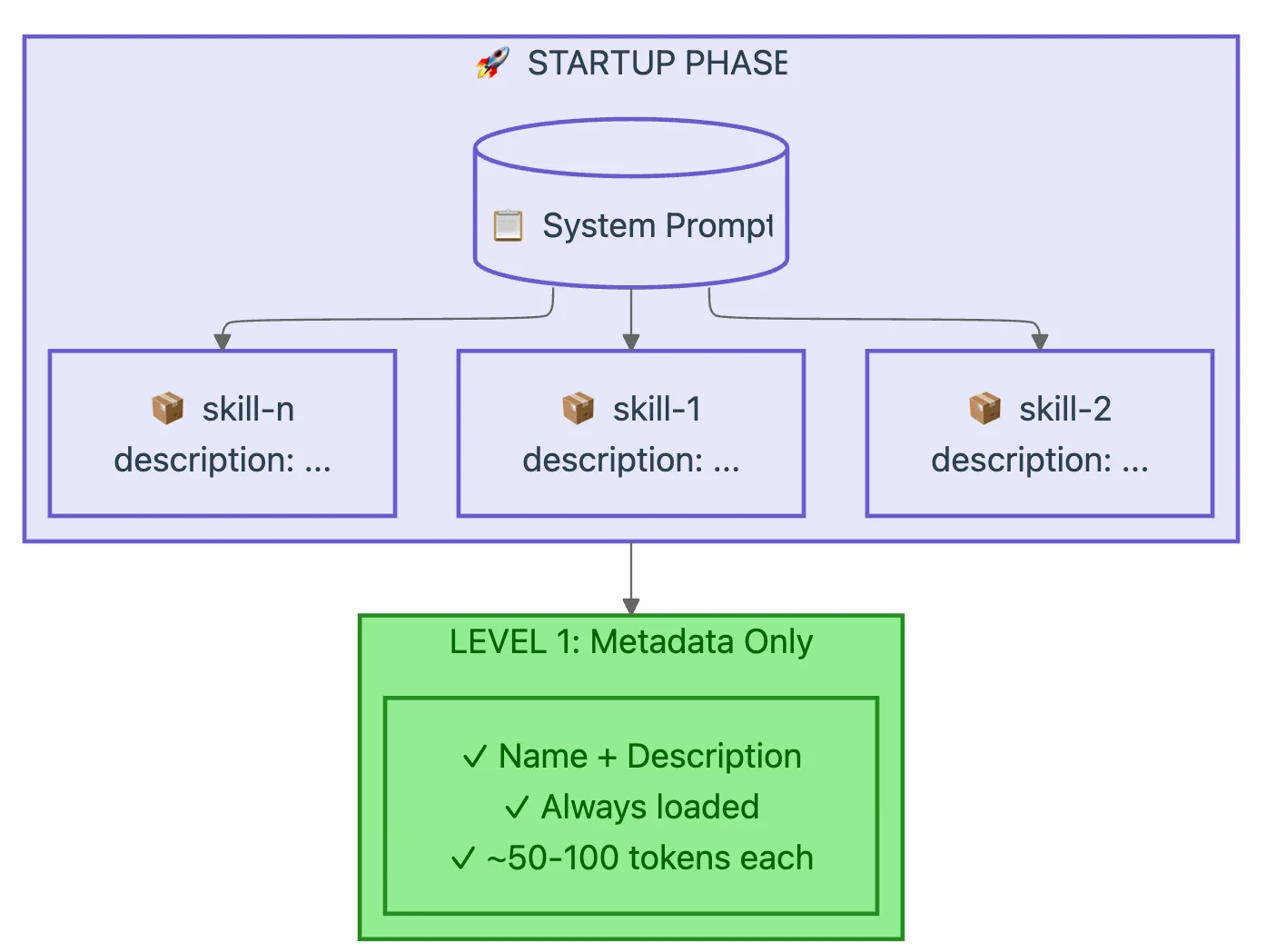
Think of Skills as onboarding documents for a brilliant new hire. They contain the procedural knowledge and organizational context that Claude needs to work like a veteran team member. The difference? Skills are modular, discoverable, and load only when needed, keeping Claude's context window focused on what matters.
What You'll Master
By the end of this guide, you'll know how to:
- Write concise, effective Skills that respect the context window
- Structure Skills using proven naming and organization patterns
- Apply progressive disclosure to manage complexity without overwhelming Claude
- Design workflows with feedback loops for quality-critical tasks
- Test and iterate using evaluation-driven development
- Package executable code that solves problems instead of creating them
Understanding How Skills Work
The Progressive Disclosure Architecture
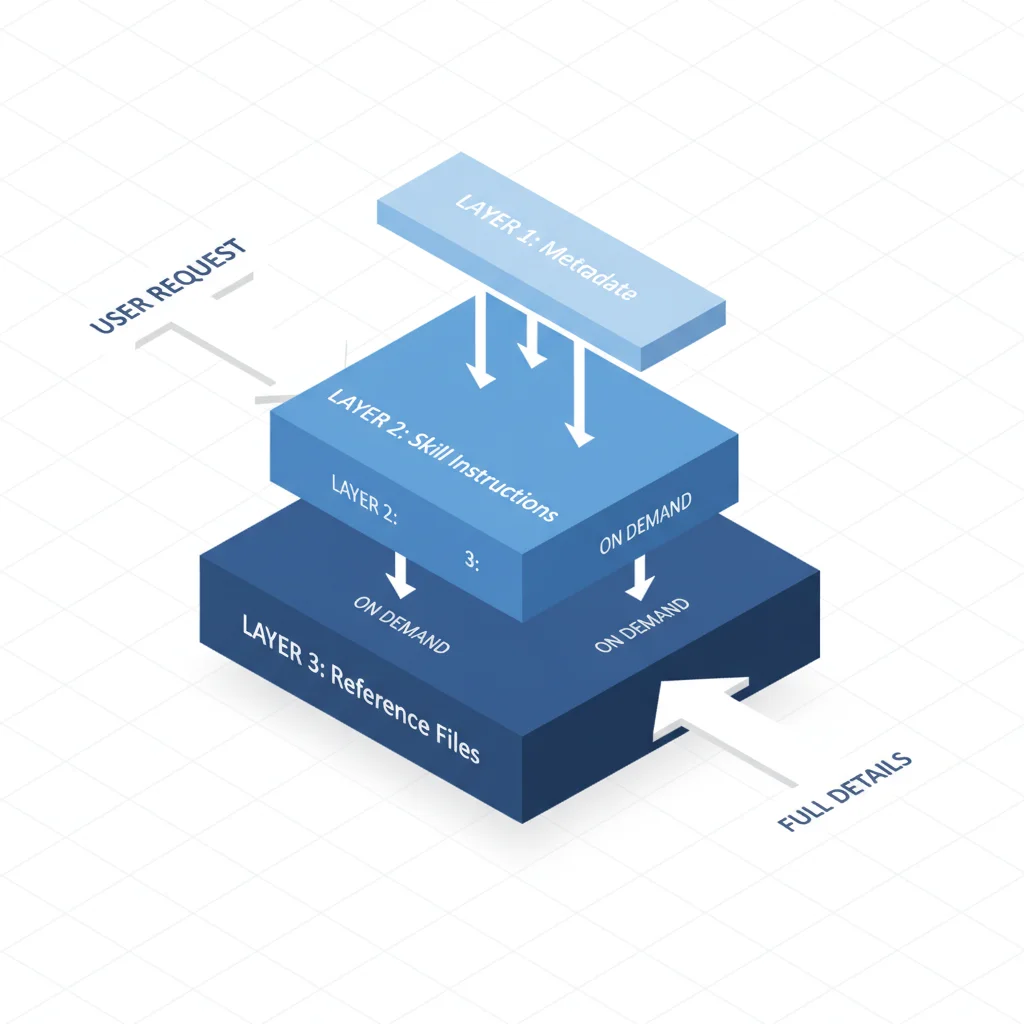
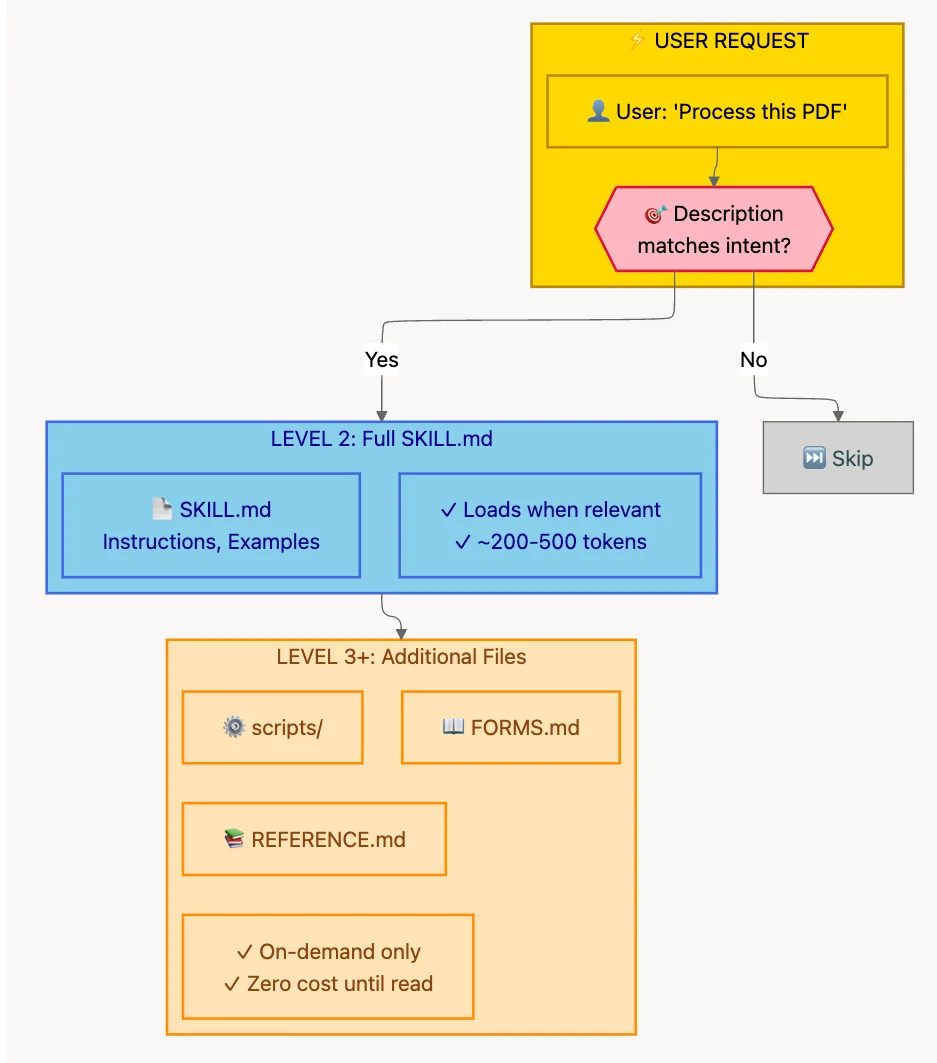
Skills don't dump everything into Claude's context at once. Instead, they use a clever three-phase loading system.
Phase 1: Discovery (Always Active) At startup, Claude loads only the metadata from all available Skills. This includes the name and description from the YAML frontmatter. This lightweight index (~50-100 tokens per Skill) allows Claude to quickly scan and identify relevant Skills without consuming significant context.
Phase 2: Deep Loading (On-Demand) When a user request matches a Skill's description, Claude loads the full SKILL.md content and any additional referenced files. This happens progressively - Claude only reads files when it needs them.
This two-phase approach is what makes Skills scalable. You can have dozens of Skills available without bloating the context window.
Core Principles
1. Conciseness is King
Your Skill is fighting for space in your coding agent's context window. Every token you add competes with the system prompt, the conversation history, other Skills' metadata, and the user's actual request.
The golden rule: Assume your coding agent is already brilliant. Only add context your coding agent doesn't have.
Good (50 tokens):
## Extract PDF text
Use pdfplumber for text extraction:
import pdfplumber
with pdfplumber.open("file.pdf") as pdf:
    text = pdf.pages[0].extract_text()
2. Set Appropriate Degrees of Freedom
Match your instruction specificity to the task's error tolerance:
- LOW FREEDOM - For fragile, error-prone operations. Use specific scripts, exact commands. Example: Database migrations.
- MEDIUM FREEDOM - For tasks with a preferred pattern. Use templates with configurable parameters. Example: Report generation.
- HIGH FREEDOM - For tasks where multiple valid approaches exist. Use text-based instructions. Example: Code review.
3. Test with All Models You Plan to Use
Skills that work beautifully with Opus might confuse Haiku. Test across models to find the sweet spot.
Skill Structure
YAML Frontmatter
---
name: your-skill-name
description: Brief description of what this Skill does and when to use it
---
Field requirements:
name: Max 64 chars, lowercase letters/numbers/hyphens onlydescription: Max 1024 chars, describes what AND when
Naming Conventions: Use Gerund Form

Use the gerund form (verb + -ing) for clarity:
processing-pdfsanalyzing-spreadsheetsmanaging-databasestesting-codegenerating-reports
Writing Descriptions That Enable Discovery
The magic formula: Describe what the Skill does AND when to use it.
Great example:
description: >
  Extracts text and tables from PDF files, fills forms, merges documents.
  Use when working with PDF files or when the user mentions PDFs, forms,
  or document extraction.
Directory Structure: One Level Deep
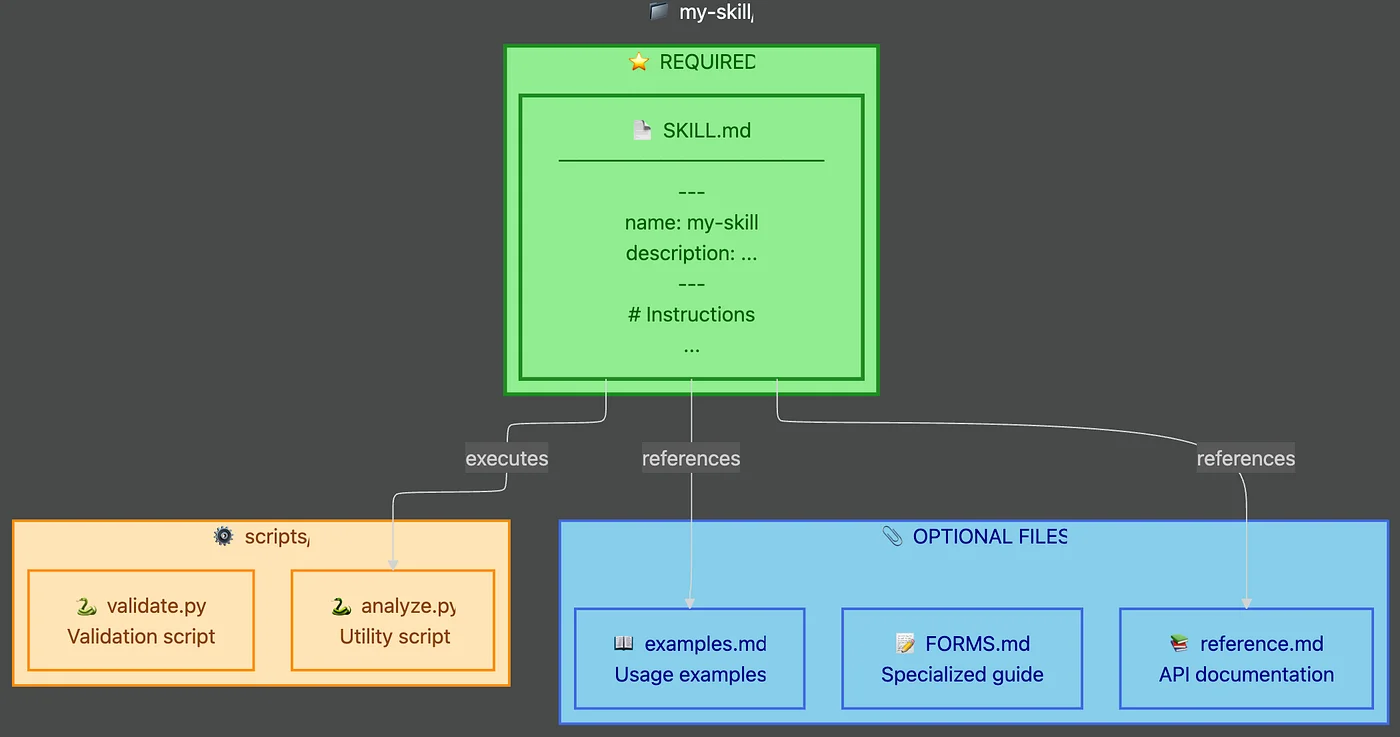
Keep your Skill's file structure flat and navigable:
my-skill/
├── SKILL.md           # Main entry point
├── reference/
│   ├── api.md         # Detailed API docs
│   └── examples.md    # Usage examples
└── scripts/
    ├── analyze.py     # Utility script
    └── validate.py    # Validation script
The golden rule: Keep references one level deep from SKILL.md.
Workflows and Feedback Loops

Breaking Complex Tasks into Steps
## PDF form filling workflow

Task Progress:
- [ ] Step 1: Analyze the form (run analyze_form.py)
- [ ] Step 2: Create field mapping (edit fields.json)
- [ ] Step 3: Validate mapping (run validate_fields.py)
- [ ] Step 4: Fill the form (run fill_form.py)
- [ ] Step 5: Verify output (run verify_output.py)
The Validate-Fix-Repeat Pattern
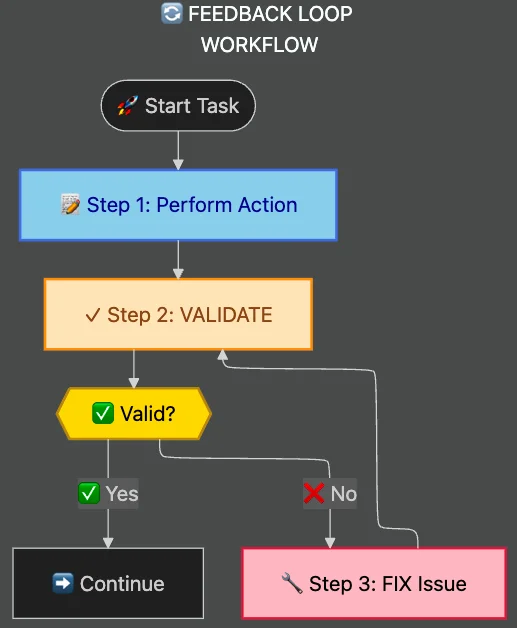
For quality-critical operations:
- Make your edits
- Validate immediately
- If validation fails: Fix and re-validate
- Do not proceed until validation passes
- Continue to next step
Teams using feedback loops report 70-90% fewer broken outputs.
Evaluation-Driven Development
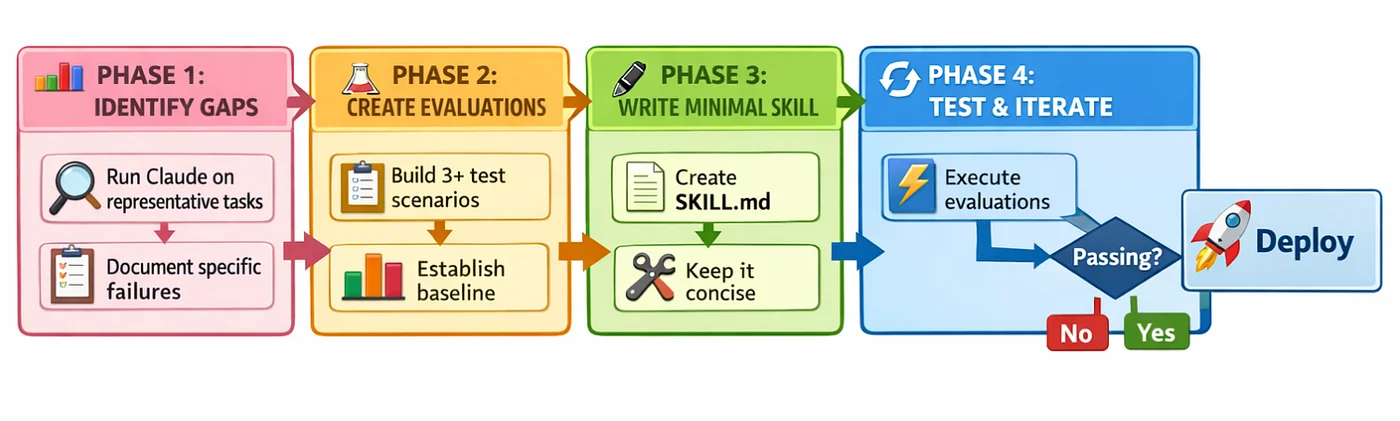
Build evaluations before writing extensive documentation.
The evaluation-driven workflow:
- Identify gaps: Run Claude on real tasks without a Skill
- Create evaluations: Build 3-5 test scenarios
- Write minimal Skill: Target the documented failures
- Test and iterate: Run evaluations, refine as needed
Advanced: Skills with Executable Code
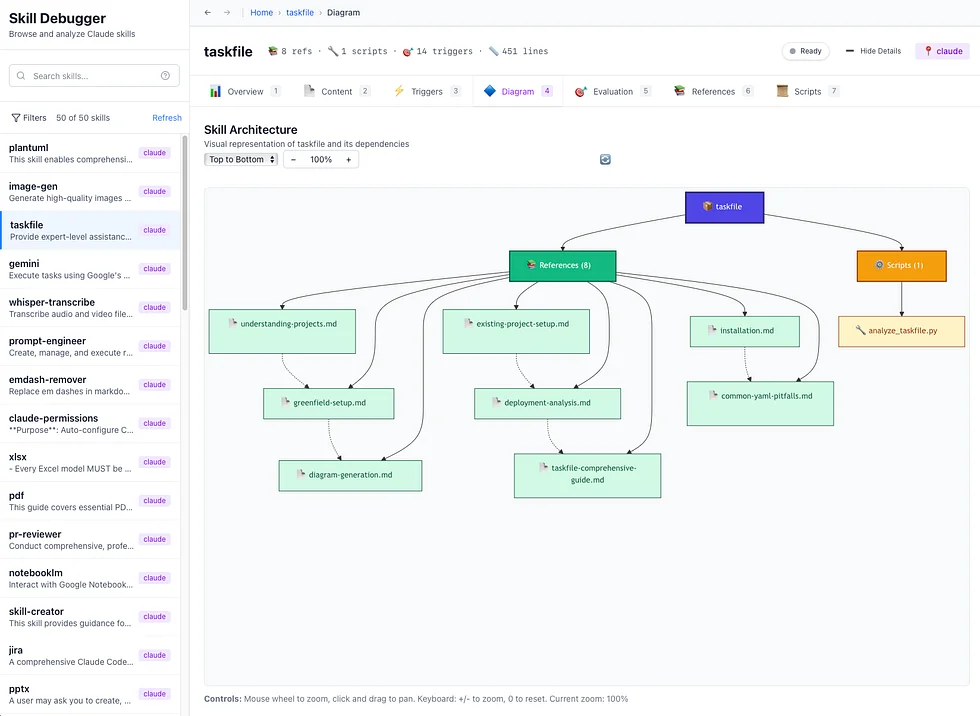
Handle Errors Explicitly
def process_file(path):
    try:
        with open(path) as f:
            return f.read()
    except FileNotFoundError:
        print(f"File {path} not found, creating with default content")
        with open(path, 'w') as f:
            f.write('# Default configuration\n')
        return '# Default configuration\n'
Provide Utility Scripts
Pre-made scripts save tokens and ensure consistency:
- More reliable: Tested and debugged in advance
- Save tokens: No code in context window
- Ensure consistency: Same approach every time
Checklist for Effective Skills
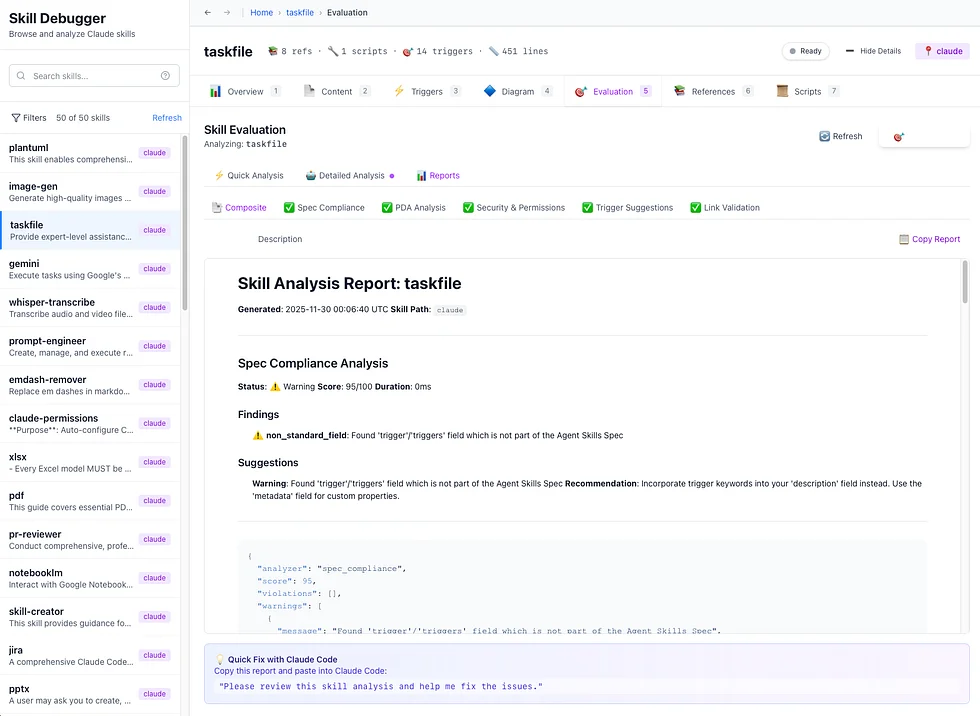
Core Quality:
- Description includes WHAT and WHEN
- SKILL.md under 500 lines
- File references one level deep
- Consistent terminology
Code and Scripts:
- Scripts handle errors explicitly
- Required packages listed
- Validation steps for critical operations
Testing:
- At least three evaluations
- Tested with multiple models
- Team feedback incorporated
Quick Reference: Creating Your First Skill
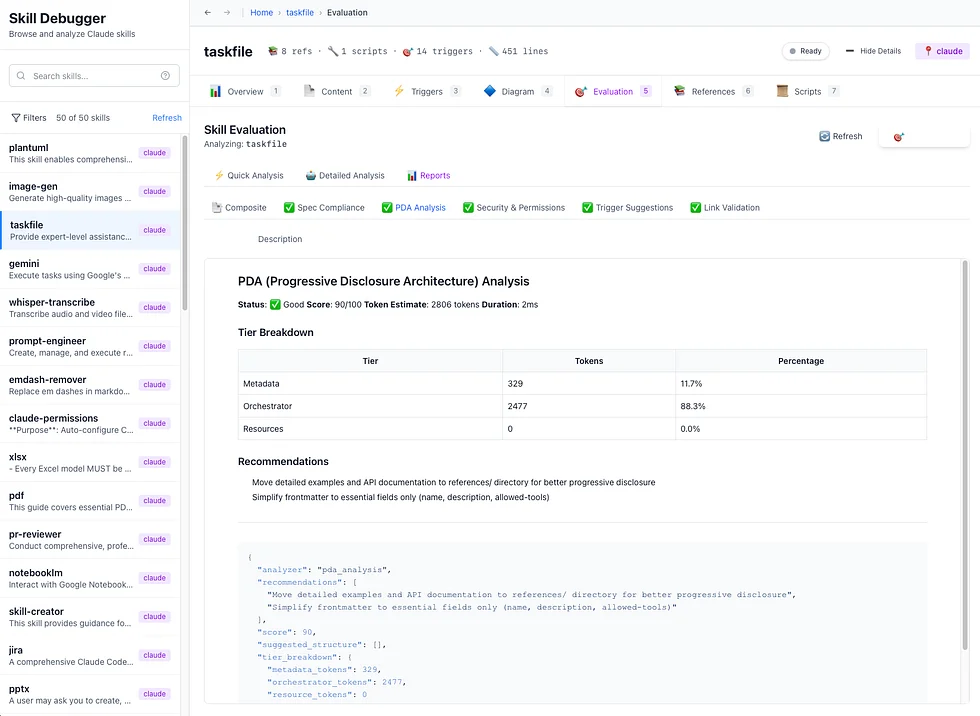
Step 1: Create the directory
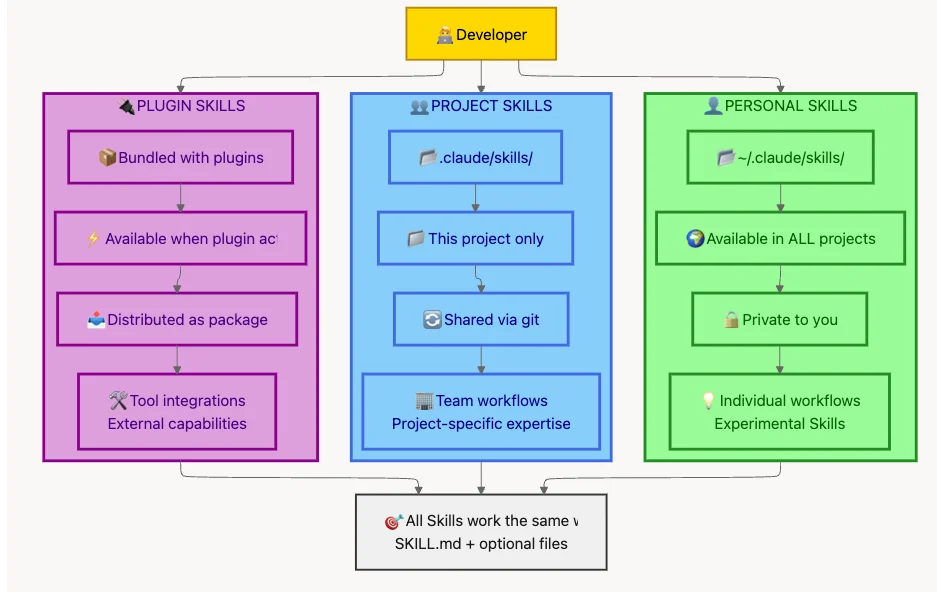
# Personal Skill
mkdir -p ~/.claude/skills/generating-commit-messages

# Project Skill
mkdir -p .claude/skills/generating-commit-messages
Step 2: Create SKILL.md
---
name: generating-commit-messages
description: Generates clear commit messages by analyzing git diffs.
  Use when writing commit messages or reviewing staged changes.
---
Step 3: Test and iterate
Conclusion
Writing effective Agentic Code Skills is about balance:
- Balance conciseness with clarity
- Balance prescription with freedom
- Balance structure with flexibility
- Balance testing with shipping
The best Skills feel like knowledge transfer from an expert. They capture the procedural wisdom that transforms Claude from a general-purpose AI into a domain specialist.
Resources
- Claude Code Skills Documentation
- Skills Overview
- Anthropic's Best Practices Guide for Creating Skills
- Anthropic Engineering Blog: Agent Skills
- Agentic Skills Standard
- SkillzWave Marketplace
- Universal Skill Installer (skilz)
About the Author
Rick Hightower is a technology executive and data engineer with extensive experience at a Fortune 100 financial services organization, where he led the development of advanced Machine Learning and AI solutions. Rick wrote the skilz universal skill installer that works with 14+ coding agents and co-founded the world's largest agentic skill marketplace.
Connect with Rick Hightower on LinkedIn or Medium.
Discover AI Agent Skills
Browse our marketplace of 41,000+ Claude Code skills, agents, and tools. Find the perfect skill for your workflow or submit your own.