
Claude Code Skills Deep Dive Part 1
Part 1 of 2: Foundations and Concepts. Imagine teaching an expert programmer a new specialty, transforming them from a generalist into a domain expert. Claude Code skills work the same way—they transform Claude from a capable generalist into a specialist for specific tasks.
What You'll Learn
- ✓ What Claude Code skills are and how they work
- ✓ The SKILL.md file structure and frontmatter
- ✓ Progressive Disclosure Architecture (PDA) philosophy
- ✓ Three core patterns: Generator, Integrator, Converter
- ✓ Token efficiency and optimization strategies
The Scaling Problem
Most developers face a familiar challenge. Their first skills work beautifully until they start scaling. A 5KB skill balloons to 50KB. Response times slow to a crawl. Maintenance becomes a nightmare. Your once-elegant skill has become a bloated encyclopedia that loads thousands of lines of documentation you never use.
There's a better way. This guide introduces Progressive Disclosure Architecture (PDA)—a philosophy that keeps your skills lean, fast, and maintainable at any scale.
What Are Claude Code Skills?
Skills are modular packages that extend Claude's capabilities with specialized knowledge, workflows, and automation. Think of them as "expert modules" that transform Claude from a generalist into a domain specialist.
Now we say "Claude Code Skills," but skills can be used with the Claude API, the Claude Desktop app, Claude Code, and the Claude Agent SDK. Thus, Agentic Skills permeate the Anthropic ecosystem—and they might be as transformative as MCP, or perhaps even bigger.
Skills Provide:
- Domain expertise — Industry-specific knowledge and terminology
- Workflow automation — Pre-built processes for common tasks
- Tool integrations — Connections to external services and APIs
- Code patterns — Reusable templates and best practices
- Quality checks — Validation rules and compliance requirements
Anatomy of a SKILL.md File
Every Claude Code skill consists of a SKILL.md file with structured YAML
frontmatter and markdown content:
---
name: code-reviewer
description: Automated code review with security analysis
version: 1.0.0
triggers:
  - "review this code"
  - "check for security issues"
allowed-tools:
  - Read
  - Grep
  - Bash(git diff:*)
---

# Code Reviewer Skill

You are an expert code reviewer. When reviewing code:

1. Check for security vulnerabilities (OWASP Top 10)
2. Verify error handling is comprehensive
3. Ensure code follows project conventions
4. Identify performance bottlenecks

## Response Format

Provide findings as a structured report...
Frontmatter Fields
name
Unique identifier for the skill (kebab-case recommended)
triggers
Phrases that automatically activate the skill
allowed-tools
Explicit list of tools the skill can use
version
Semantic versioning for tracking changes
Progressive Disclosure Architecture (PDA)
PDA is the core philosophy that separates efficient skills from bloated ones. Instead of loading everything upfront (the "encyclopedia approach"), PDA loads information only when needed.

Three Pillars of PDA
- Lazy Loading References — Point to documentation files instead of embedding content. The AI reads files only when the task requires them.
- Task-Triggered Scripts — External scripts execute only when specific conditions are met, keeping the core skill lightweight.
- AI Resilience — Trust the AI's existing knowledge for common patterns. Only document project-specific deviations.
Token Efficiency Analysis
The difference between encyclopedia-style and PDA-style skills is dramatic:
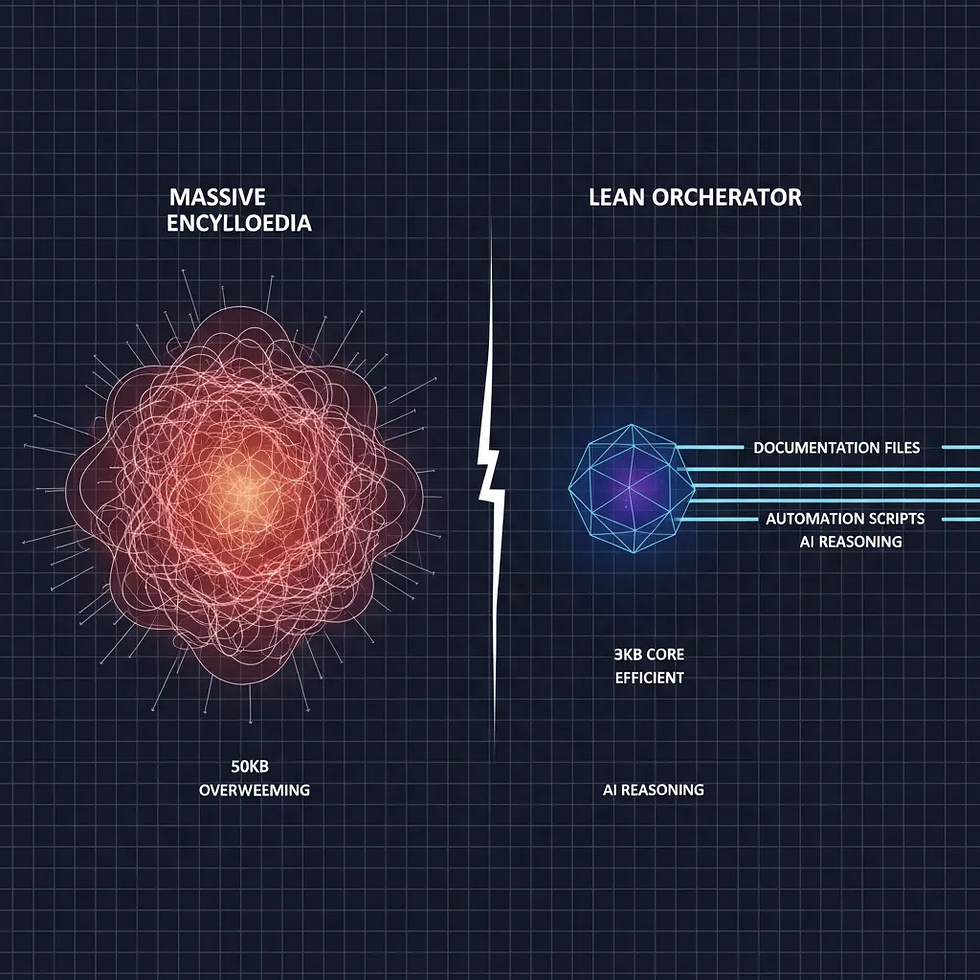
Comparison: Encyclopedia vs PDA
| Metric | Encyclopedia | PDA |
|---|---|---|
| Initial load | 50,000+ tokens | 2,000-5,000 tokens |
| Per-task overhead | Full context every time | Only relevant refs |
| Maintenance | Edit massive file | Edit specific refs |
| Response time | Slower (more context) | Faster (lean context) |
Three Core Patterns
Most effective skills follow one of three patterns. Understanding these helps you choose the right architecture for your use case.
1. The Generator Pattern
Generators create new artifacts from templates or specifications. Examples include documentation generators, code scaffolders, and report builders.
# Generator Skill Example
You generate [artifact type] from [input type].

## Process
1. Read the specification from user input
2. Load template from references/template.md
3. Apply transformations
4. Output formatted result

## Templates Available
- references/api-doc-template.md
- references/test-template.md
2. The Integrator Pattern
Integrators connect multiple systems or data sources. They often involve API calls, data transformation, and orchestration of external tools.
3. The Converter Pattern
Converters transform content from one format to another. Examples include markdown-to-HTML converters, code translators, and data format transformers.
When to Apply PDA
Use PDA when your skill has:
- More than 5,000 tokens of documentation
- Multiple distinct use cases
- Reference material that isn't always needed
- Performance requirements (response time matters)
Keep it simple (no PDA) when:
- The skill is under 2,000 tokens total
- Every invocation needs all the context
- You're prototyping and iterating rapidly
Next Steps
You now understand the foundations of Claude Code skills: the SKILL.md structure, Progressive Disclosure Architecture, and the three core patterns. In Part 2, we'll dive into advanced topics:
- Tool permissions and security considerations
- Sub-agent orchestration
- Hook integration for deterministic behavior
- Production optimization and debugging
Start Building
Ready to create your first skill? Browse existing skills for inspiration or jump straight into the quick start guide.