
Registry
The registry maps skill IDs to their source locations. Skilz uses the registry to resolve and download skills during installation. This guide covers registry configuration, custom sources, and version management.
Remember: Install Skilz first with pip install skilz before configuring registries.
How the Registry Works
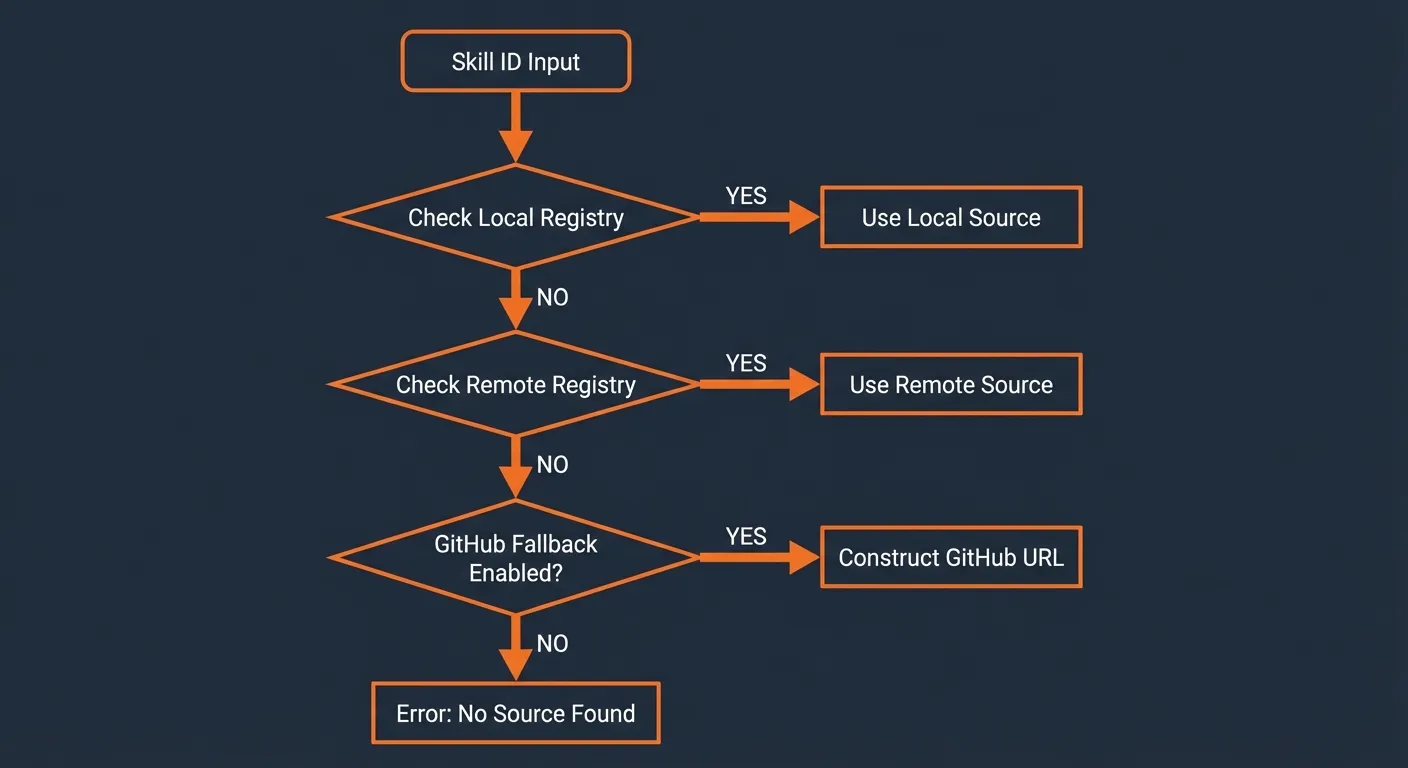
When you run a skill installation:
pip install skilzskilz install anthropics_skills/theme-factorySkilz follows this resolution order:
- Check local registry file (
~/.skilz/registry.yaml) - Check remote registry (if configured)
- Fallback to GitHub (if
fallback_to_github: true)
Registry Configuration
Configure the registry in your Skilz config file (~/.config/skilz/config.json):
{
  "registry": {
    "local": "~/.skilz/registry.yaml",
    "remote": "https://skillzwave.ai/api/registry.yaml",
    "fallback_to_github": true
  }
}
Local Registry Format
The local registry is a YAML file mapping skill IDs to their Git sources.
Create or edit ~/.skilz/registry.yaml:
# ~/.skilz/registry.yaml

# Format: owner_repo/skill-name → Git URL
skills:
  anthropics_skills/theme-factory:
    git: https://github.com/anthropics/skills.git
    path: theme-factory
    branch: main

  anthropics_skills/algorithmic-art:
    git: https://github.com/anthropics/skills.git
    path: algorithmic-art
    branch: main

  # Private repository example
  mycompany_internal/code-review:
    git: git@github.com:mycompany/internal-skills.git
    path: code-review
    branch: main
Registry Entry Fields
| Field | Required | Description |
|---|---|---|
git | Yes | Git repository URL (HTTPS or SSH) |
path | No | Path within repo to skill (default: root) |
branch | No | Branch name (default: main) |
tag | No | Specific tag to use |
commit | No | Specific commit SHA |
GitHub Fallback
When fallback_to_github: true (the default), Skilz will automatically
try to resolve skill IDs as GitHub repositories if they're not in the registry.
The skill ID owner_repo/skill-name maps to:
https://github.com/owner/repoNote: The underscore in the skill ID separates the GitHub owner from the repository name. This allows skills to be uniquely identified even when multiple repos have skills with the same name.
Version Pinning
Pin skills to specific versions using the --version flag:
pip install skilz# Install specific commit
skilz install anthropics_skills/theme-factory --version abc1234
# Install specific tag
skilz install anthropics_skills/theme-factory --version v1.0.0Pinning in Registry
You can also pin versions directly in your registry:
# ~/.skilz/registry.yaml
skills:
  anthropics_skills/theme-factory:
    git: https://github.com/anthropics/skills.git
    path: theme-factory
    tag: v1.0.0  # Pin to specific tag

  anthropics_skills/algorithmic-art:
    git: https://github.com/anthropics/skills.git
    path: algorithmic-art
    commit: abc123def456  # Pin to specific commit
Private Repositories
For private repositories, use SSH URLs with configured SSH keys:
# ~/.skilz/registry.yaml
skills:
  mycompany_internal/secret-skill:
    git: git@github.com:mycompany/internal-skills.git
    path: secret-skill
    branch: main
Ensure your SSH key is configured in your Git provider.
Custom Remote Registries
Organizations can host their own skill registries. Configure a remote registry URL:
{
  "registry": {
    "remote": "https://skills.mycompany.com/registry.yaml",
    "fallback_to_github": false
  }
}
Remote registries follow the same YAML format as local registries.
Registry Priority
When the same skill ID exists in multiple registries:
- Local registry takes precedence
- Then remote registry
- Finally GitHub fallback
This allows you to override public skills with local versions or use internal forks of public skills.
Clearing Registry Cache
Skilz caches cloned repositories. To clear the cache and force fresh downloads:
pip install skilz# Clear all cached repos
rm -rf ~/.skilz/cache
# Reinstall skill with fresh clone
skilz install anthropics_skills/theme-factory --forceTroubleshooting Registry Issues
Skill Not Found
If a skill can't be resolved:
- Check the skill ID format (owner_repo/skill-name)
- Verify the skill exists in your registry or on GitHub
- Check if
fallback_to_githubis enabled
Private Repo Access Denied
- Ensure SSH key is configured:
ssh -T git@github.com - Use SSH URL format:
git@github.com:owner/repo.git - Check repository permissions
See Also
- Configuration Guide — Full config file reference
- Commands — The
--versionoption - Troubleshooting — Common issues